How to Test Western Digital Hard Drive Speed [Full Guide in 2024]
Western Digital hard drives are highly regarded for their quality and performance, making them a popular choice among users. This page will provide two methods to test and boost the speed of Western Digital hard drives.
Before we start the specific step-by-step guide, we need to understand the necessity of testing Western Digital hard drive speed.
View the Necessary Tools for Testing Western Digital Hard Drive Speed:
| ⏱️ Duration: | 3-5 minutes |
| Tools: |
|
| Supported Operating System: | Windows 11/10/8/7 |
| Operation Steps |
Three steps and suitable for all |
Why Need to Test Western Digital Hard Drive Speed
Western Digital hard drives have a capacity of up to 4TB, with sequential read and write speeds of up to 560MB/s and 530MB/s respectively. However, if the drive's read and write speeds fall below standard levels, it may impact the computer's performance, often requiring a benchmark test to identify the issue, typically caused by one of two main reasons.
- To ensure the drive is working properly and running faster, you can check for disk errors, update the drive's firmware, and run a disk cleanup tool to remove unnecessary files and free up space. Additionally, consider running a disk defragmentation tool to reorganize the drive's data and improve performance.
- To detect hard drive problems and fix them
Performing a speed test on your Western Digital hard drive is essential, allowing you to check its performance and verify if it meets the expected speed standards. This can also be useful for newly purchased hard drives to ensure they are functioning as intended.
How to Test Western Digital Hard Drive Speed
This section highlights two reliable and professional speed benchmarking tools to test Western hard drive speed. For your convenience, a simple comparison is provided to help you choose the right method for your needs.
| Comparison | ||
|---|---|---|
| Detected data | Read/write speed, I/O, and delay data | Read and write data |
| Data Export Function | Support data export | No support |
| Data Type | Real-time data and extreme performance of hard drive | Real-time data |
| Operation Difficulty | Easy | Difficult |
| Suitable Users | All, including beginners | For experienced computer users |
To complete the Western drive speed test, follow the step-by-step guide below. After a brief comparison, you can start by referring to the detailed instructions to ensure a smooth and accurate test.
Way 1. Test WD Hard Drive Speed via Qiling Disk Master
Qiling Disk Master offers a feature called "DiskMark" that enables users to quickly measure the sequential and random read and write speeds, as well as I/O and delay speeds, of their hard drives with minimal effort.
Here are the steps to run the Western Digital hard drive speed test using Qiling Disk Master.
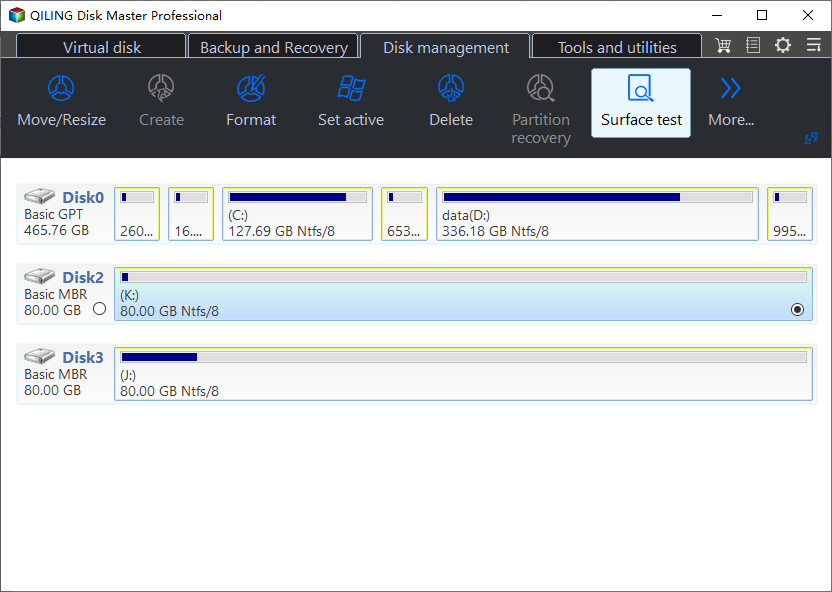
Step 1. Launch Qiling Disk Master and click the download button to activate the "Surface test" feature under the "Disk management" section.
Step 2. Select the target drive, test data, and block size from the drop-down boxes to configure the test settings.
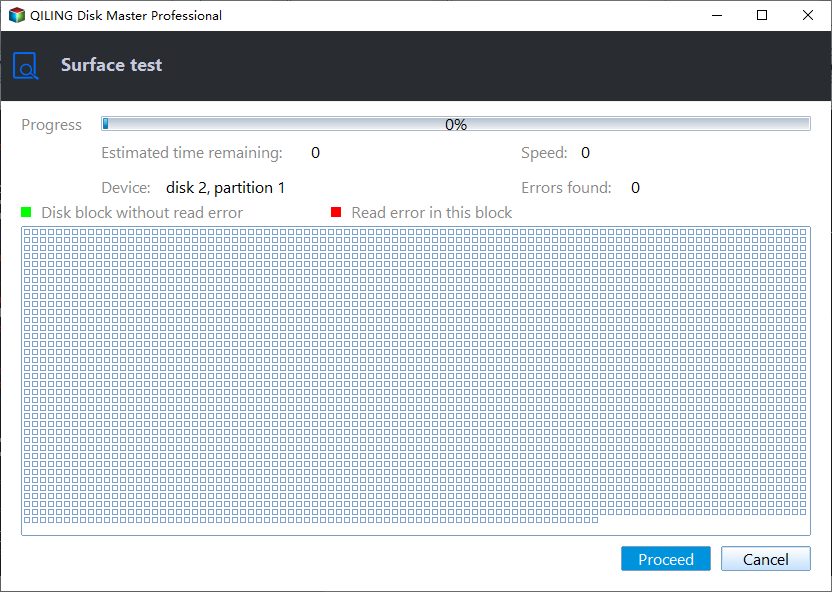
Step 3. Once everything is configured, click "Proceed" to begin the disk test, which will then display the Sequential read speed, I/O, and Delay data.
If you need to save the report, click "Save this report" in the bottom left corner to export the data and analyze the anomalies.
The tool can check hard drive health and help manage your computer more effectively, making it a useful addition to your toolkit.
Way 2. Test WD Hard Drive Speed via Task Manager
To test the read and write speeds of a Western Digital hard drive, you can use the Task Manager tool provided by Windows, but it only shows basic results. For more detailed real-time data, use a dedicated disk speed test tool and compare the results with the drive's expected performance.
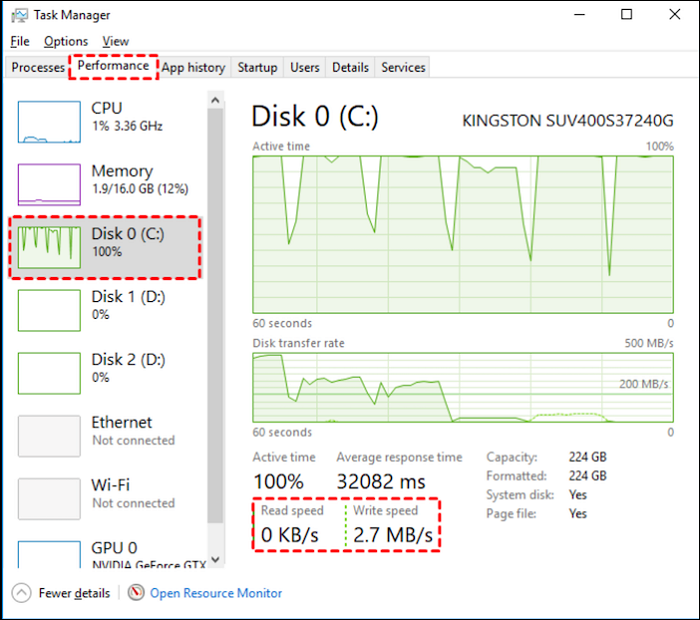
Step 1. To access the Task Manager, right-click on the bottom of the Task Bar and select "Task Manager" from the menu that appears.
Step 2. To review the performance of your computer, select "Performance" from the menu at the top of the newly opened window.
Step 3. Choose the target drive and see the speed data.
Western Digital also offers its own hard drive diagnostic tool, Data LifeGuard Diagnostics, which can identify, diagnose and repair Western Digital hard drives, but not test speed.
How to Improve Western Digital Hard Drive Speed
Here are the ways to test and speed up Western Digital hard drive speed:
- Free up disk space: Clean up some unnecessary files and programs.
- Update programs: Run the latest Windows updates.
- Defragmentation: To reduce the time spent by the head to read file fragments, consider implementing a caching mechanism that stores frequently accessed file fragments in a faster storage location, such as a solid-state drive (SSD). This approach can significantly decrease the time spent by the head to read file fragments, as the most commonly accessed data is readily available in the faster storage location.
- Expand disk space: You can either expand the partition or clone all data to a new hard drive.
- Repair bad sectors: If there are a small number of bad sectors, you can use the Disk Surface Test to clear them, allowing the hard drive to continue functioning properly.
Qiling Disk Master is a useful tool that can help improve hard drive speed, making it worth trying if you haven't already.
Conclusion
Do you know how to test Western Digital hard drive speed yet? This article shares two methods to improve your Western Digital hard drive speed.
Qiling Disk Master is a tool that helps you manage your disks more effectively. It enables you to check your hard drive's speed and health, which can help boost your data and overall system performance.
FAQs About How to Test Western Digital Hard Drive Speed
This article provides a detailed tutorial on testing Western Digital hard drive speed, as well as answers to frequently asked questions. The tutorial is designed to be helpful for users looking to assess their hard drive's performance.
1. How do I test my Western Digital hard drive?
You can test the speed of your Western Digital hard drive using either Qiling Disk Master for speed and health testing or cmd for data testing, or use WD Data LifeGuard Diagnostics to check its health.
Step 1. Download DLGDIAG Western Digital Support for Windows.
Step 2. Right-click on the drive and select "Run Diagnostics."
Step 3. Select the "Quick Test" option and click the "Start" button. A pop-up window will appear, and clicking "OK" will proceed with the test.
Step 4. If you need to check for bad sectors, select the Extended Test option. Otherwise, selecting Erase will completely erase the drive.
2. What is the speed of the Western Digital hard disk?
Western Digital hard drives have sequential read speeds of up to 560MB/s and sequential write speeds of up to 530MB/s.
3. Why is my WD hard drive so slow?
Your Western Digital hard drive may be slow due to various reasons. It could be experiencing mechanical issues, such as worn-out motor bearings or a faulty spindle motor, which can cause the drive to spin slowly or not spin at all.
- A large amount of fragmentation on the drive.
- Insufficient hard drive space.
- Bad sectors on the drive.
- The drive is infected with malware.
You can use Qiling Disk Master to fix the problem and perform a hard drive speedup.
Related Articles
- How to Check Disk Read/Write Speed in Windows 10? 3 Practical Methods
- How to Create WinPE Bootable Disk for All Windows - 2 Ways
- How to Change Boot Drive Windows 11 [Beginner's Guide]
- USB Partition Tool/Manager: Partition USB or Create Portable USB Drive
- 3 Ways to Combine or Merge Partitions in Windows Server 2022/2019/2016
Merging partitions in Windows Servers can be a challenging task, as it often results in data loss. However, with the right approach, it's possible to merge partitions without losing any data. - 3 Ways to Easily Fix 3TB Hard Drive Only Shows 2TB
You can learn the reasons for 3TB hard drive only shows 2TB and 3 easy ways to fix the problem. The stepwise tutorial will be included in each method. Please read on.
Products
Articles & Tutorials
- Data Recovery
- Data Backup
- File Recovery
- File Backup
- System Backup and Restore
- Disk and Partition Clone
- Technical articles
- Mobile articles
- Disk Master Help
- Windows Data Recovery Tutorials
- Windows Secure Delete Tutorials
- Windows Partition Management Tutorials
- Windows File Backup and Restore Tutorials
- Windows System Backup and Restore Tutorials
- Windows Disk Backup and Restore Tutorials
- Windows Clone Tutorials