10TB and 12TB Hard Drives: Capacity, Price, and Recovery
Purchasing a new hard drive is a straightforward process. All hard drives have a limited lifespan and eventually stop functioning, so users typically buy a new hard drive when the old ones begin to fail.
Purchasing a new hard drive is often necessary to meet storage needs, as our desktops and laptops have limited free storage that can quickly fill up. Fortunately, adding terabytes of storage is now easily achievable with just a USB cable and a modest budget, offering users a convenient solution to their storage needs. Users typically have two options: an external hard drive, which can be connected via USB, or an internal hard drive, which requires installation within the PC.
A 10TB or 12TB NAS hard drive can store all shared data, providing ample space for professionals and personal users, and serving as a Network Attached Storage device that allows data storage and retrieval from a central location for authorized network users.
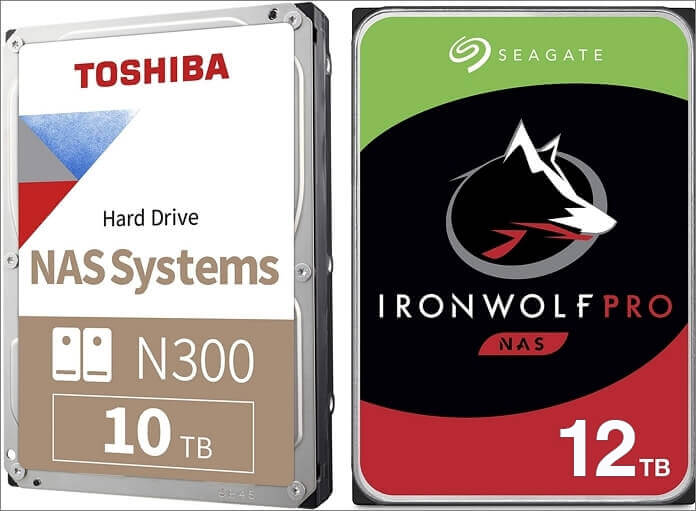
A 10TB or 12TB hard drive can be used as a regular desktop drive, but it's up to you whether you prefer a portable or desktop drive. A desktop drive with a single platter mechanism usually has a 3.5-inch drive inside and holds up to 12TB of data.
10TB/12TB Hard Drive Price
Searching for a 10TB or 12TB hard drive online reveals a wide range of options, leaving the choice up to personal preference. Fortunately, hard drives have become more affordable over time, making it easier to select the best one based on user reviews, which we've compiled to provide a general idea of the top options available.
1. 10TB Internal and External Hard Drive Price
The Toshiba N300 10TB NAS is a high-capacity internal hard drive with a 256 MB cache and 7200 RPM speed, available on Amazon for $229.99, a price that's justified by its excellent reviews and best-seller status.
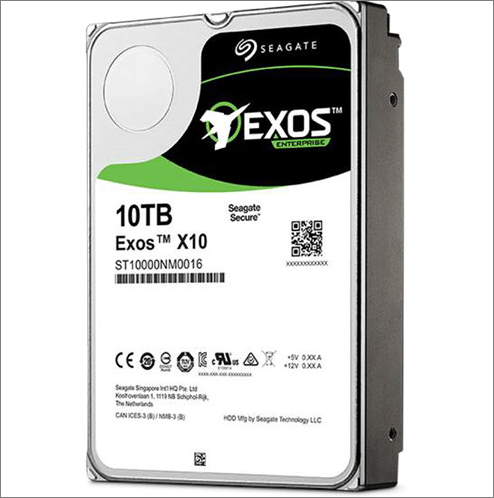
The Seagate IronWolf 10TB NAS is another excellent HDD in the 10TB segment, offering similar specs to the Toshiba N300, but with exceptional customer reviews and ratings, available for $249.99 on Amazon, just a few dollars more than the previous model, and priced similarly to other 10TB HDDs in the $230-$250 range.
2. 12TB Internal and External Hard Drive Price
A 12TB hard drive is slightly more expensive than a 10TB one, with the WD 12TB Elements Desktop hard drive costing $263.75 on Amazon. It is a popular choice due to its consistent performance and compatibility with multiple platforms.
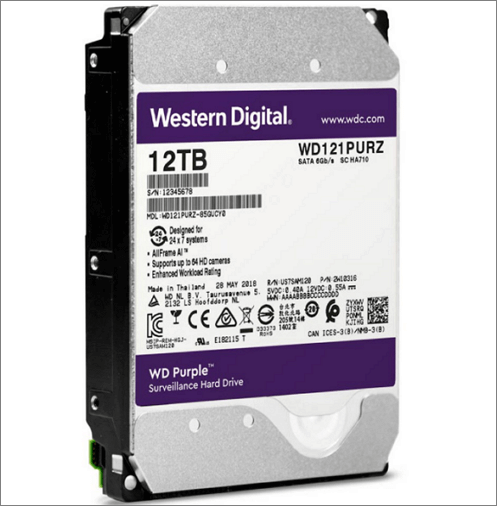
The SanDisk Professional 12TB G-DRIVE Enterprise-Class Hard Drive HDD is a good option for a professional hard drive, costing around $379. This price is reasonable, given that a 12TB hard drive typically costs between $280 and $400.
How Much Usable Space Is on a 10TB or 12TB Drive
The actual capacity of a hard drive is always less than its advertised capacity due to the difference in binary and decimal number systems. Specifically, 1 MB is equivalent to 1,048,576 bytes in a binary system, which is less than the 1,000,000 bytes in a decimal system. This discrepancy is accounted for in the capacity calculation formula: Decimal Capacity / 1,099,511,627,776 = Binary TB capacity.
Hard drive manufacturers often advertise capacity using decimal units (1TB = 1,000,000,000,000 bytes), while operating systems calculate storage in binary units (1TB = 1,099,511,627,776 bytes). This means the actual usable storage space is slightly less than the advertised capacity, resulting in a discrepancy of around 10%. For example, a 10TB hard drive might only provide 9.09TB of usable storage, and a 12TB drive might offer 10.91TB.
10TB or 12TB Hard Drive Data Recovery
Data loss is a possibility with both HDDs and SSDs, and can occur due to hardware failure, malware attacks, or human error. Losing large amounts of data, such as 10+ terabytes, can be extremely painful and detrimental, which is why data recovery tools are essential.
If you've lost data on your hard drive, you can recover it with the Qiling hard drive recovery software. It can recover all types of files, including pictures, videos, documents, and more, and even help after an operating system crash or partition loss, restoring your data in just minutes.
This software can recover data from various storage devices, including HDDs, USB drives, SD cards, SSDs, and external hard drives, making it an all-in-one data recovery solution. It can also retrieve data from formatted drives, offering a complete recovery of lost data.
Before recovering deleted data, you can get a preview of what you're recovering and decide whether or not you want to recover it. The software offers two scanning modes: a quick scan that performs a cursory scan of deleted data, and an advanced scan that thoroughly scans the storage sector by sector. This allows you to choose the level of detail you want in your scan.
Step 1. Select file types and click "Fast Scan" to start
Launch Deep Data Recovery, select file types and click "Fast Scan" to start the recovery process.

Note: You can choose different search modes based on where and why the data was lost.
Step 2. Scan the hard drive partition
Select the drive on your hard disk where you lost or deleted files, click "Scan" and let the software scan for all lost data and files on the selected drive.

Step 3. Check the results
After the scan is complete, you can apply the "Filter" feature to narrow down the search results or click "Search files or folders" to locate the lost files on the hard drive.

Step 4. Restore lost hard drive data
Select the files you want to recover and click "Recover" to save them to another location.
Qiling offers 24/7 customer service and remote assistance for complex cases, and it's recommended to download their data recovery software to protect your data.
Conclusion
Purchasing a 10TB or 12TB hard drive is a significant investment, and it's essential to approach with caution. This article serves as a comprehensive guide to help you make an informed decision when shopping for a hard drive, ensuring you get the best value for your money.
Using data recovery software like Deep Data Recovery can be a lifesaver, especially when dealing with large amounts of data. Losing 10TB or 12TB of data can be disastrous, both financially and in terms of productivity. This software is user-friendly and can assist in recovering deleted data from any storage device, making it a valuable tool to have in case of data loss.
Related Articles
- Fix SSD Not Showing Up in Windows 10/11 [2022 Tips]
- Fix External Hard Drive Not Showing Full Capacity on Windows & Mac
- How to Recover Files from Dead Laptop Hard Drive in Windows 10/8/7
- [5 Ways] How to Remove Write Protection from USB in Windows 11/10/8/7
- Error: Google Docs Didn't Save My Work _ How to Recover Unsaved Changes to Google Docs
If Google Docs didn't save your work. If your changes didn't auto-save. you can try to recover them. Follow our advice to potentially reappear unsaved changes. - Google Drive Files Not Showing Up on PC/Phone/Mac [Fixed]
Uploading files and documents to Google Drive may not always result in them being displayed immediately. Various factors can contribute to this issue, and several solutions have been proposed to resolve it.
Products
Articles & Tutorials
- Data Recovery
- Data Backup
- File Recovery
- File Backup
- System Backup and Restore
- Disk and Partition Clone
- Technical articles
- Mobile articles
- Disk Master Help
- Windows Data Recovery Tutorials
- Windows Secure Delete Tutorials
- Windows Partition Management Tutorials
- Windows File Backup and Restore Tutorials
- Windows System Backup and Restore Tutorials
- Windows Disk Backup and Restore Tutorials
- Windows Clone Tutorials