Top 5 Best Open Source Data Recovery for Windows/Mac/Linux/Android
Data loss can occur due to various factors, including file corruption and power outages, leaving users in a stressful situation. Fortunately, open-source data recovery software can help in such scenarios. This type of software is available to assist individuals in recovering their lost data, and there are several options to choose from. We'll explore the world of open-source data recovery and introduce you to the best open-source software available.
What is Open Source Data Recovery Software
Open-source data recovery software is free to use and allows users to recover deleted, corrupted, or inaccessible data. It scans, reviews, extracts, identifies, and copies data by digging into storage devices, offering distinct advantages compared to proprietary recovery software, including being free to use and fostering incredible benefits for users.
- Free to use
- Deep scan search down all the deleted or corrupted files
- Provide a preview before recovery
- Recover any sort of files or data
We've compiled a list of the 5 best open source data recovery software after reviewing most of them, and the good news is that several open source data recovery solutions are available. Read to the last to find your best one!
Top 5 Best Open Source Data Recovery for Windows, Mac, and Linux
Data recovery software has become a crucial tool for digital users, and open-source options are gaining popularity. If you're looking for the best open-source data recovery software, this guide can help.
The following are the 5 best open source data recovery software:
Let's discuss each in detail:
1. PhotoRec (For Windows, Mac & Linux)
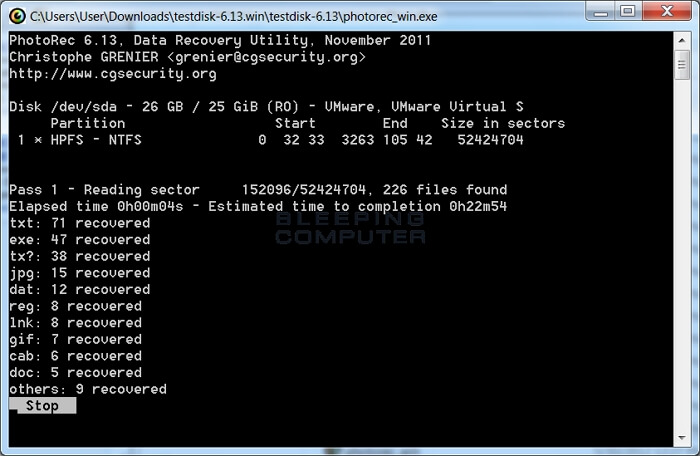
PhotoRec is an open-source recovery software that can be used to recover deleted files from various types of media, including pictures, videos, and other files. This software can help retrieve lost data from all types of storage devices, such as hard disks, digital cameras, and CDs.
Pros:
- Over 480 file recovery formats to choose from
- Support a variety of file systems
- Provide Custom file recovery
Cons:
- The interface is confusing for many users.
User Experience:
PhotoRec is a free data recovery software that can recover documents, photos, videos, and other files from any storage device. It's user-friendly and performs well, but may be challenging for beginners to navigate. However, its simplicity and effectiveness make it a reliable tool for quickly recovering lost files.
2. TestDisk (For Windows, Mac & Linux)
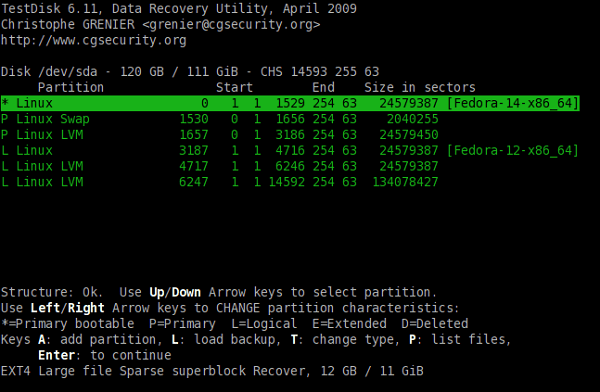
TestDisk is a free data recovery software that helps recover lost partitions and make a disk bootable again, often used to recover data lost due to malware or human errors.
Pros:
- Quickly recover partition tables
- Repair MFT and FAT tables
- No need to install anything
- The majority of popular file systems are supported
Cons:
- The interface is quite tricky to use.
User Experience:
TestDisk is a free recovery tool that requires no installation, yet the recovery process is streamlined. It offers a command-line interface that may seem challenging, but makes partition recovery simpler. With TestDisk, you can recover hundreds of file types, so you don't need to worry about the file format. Whether you lost a specific file, TestDisk can help you get it back quickly.
3. FreeRecover (For Windows)
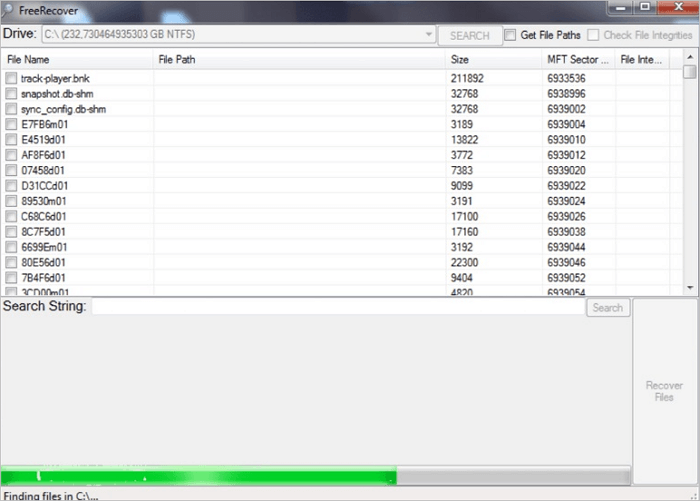
FreeRecover, an open-source data recovery program, was released in 2013 and supports the NTFS file system. The program's user-friendly interface makes recovery easy and simple, allowing it to deeply scan locations and search for deleted files.
Pros:
- Preview your deleted files
- Advance and easy to use interface
Cons:
- To run this program, you'll need the .NET framework.
User Experience:
The software is easy to use with a simple and enjoyable user interface. It can recover original file paths and provide integrity estimations for lost or corrupted files.
If you want to get the best recovery for free, we recommend using it, but keep in mind that it can come with certain restrictions.
4. Kickass Undelete (For Windows)
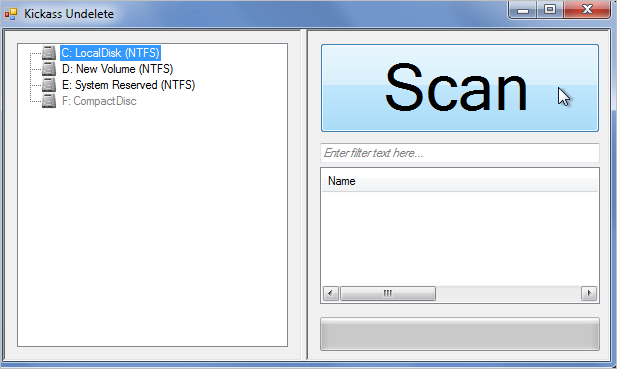
Kickass Undelete is an open-source software that makes file recovery easier, specifically designed for Windows. It can recover deleted files from various storage devices such as SD cards, flash drives, and hard drives.
Pros:
- The interface is simple to use
- Filter out your files and extensions
- Compatible with FAT and NTFS file systems
Cons:
- Occasionally crashes
- Only Windows platforms are supported
User Experience:
After using the recovery software, we experienced occasional crashes after file recovery, which may be attributed to errors, but it still suggests that the software might crash during file recovery.
Its simple and user-friendly interface makes this file recovery tool appealing to new users. It allows for quick sorting of files by name and extension to easily locate important documents; however, if it crashes, the recovery process may be difficult to complete.
5. Scrounge NTFS (For Windows and Linux)
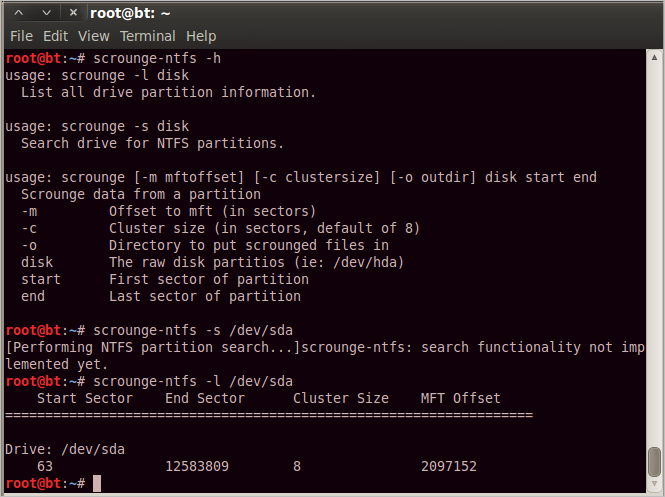
Scrounge NTFS is a free, open-source data recovery tool that works with Windows systems and later versions were adapted to Linux, allowing it to handle highly fragmented MFTs.
Pros:
- Partition recovery is available
- Work on NTFS file system
Cons:
- The interface of the software is tough to understand
- Not updated yet after the last update in 2014
User experience:
The program was initially confusing, but it seemed to recover partition files or support NTF files. However, it appears to lack significant updates to meet user demands.
Advantages and Disadvantages of Open Source Data Recovery Software
While free data recovery software is available, some users may still find it beneficial to purchase a paid version, despite the fact that the free alternative can provide similar functionality. However, some disadvantages of using free data recovery software may outweigh the benefits, leading some to opt for a paid, trustable solution.
The open-source data recovery software has several benefits and drawbacks. On the one hand, it is free to use, has a wide community of users and developers who contribute to its development, and can be customized to suit specific needs.
Advantages
- It is entirely free to use.
- Most of the open-source data recovery software is typically developed by experts, which minimizes the likelihood of flaws or errors in the software.
- They are flexible to use and edit, allowing users to remove any feature they don't want to use.
- All types of data can be recovered.
Disadvantages
- Malicious users are a threat.
- Some tools can be challenging to use due to a complicated user interface.
- There isn't a lot of support available.
- Sometimes, the software doesn't support the user's operating systems.
- Typically, tools are free to use, but there are instances where hidden charges apply. In some cases, tools may even ask for payment to recover data.
To address users' concerns about data security, we've compiled a list of the 10 best data recovery software, providing a secure solution to recovery problems, as open-source options may not guarantee this.
Top 10 Best Free Data Recovery Software for Windows, Mac, Linux, and Android
Compared to open-source alternatives, free recovery software often provides better data privacy protection. If you're looking for a reliable free recovery solution, we've compiled a list of the top 10 best free data recovery software options available.
- 1. Deep Data Recovery Free
- 2. Stellar Data Recovery
- 3. Recuva
- 4. Disk Drill Data Recovery
- 5. Recover My Files
- 6. Puran Data Recovery
- 7. Windows File Recovery
- 8. Qiling MobiSaver for Android Free
- 9. DiskDigger
- 10. Apeaksoft Android Data Recovery
Below, we've explained each software in detail:
1. Deep Data Recovery Free

Deep Data Recovery Free is a top-rated data recovery software that offers impressive performance, simplicity, and accessibility, allowing users to easily recover large numbers of files from various storage devices, including Windows and laptops.
Deep Data Recovery Free can do the following:
- Recovery of the lost data
- Storage Media Recovery
- Formatted File Recovery
- Partition Recovery
- Nas Data Recovery
System Compatibility:
Deep Data Recovery Free is a software compatible with both Windows and Mac operating systems, and it also has mobile applications available for Android and iOS devices.
Features:
- Advanced Scanning Algorithm: Their advanced algorithm checks files and shares a list of restorable data, offering two scanning options: a quick scan for a fast search and an advanced scan for a more in-depth search that takes a bit more time.
- Preview and Recover: Instead of recovering all the hard drive data, you can preview your desired files. If they are needed, you can recover them using a single button.
- Tag Option: With this feature, you can tag a single file type, such as photos, and recover only those files, making the recovery process more efficient and targeted. This allows you to recover only the files that are needed, saving time and effort.
- 3 Steps Recovery: Files can be restored in 3 simple steps: scan, preview, and recover.
To recover data with Deep Data Recovery Free, follow these steps:
Step 1. Select file types and click "Fast Scan" to start
Launch Deep Data Recovery, select the file types you want to recover, and click "Fast Scan" to begin the process.

Note: You can choose different search modes based on where and why the data was lost.
Step 2. Select a drive and start scanning
Hover over the partition where you lost data and click "Scan".

Step 3. Check and preview scanned files
To narrow down the scan results, use the file format filter on the left or upper right corner. Once you've filtered the results, you can click the "Preview" button or double-click a file to view its content. This allows you to quickly scan through the files and find the ones you need.
Step 4. Recover lost data to a secure location
To recover lost data, select the file, check the box next to it, and click "Recover" to restore it to a secure location. It's advisable to avoid storing the recovered data on the same disk where it was initially lost.
2. Stellar Data Recovery
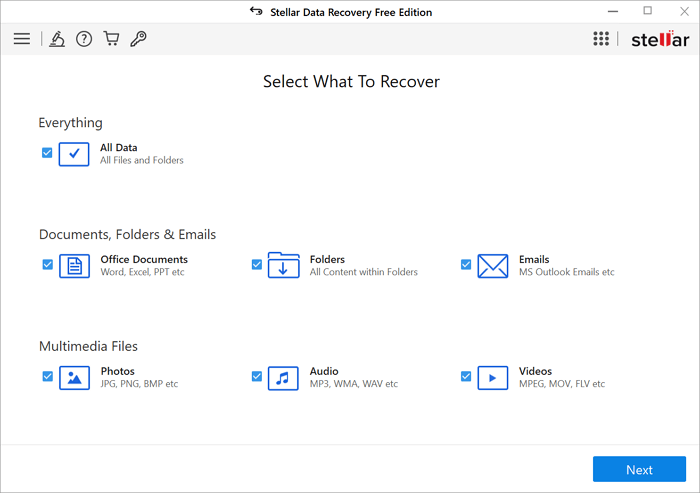
Stellar Data Recovery is a high-end, user-friendly software that offers an extraordinary recovery process, making it streamlined and uncomplicated for users. The software is available in various editions and helps recover data from DSLR, SD cards, and iPhones, making it a reliable tool for data recovery.
System Compatibility:
Compatible with Windows and macOS operating systems.
Features:
- Simple and user-friendly interface
- High-end scanning and file preview
- Foster disk cloning
3. Recuva
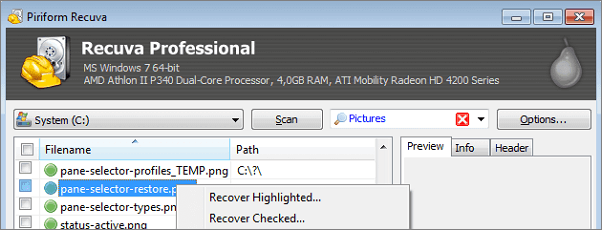
Recuva is a simple data recovery program that can handle all recovery tasks, and its main advantage is that it can recover an endless amount of data for free. Even if the data is deleted from the recycle bin, it can still be restored.
System Compatibility:
It is compatible with Windows only.
Features:
- Provide a preview before recovery
- An unlimited amount of data can be recovered simultaneously.
- Data deleted a long time ago can also be restored
4. Disk Drill Data Recovery
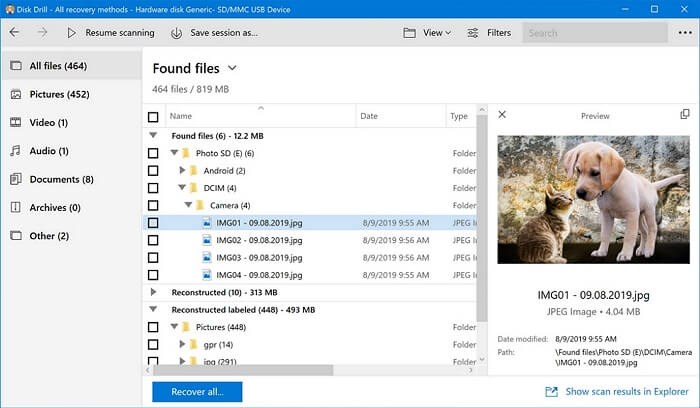
Disk Drill Data Recovery is a powerful disk recovery tool with a good reputation in the IT market. It is designed to recover disk files, but also supports the recovery of other storage devices like SD cards and USB drives.
System Compatibility:
It is specially designed for Windows and MAC.
Features:
- Introduce an advanced and modern interface
- The free version of the software can recover more than 500 MB of data.
- Lightning-fast scanning with the option to resume and stop
- A variety of file formats are supported
- Recover data from the corrupted cards as well
5. RecoverMyFiles
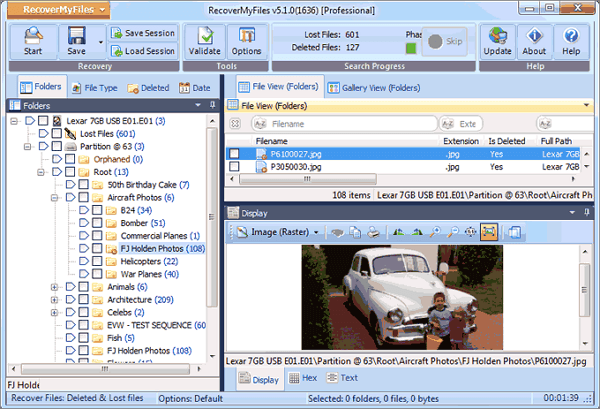
Despite its age, RecoverMyFiles still performs well, especially in recovering basic file formats from Windows discs, and can also recover data from RAW drives and disk data recovery after a hard disk crash.
System Compatibility:
It is only compatible with Windows and HFS+ (MAC).
Features:
- The performance is great
- The interface is efficient to use
- Recover all types of files admirably
6. Puran Data Recovery
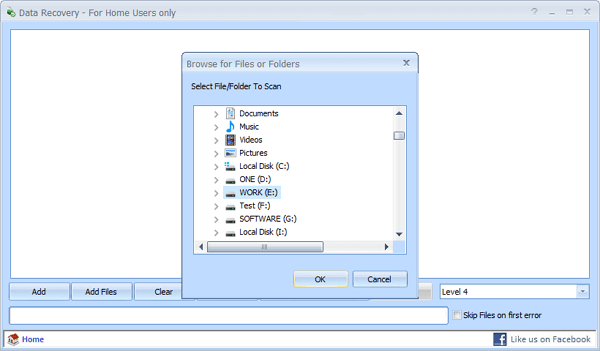
Puran File Recovery is a tool that can help recover data from various storage devices, including DVDs, CDs, damaged pen drives, and memory cards, and is compatible with all Windows systems, despite its outdated appearance and last update in 2013. It remains a viable option for data recovery, particularly on older PCs, and can deliver satisfactory results.
System Compatibility:
The Puran data recovery software is designed for Windows users and is compatible with all types of Windows operating systems, allowing users to recover lost data with ease.
Features:
- Perfect solution for older PCs
- Specially designed to recover data from windows
- Provide easy and satisfactory recovery
7. Windows File Recovery
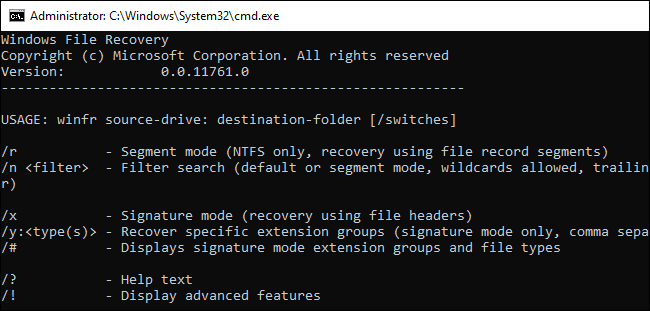
Windows File Recovery is a powerful tool introduced by Microsoft that can recover lost files from local storage devices, including those that have been deleted or cannot be restored. It's a free solution specifically designed for Windows users, although it's not compatible with iCloud or Linux storage. However, its interface may not be user-friendly for beginners.
System Compatibility:
It's only compatible with Windows.
Features:
- Available for all data recovery from windows
- Data recovery software can recover all types of data from various storage devices, including hard drives, solid-state drives, USB drives, memory cards, and more. It can also recover data from damaged, corrupted, or formatted storage devices, and even from devices that have been physically damaged or have been subjected to water or fire damage.
- Completely free to use
8. Qiling MobiSaver for Android Free
Qiling MobiSaver for Android Free is a reliable program that allows users to recover files from their Android device in just 3 steps. It can recover photos, messages, and music, and also supports recovery from memory and SD cards, all for free.
It includes a user-friendly interface that is incredibly effective. Meet the ultimate game-changer for your lost files! This amazing tool is designed to make data recovery straightforward. With its intuitive design, you'll be able to recover the majority of your lost files in no time. Whether you've accidentally deleted something or your Android device has crashed, this tool is here to save the day.
System Compatibility:
It is compatible with Windows.
Features:
- To recover data from a damaged phone, first, preview all the required SMS, documents, and photos. Then, recover them instead of downloading the complete data.
- Export your contacts in CSV, HTML, and VCF formats
- Here are the steps to recover lost files:
- Recover your data in 3 simple steps
- Support more than 6000 android phones and tablets
9. DiskDigger
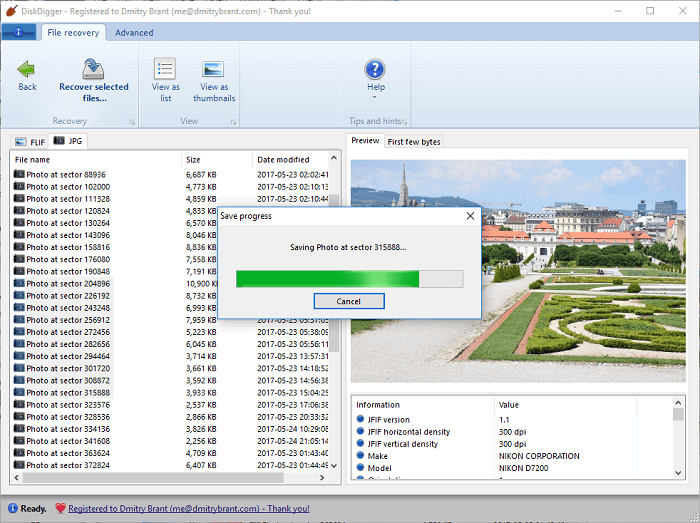
DiskDigger can recover almost any file type from internal and external storage devices, including hard disks, USB flash drives, and memory cards, even if the device is corrupted.
System Compatibility:
It's available for Windows and Linux.
Features:
- User-friendly interface
- Retrieve almost every type of file
- Performs well in portable storage devices
- The Android app functions optimally when the phone is not rooted, allowing for smoother and more efficient performance.
10. Apeaksoft Android Data Recovery
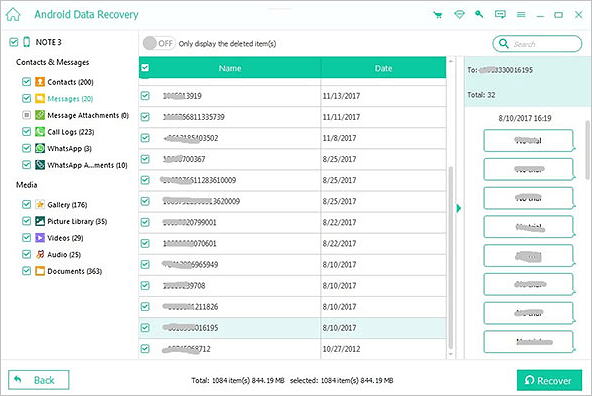
Apeaksoft Android Data Recovery is a software that specializes in recovering videos, photos, files, and documents from Android devices, making it a top choice for Android users. It's efficient and safe to use, and can even help restore files in case of a rooting error.
System Compatibility:
This program can recover all types of files from both Windows and MAC operating systems.
Features:
- Provide deep scanning before recovery
- It supports more than 5000 devices
- The free preview is available
- The device can recover data from SIM cards, internal memory, and SD cards, making it a versatile tool for retrieving lost information.
Tips for Preventing Data Loss in the First Place
Data loss can be a significant issue, especially when we're caught up in our busy schedules. However, taking a few precautions can help prevent it. By implementing these simple tips, you can ensure that your data remains safe and secure.
- Maintain a dust-free and clean computer.
- If your computer overheats, it's not necessarily because it needs to be disassembled and cleaned. In fact, this can often cause more harm than good.
- Regularly save and backup your files to multiple locations, and consider encrypting them for added security.
- Create a backup image of your hard drive before you notice any signs of impending hard drive failure. This will ensure that you have a safe and reliable copy of your data in case the original drive fails.
- Maintain the most recent version of your anti-virus software.
To avoid a depressing data loss scenario, it's a good idea to have a backup solution in place before a problem occurs, as "to err is human".
Back up your data regularly to avoid losing it in case of an unfortunate event.
FAQs About Open Source Data Recovery
People have specific questions to which they want a detailed answer regarding open source recovery. Below we've compiled the frequently asked questions; let's look at their solutions.
1. Is Recuva open source?
Recuva is an award-winning freeware software that is not open-source, despite being able to recover files from nearly any storage device.
2. How to use open-source data recovery software?
Open-source data recovery software uses its powerful algorithm to retrieve deleted data, digging out files from their original location and scanning them to ensure they're ready to go. Once recovered, the files can be saved to a desired location, giving users control over where their restored data ends up.
3. What is the open-source data recovery software for Android?
While there isn't a specific open-source data recovery software for Android, you can still recover data from your Android device using open-source data recovery software available for Windows.
Conclusion
After reviewing various data recovery software, we found that free data recovery software is more accessible than open-source recovery software, but the latter is more secure and easier to use. Our top picks from the list of open-source and free data recovery software are Qiling Data Recovery Wizard Free and Qiling Android Data Recovery Free, which are both helpful and user-friendly, saving time and money.
These tools offer free recovery, which is a huge help to many individuals and businesses who need to restore their important data.
These recovery tools provide solutions without compromising users' privacy protection. They also ensure Malware-protected recovery, making them a reliable option. Downloading them now is a good idea.
Related Articles
- Top 6 Best Hard Drive Data Recovery Services
- Top 6 Ways to Fix Windows 10 WHEA Uncorrectable Error
- How Long Does It Take | 1 TB Data Recovery
- Top 9 Best USB Recovery Software Free Download in 2022
- PDF Won't Open? 3 Quick Ways to Fix 'can't open pdf' Error on Windows/Mac
If your PDF file won't open, several factors might be at play, causing the issue. To resolve the problem, you can try checking for reliable solutions to fix the issue with your PDF file. - 2022 Guide: How to Recover Deleted Files from Pen Drive in 3 Ways
When you lose or delete files on a pen drive, USB flash drive, or other drives, stop using the device immediately. To recover deleted files, you can use a pen drive data recovery software like Deep Data Recovery, or try using CMD or a data recovery service if the files are hidden.
Products
Articles & Tutorials
- Data Recovery
- Data Backup
- File Recovery
- File Backup
- System Backup and Restore
- Disk and Partition Clone
- Technical articles
- Mobile articles
- Disk Master Help
- Windows Data Recovery Tutorials
- Windows Secure Delete Tutorials
- Windows Partition Management Tutorials
- Windows File Backup and Restore Tutorials
- Windows System Backup and Restore Tutorials
- Windows Disk Backup and Restore Tutorials
- Windows Clone Tutorials