CCTV DVR Data Recovery: How to Get Data From DVR Hard Disk
If you've lost crucial videos or recordings from a CCTV DVR hard drive due to deletion or disk formatting, there are ways to recover the data. This article will guide you through the process of DVR data recovery, allowing you to retrieve data from the DVR hard disk with satisfactory results.
If you don't have backups or extra copies of the lost .cctv or .dvr videos, the DVR hard disk recovery software is the only way to restore deleted/formatted DVR videos, footages or recordings, and it's more straightforward and competent in the recovery process.
Can You Recover Deleted Recordings from a DVR?
If you've ever had the frustrating experience of accidentally deleting or erasing recorded videos and images from a CCTV/DVR camera hard drive, or formatted the hard drive without saving a copy in advance, you may be wondering if you can recover the deleted footage. Fortunately, many DVR devices, including Dish DVR and Hikvision DVR, have a recycle bin-like feature that temporarily stores removed footage, which can be recovered using professional DVR hard disk recovery software or a previously created backup. This means that even if you've made a mistake, you may still be able to recover your digital data.
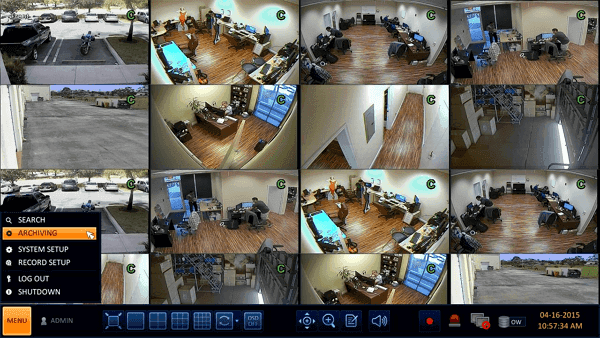
Method 1. Use DVR Hard Disk Recovery Software
If you don't have a backup or an extra copy of the lost CCTV/DVR videos or images, you can still recover them using powerful hard drive recovery software, which can provide a robust recovery function.
If you've lost important video recordings from a CCTV or DVR camera due to formatting, deletion, erasure, or other reasons, you can still recover them using a powerful data recovery software. Deep Data Recovery is a reliable tool that allows you to retrieve deleted, formatted, lost, or erased files from a Windows 10/8/7 hard drive, SD card, or USB storage device in just three simple steps. This software can help you recover your lost recordings and get back to monitoring what matters.
How to recover deleted videos/footages with professional DVR hard drive recovery software:
Step 1. Launch Qiling Deep data recovery software on your PC, select file types, and click "Fast Scan" to start the recovery process.

Note: You can choose different search modes based on where and why the data was lost.
Step 2. To recover deleted videos, select the location or device where the videos were lost, then click "Scan" to start the recovery process. This will search for any remaining video files on the selected location or device.

Step 3. After scanning, select "Videos" in the left panel, navigate to "Lost" or "All" to find the desired videos, select them, and click "Preview".

Step 4. To recover video files, select the desired files and click the "Recover" button to save them to a secure location.
You May Also Like:
How to Recover Deleted Files from Recycle Bin?
If you're looking for a way to recover deleted files from the Recycle Bin, follow the steps to learn how to do it immediately.

Method 2. Restore from DVR hard drive backup
If you've backed up the surveillance videos to another connected removable disk drive or some cloud storage, you can easily transfer the backup file back to the original hard drive, or simply view the lost footages on the backup drive.
Step 1. Find and open the video backup folder.
Step 2. Locate the exact video that you've deleted or lost from the CCTV or DVR hard drive/SD card.
Step 3. The video from the camera should be copied and stored back to the disk or SD card.
There are two effective ways to recover DVR data from a computer-based hard disk drive or SD card: you can choose the method that best suits your situation.
Can Overwritten CCTV Footage Be Recovered?
While it's a challenging task, some data recovery software can recover parts of overwritten files after deletion or formatting, but the success rate depends on how quickly the marked 'empty' space is occupied by random data.
In the previous article, we discussed how to recover overwritten CCTV files, which elaborated on the concept of overwritten files and the possibility of recovery.
By learning the aspects that aid full recovery of CCTV DVR videos, images, and footages, we know that powerful data recovery software can help revive data in most loss scenarios. However, taking a real-time backup can guarantee 100% data loss prevention, ensuring that evidence of burglaries, thefts, or other crimes is preserved, thus largely guaranteeing home and office security.
Qiling Backup Free is a free program that automatically backs up and recovers data on your computer, allowing you to schedule backups at specific times.
Related Articles
- Seagate 4TB External Hard Drive PS4/Xbox One [Full Guide]
- How to Recover Files from Dead Laptop Hard Drive in Windows 10/8/7
- How Do I Get My Computer to Recognize a USB Device [Solved]
- How to Recover Data from a PC/Laptop Hard Drive That Won't Boot
- Restore Missing Fonts After Windows 10 Creator Update
If you're experiencing missing fonts after the Windows 10 Creator update, This article provides a quick fix and reliable solutions to restore the installed fonts on your computer. Follow the steps to resolve the issue and have your fonts back in no time. - Restore Overwritten/Replaced/Saved-over XLS/CSV Files
If your Excel file saved as XLS or CSV format got overwritten, replaced or saved-over by a new file, This page shows you how to restore overwritten, replaced or saved-over XLS/CSV files in Windows 10/8/7 with simple steps.
Products
Articles & Tutorials
- Data Recovery
- Data Backup
- File Recovery
- File Backup
- System Backup and Restore
- Disk and Partition Clone
- Technical articles
- Mobile articles
- Disk Master Help
- Windows Data Recovery Tutorials
- Windows Secure Delete Tutorials
- Windows Partition Management Tutorials
- Windows File Backup and Restore Tutorials
- Windows System Backup and Restore Tutorials
- Windows Disk Backup and Restore Tutorials
- Windows Clone Tutorials