Primary vs. Extended Partition | Compare Their Features and How to Manage Them
A Brief Introduction to Hard Drive Partition
Hard disk partitioning involves dividing the overall storage space of the hard disk into multiple independent areas called primary and extended partitions. To understand primary vs. extended partition, it's essential to know that hard disk partitioning refers to dividing the overall storage space of the hard disk into multiple independent areas. The difference between primary and extended partition, their respective functions, and whether you can convert primary to extended partition will be discussed in this article, aiming to help computer novices understand and apply them better.
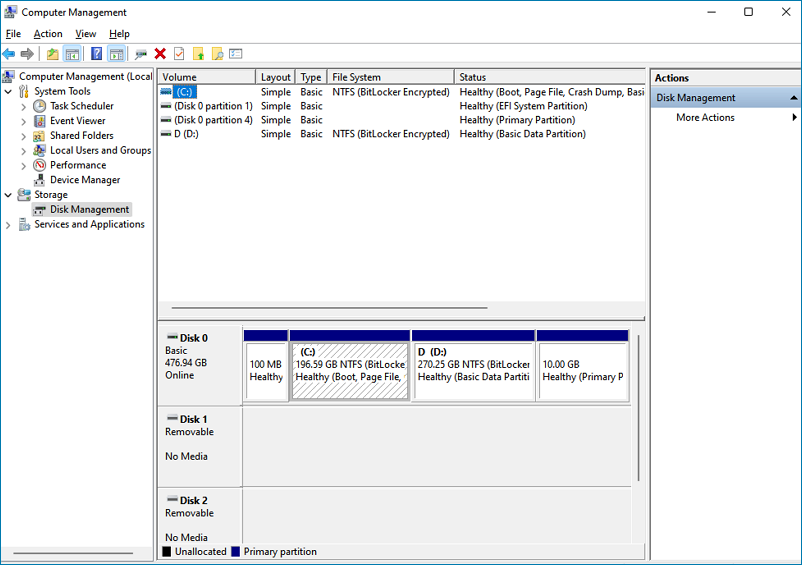
Primary Partition: A must-have Partition for System Boot
A primary partition, also known as the main partition, is the first partition of a hard disk that the operating system and motherboard recognize. It is the main partition that the system looks to for booting and running the operating system. In contrast, extended partitions are additional partitions that can be created on a hard disk, beyond the primary partition. They can be used to hold additional operating systems, data, or programs, and are often used when a primary partition is not sufficient to hold all the necessary files.
The primary partition is a basic partition located in the frontmost area of the hard disk, acting as the logical C disk. It contains the primary boot program, responsible for detecting the correctness of the hard disk partition, determining the active partition, and transferring the boot right to DOS or other operating systems. If this program is damaged, the computer will not be able to boot from the hard disk, but the hard disk can still be read and written after booting from a floppy drive or CD-ROM.
After dividing one primary partition, we can divide the rest into extended partitions. The quantity of primary partitions is not fixed, and we can split a primary partition into two. However, a disk drive can only contain up to four primary partitions or three primary and one extended partition. The primary partition is also known as the boot partition, recognized by the operating system and motherboard as the boot partition of the hard disk.
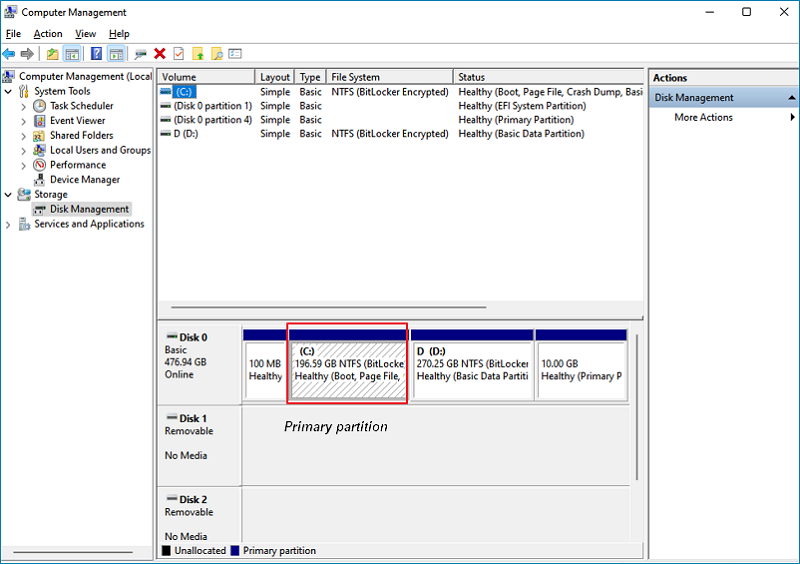
Know All Information About Extended Partition
An extended partition can be subdivided into several partitions called logical partitions, allowing multiple partitions to exist within a single extended partition. This allows for more flexibility and organization of data on a hard disk. A hard disk can contain only one extended partition, but multiple logical partitions can be created within it.
Extended partitions serve as containers for logical partitions, and their structure is described in the Extended Boot Record (EBR). When formatted with a file system, the logical partitions within an extended partition become visible. This setup allows for user data to be stored, providing protection from operating system crashes or corruption.
The extended partition cannot be used directly. Instead, it is used as a logical partition to divide the extended partition into several logical partitions, where each logical partition is contained within the extended partition.
Primary vs. Extended Partition | What's the Difference and Which Is Better
| Difference | Primary partition | Extended partition |
|---|---|---|
|
Quantity |
At least 1 and a maximum of 4. |
The extended partition cannot be used directly. Instead, it serves as a logical partition, comprising multiple logical partitions within it. |
|
Bootable |
The primary partition is the first partition on a hard drive that contains the operating system and is marked as bootable. |
The extended partition is a special partition on a hard drive that is not bootable and serves as a container for other partitions, known as logical drives. It is typically designated as the fourth primary partition (if there are four primary partitions on the drive) and allows for the creation of additional partitions beyond the four primary partitions. The extended partition does not have a drive letter or file system and is used to hold other partitions, which can have their own drive letters and file systems. |
|
Applicable scenarios |
We can use it to boot the operating system, establish one to four primary partitions, and install multiple operating systems without interference. |
Extended partitions, also known as logical drives, do not directly store files but instead create separate partitions to store various types of data, such as general files, audio files, and images. |
|
Naming example |
Primary partitions are assigned the first letters in the alphabet as drive letters (such as C, D). |
In the extended partition, logical drives are assigned other letters, typically E, F, and G. |
Primary and Extended partition Q&A
1. How to Create a Primary Partition?
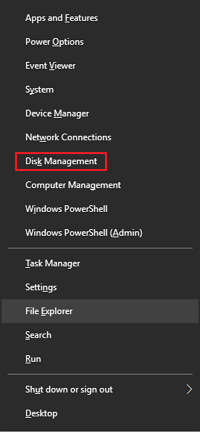
Step 1. Right-click "This PC" and click"Manage" to open "Disk Management".
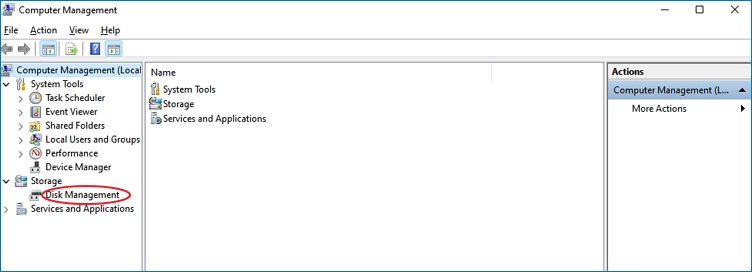
Step 2. If there are 4 primary partitions already, we can't create a new one, but if there are less than 4, we can create a new primary partition.
Step 3. Select free space to create a primary partition.
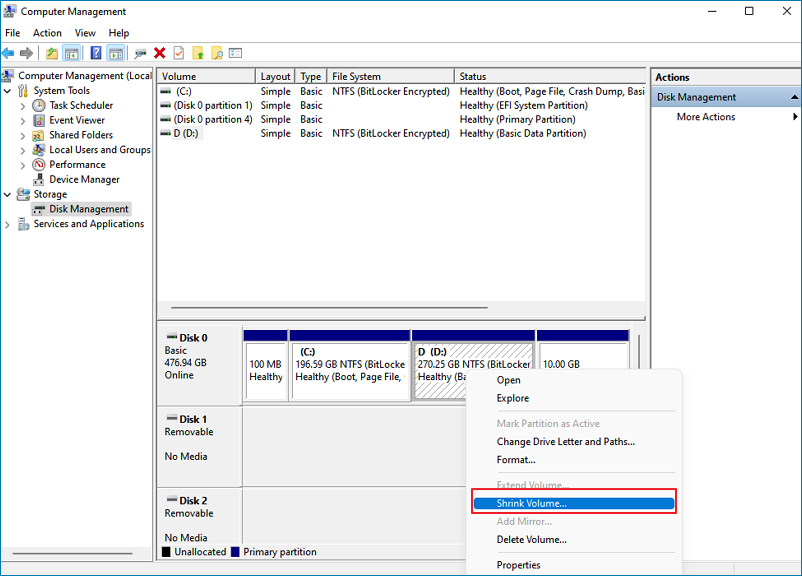
Step 4. To create a new primary partition, select the available space and right-click on it. From the context menu, choose "New Simple Volume" and follow the prompts to build the new partition.
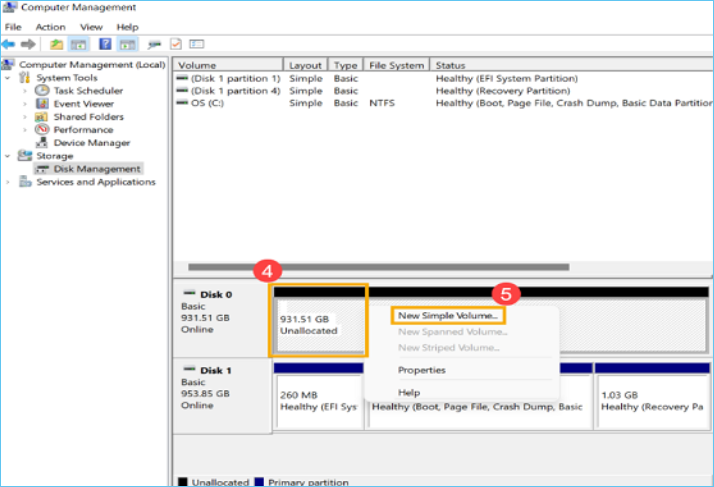
2. How to convert primary to logical partition?
To free up space on your system partition, you can use a disk partition tool like Qiling Partition Master to allocate the extra space from a logical partition to the system partition without causing system corruption or losing essential files.
Step 1. Download and install Qiling Partition Master Suite.
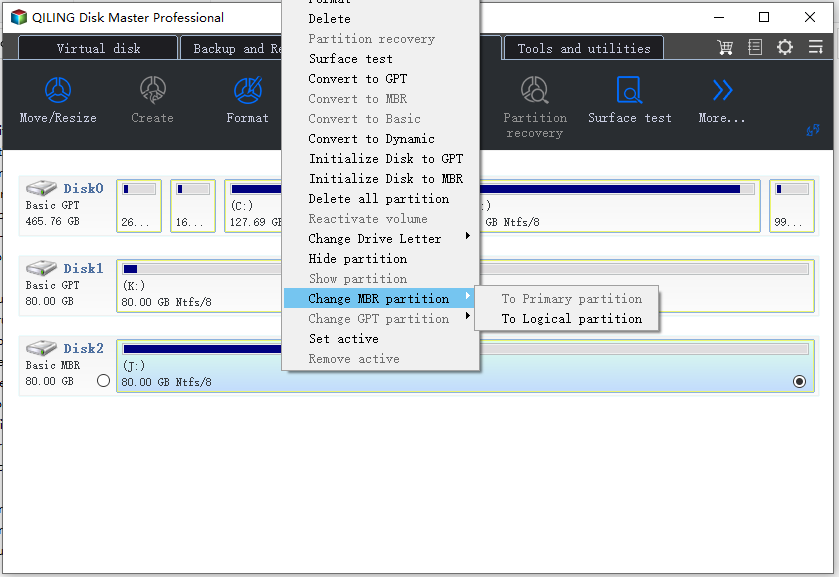
Step 2. Choose primary partition and click [convert primary to logical partition].
Conclusion:
The article explains that the primary partition is the first partition on a disk, which can be bootable and can contain a maximum of 4 partitions. The extended partition is a special partition that can contain multiple logical partitions, making it useful for storing large amounts of data. This knowledge can help you decide how to partition a new disk, taking into account the need for a bootable primary partition and the ability to store multiple operating systems or large files.
Related Articles
- What Is RSAT? How to Install Remote Server Administration Tool on Windows? [All You Should Know]
- How to Use Device Encryption on Windows 11
- How to Fix High Memory Usage in Windows 11
- What Is the Mac Terminal? Introduction to the Command Line Interface on macOS
- What Happens If an SD Card Is Corrupted [Full Guide on 10 Fixes]
This page explains what happens if an SD card is corrupted and provides ten full guides on how to fix SD card corruption. - (Solved!) Secure Boot Enabled But Not Active🔥
One of the most common problems computer users have faced is secure boot enabled but not active. Learn about the solutions here and solve this problem within minutes.
Products
Articles & Tutorials
- Data Recovery
- Data Backup
- File Recovery
- File Backup
- System Backup and Restore
- Disk and Partition Clone
- Technical articles
- Mobile articles
- Disk Master Help
- Windows Data Recovery Tutorials
- Windows Secure Delete Tutorials
- Windows Partition Management Tutorials
- Windows File Backup and Restore Tutorials
- Windows System Backup and Restore Tutorials
- Windows Disk Backup and Restore Tutorials
- Windows Clone Tutorials