HiDrive vs Google Drive: Ultimate Comparison in 2024🏆
Cloud drives have become essential options for storing and managing large files, providing backup options and ease of access, regardless of personal or professional use, with services like Google Drive and HiDrive.
To determine who wins the battle between HiDrive and Google Drive, Qiling spent some time using both apps and here's the comparison.
An Overview of HiDrive
HiDrive is a cloud storage service developed by Strato, a German company, offering various products including web hosting and online backup tools. Available only to European residents with a valid European phone number, HiDrive allows users to store, manage, and access files across multiple platforms, including Windows, iOS, iPhone, and Android devices.
Ease of Use
The app provides a seamless user experience across all devices, with a smooth navigation on desktop. It syncs files from HiDrive on all devices, but does not allow file sharing through the platform. However, it enables sharing of sync folder files via messaging, sharing apps, or Airdrop.
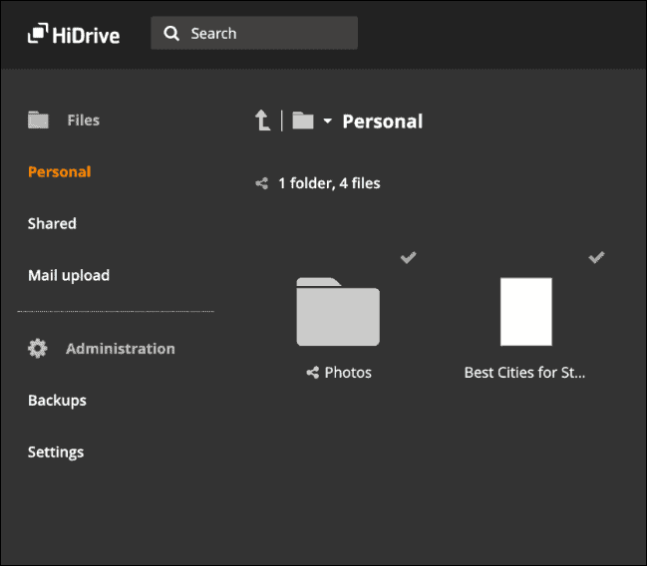
In terms of design and functionality, web and mobile applications have a minimalist approach, making tasks easy and breezy. However, there's a difference in how they handle Word files, with web platforms not allowing viewing, but mobile apps offering a different experience.
File Sharing & Syncing
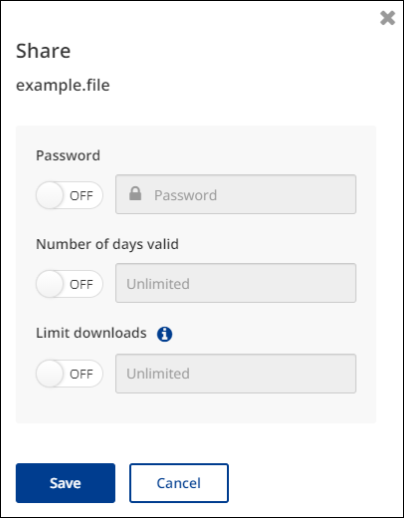
HiDrive offers excellent file sharing capabilities with encryption options, allowing users to authorize edit access and password protect shared files. It also features advanced sharing options such as link passwords, expiry, and download limits.
The files will be synced across all platforms instantly after uploading, and permissions can be set to control access. However, selective sync for folders on the computer's hard drive is not possible.
Security & Privacy
HiDrive offers full control over file encryption, using local encryption for end-to-end security, and supports WebDAV, rSync, FTP, and Git protocols.
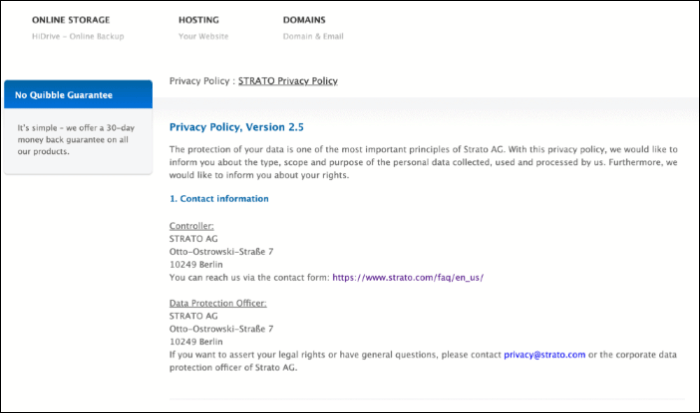
HiDrive allows users to create Git repositories and make changes and updates to the Git Folder, while adhering to EU GDPR rules by processing minimal user data.
Price
HiDrive requires a paid subscription to use, with a 30-day money-back guarantee if you're not satisfied.
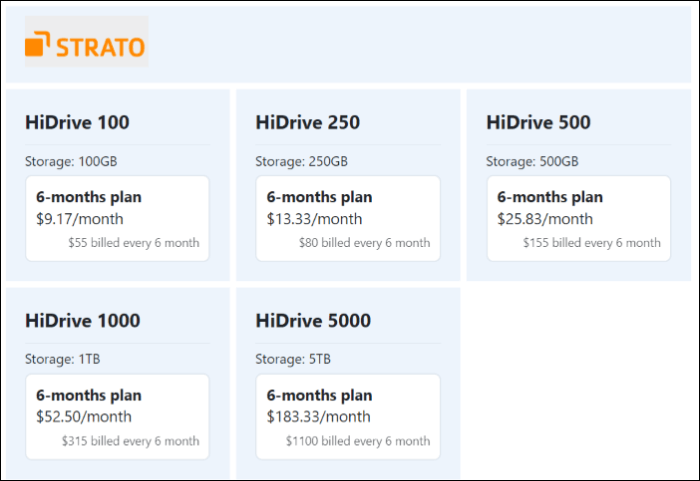
HiDrive offers 5 plans, with 3 being personal and 2 business plans, all of which are 6-month contracts that require payment in advance.
An Overview of Google Drive
Google Drive is a popular cloud storage service offered by Google, part of Google Workspace, alongside other apps like Docs, Sheets, and Slides. It provides generous storage for users worldwide, with an excellent free storage plan available with a Google account. Additionally, it offers automatic backup of folders on local computers, making it a convenient option. Google Drive is compatible with Windows, Mac, Android, and IOS platforms.
Ease of Use
Google Drive's web interface has significantly improved, making it easy to store, view, change, organize, and create folders with features like color coding and stars to mark important ones. Additionally, the conventional uploading method is complemented by a drag-and-drop feature for desktop users.
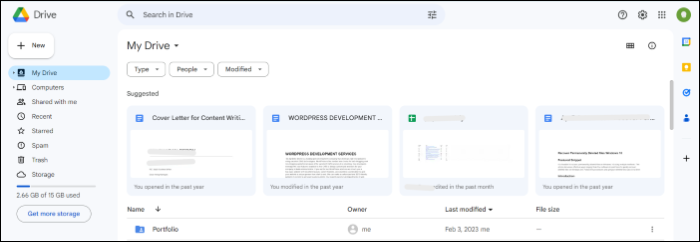
Google Drive is available as a web app, desktop client, and mobile service, and may require some time to get used to. It integrates with Google Workspace apps, including Docs, Sheets, and Slides, and can also be connected to various third-party apps, such as maps, forms, PDFs, images, and more, to expand its capabilities.
File Sharing & Syncing
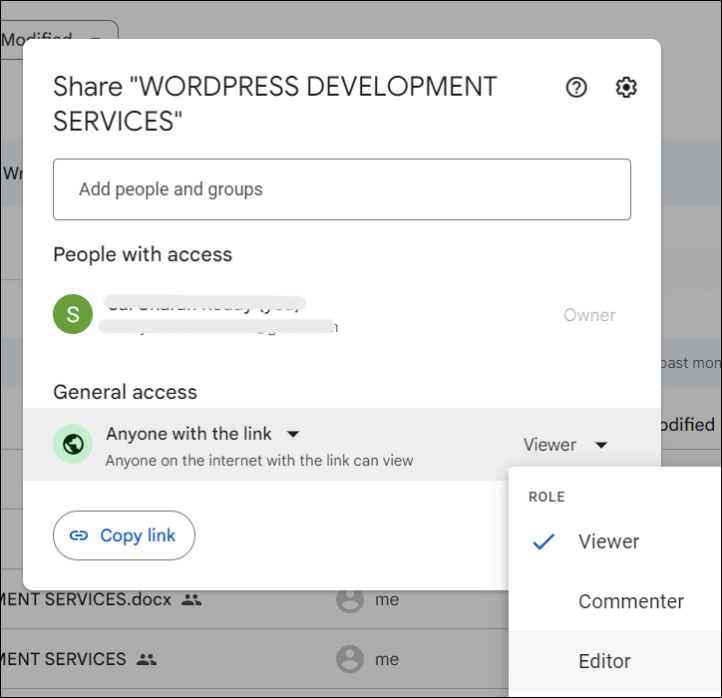
Google Drive allows users to share files privately or publicly, with control over link availability and permissions. However, password protection and expiration dates are not available, even with paid plans.
Drive allows for seamless file syncing across devices, making uploaded files instantly visible on all devices. Additionally, users can create local backups of folders on their computer. The platform's unique features include desktop-to-desktop file syncing and real-time collaboration, making it an ideal option for group work and collective projects.
Security and Privacy
Google Data Centers are highly secure, with data encrypted when stored on disk, backup media, or transmitted between centers. However, this doesn't completely eliminate threats, and additional protections like multi-factor authentication can be used to enhance security. A notable shortcoming is the lack of password protection for shared data, which is offered by some smaller companies.
Google's privacy policy is strict, with a focus on not using personal content for advertising purposes, and users can review the full policy if they want.
Pricing
Google offers a generous 15 GB free plan with Gmail, along with reasonable pricing plans for personal and business use. For additional storage, users can upgrade to a Google One account, which also includes extra features like photo editing tools, VPN, and shared access for up to five members.
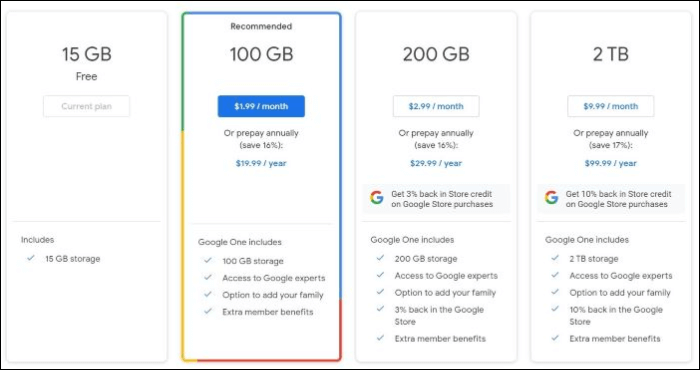
Google One's basic plan provides 100GB of additional storage for $1.99/month or $19.99/year, while the Standard plan offers 200GB of storage and a 3% discount on Google products for $2.99/month or $29.99/year.
There are reports that Google Drive will be discontinued in 2023, but it's unclear if this is actually the case. If you're looking for more information, you can check out the article that provides further details.
Is Google Drive Going Away? Get Clear Ideas Here!
There's been speculation that Google Drive may be going away, but the truth is that it's still a reliable tool for storing and sharing files. However, if you're looking for an alternative to protect your data, there are other options available. Consider storage space, sharing needs, security, and budget before choosing a cloud service.
Google Drive vs HiDrive: Which Is Better
Google Drive and HiDrive are two popular cloud storage services that allow users to store and access their files from anywhere. Google Drive offers 15 GB of free storage, with the option to upgrade to 100 GB or more for a fee. HiDrive, on the other hand, offers 5 GB of free storage, with the option to upgrade to 2 TB or more for a fee.
| Comparison | Google Drive | HiDrive |
| 💰Price | The plan offers 100GB of storage for $2 per month and 200GB of storage for $3 per month. | You can get 100 GB of data for $55, billed for 6 months, or 250 GB for $80, also billed for 6 months. |
| 🗃️Storage | A free 15GB and addons up to 5TB | No free storage and addons up to 5GB |
| 🔒Privacy | Does not process data until or unless the user permits | It has the least control over user data, adhering to EU rules. |
| 🛡️Security | Offers multi-factor authentication and end-to-end encryption. | Supports WebDAV, which gives total control over file encryption |
| 💻File Syncing | Files available immediately | You can quickly locate and access all device data with our tool |
| 🖥️File Sharing | Offers basic files sharing permissions abilities | Allows file sharing with advanced user permissions |
| 🪄Special Features | Real-time collaborative environment | Password protection and expiry links for file sharing |
| 📌Best for | Everyone | People who want advanced and more secure file-sharing options |
Google Drive is the better option due to its more reasonable pricing plans and real-time collaborative features, which HiDrive lacks, except for advanced sharing features that can be replicated with Google Drive to increase security.
If this article is useful to you, share it with your friends:
How to Backup to Google Drive or HiDrive
While cloud storage solutions like Google Drive and HiDrive offer backup capabilities, they may not be sufficient for a secure and reliable backup. For a more secure and reliable backup solution, Qiling Disk Master is a safer option to back up to Google Drive or HiDrive.
Qiling Disk Master Pro is a backup and recovery utility for Windows that offers a range of features, including the ability to back up multiple hard disks at once and automatically back up systems, files, and apps. It also allows for diverse backup modes, such as full, incremental, and differential backups, providing a practical solution for users to protect their data.
Here are some key features of Qiling Disk Master Pro:
- Clone a hard drive and image a hard drive
- Compress backups to save storage space
- Transfer an operating system from one computer to another
- Store backups in a combination of local drives, external drives, NAS (Network-Attached Storage), a secure zone, and cloud storage to ensure maximum data protection and accessibility.
- Get 250GB of free cloud storage to safely back up your files to the cloud, giving you peace of mind and easy access to your important documents and photos.
Here are the steps to back up files to Qiling Cloud in one paragraph: To back up your files to Qiling Cloud, you can start by downloading the Qiling Cloud app on your device, then sign in with your account credentials. Once you're logged in, you can select the files you want to back up from your device, and the app will upload them to your Qiling Cloud account. You can also schedule automatic backups to run at set intervals, such as daily or weekly, to ensure your files are always up to date.
Step 1. To initiate a backup, click the Select backup contents option.
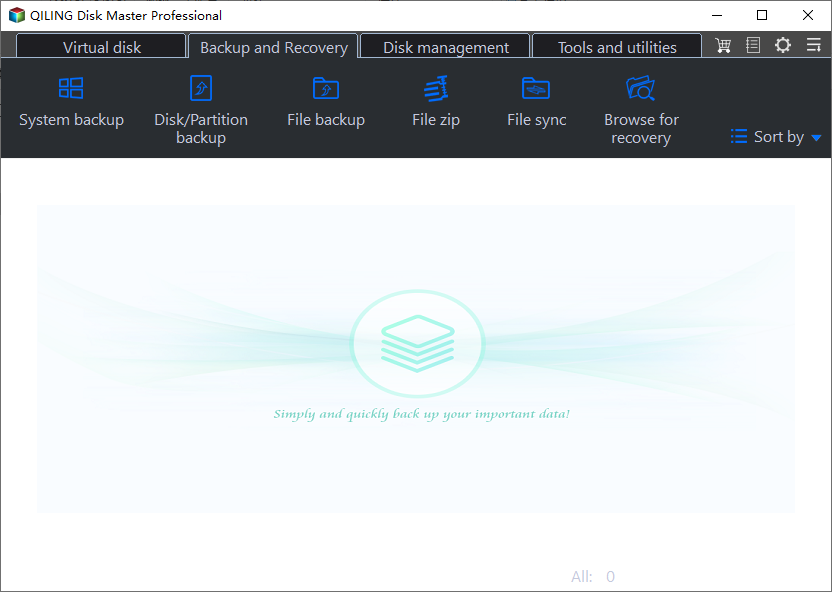
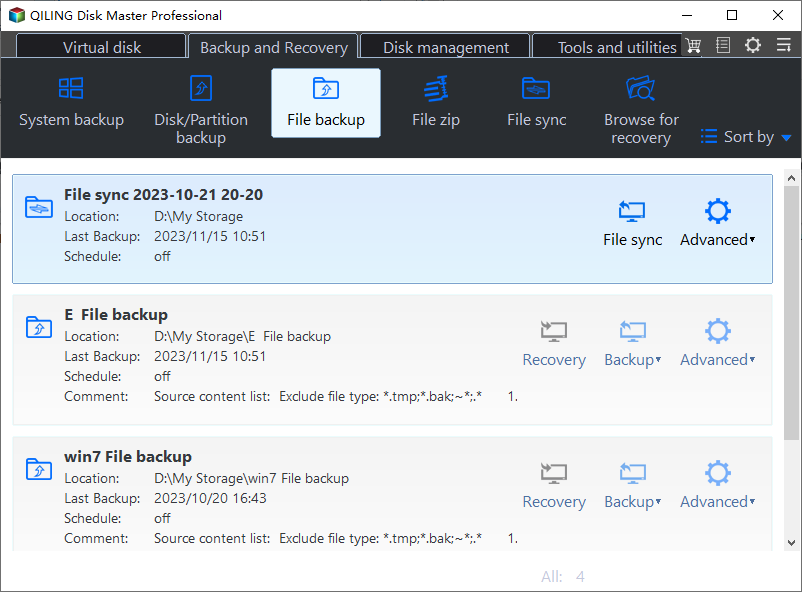
Step 2. There are four data backup categories: File, Disk, OS, and Mail. Clicking on File backup is the next step.
Step 3. On the left, both local and network files will be shown, allowing you to browse and select the desired backup files from the directory.
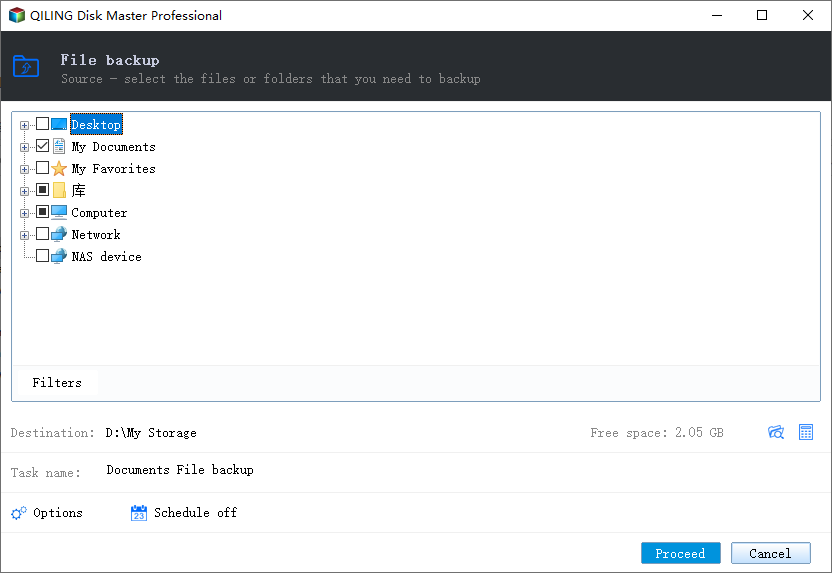
Step 4. Save the backup to a location that is easily accessible and has enough space to store the file.
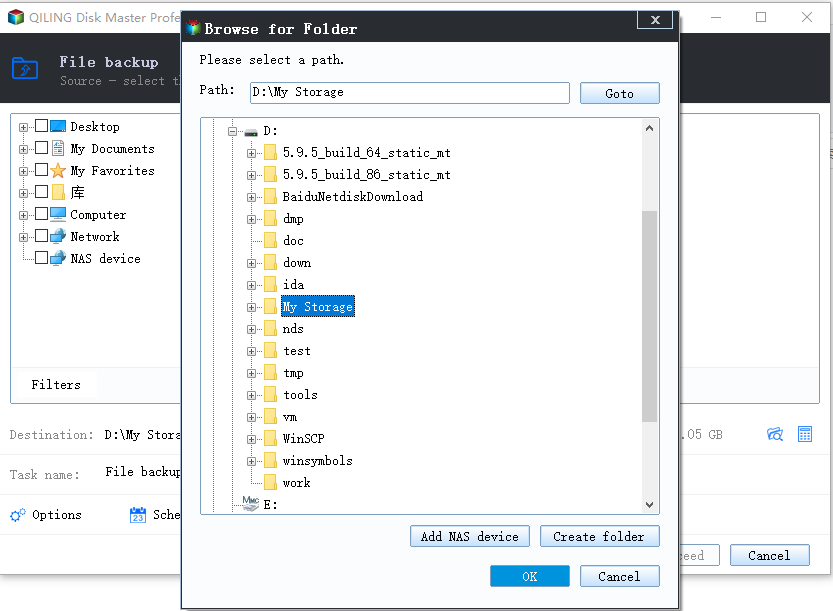
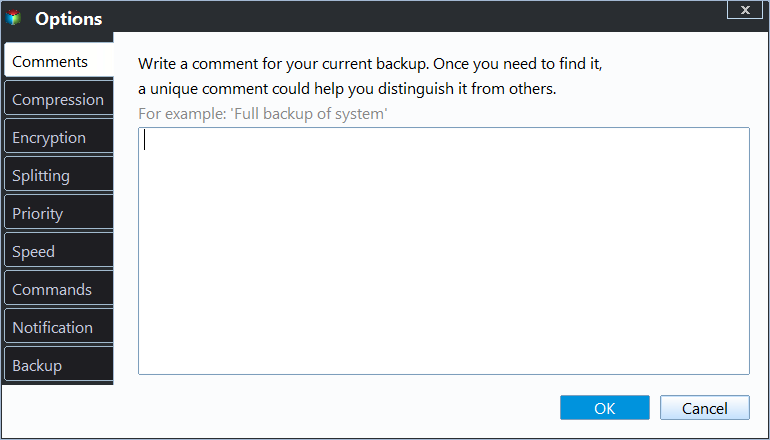
To encrypt the backup with a password, click Options, then select Backup Options. From there, you can specify a password to secure your backup. Additionally, you can choose the Backup Scheme to set a schedule for the backup and start it at a specific event.
Step 5. The backup may be stored on a local disk, Qiling's online service, or NAS.
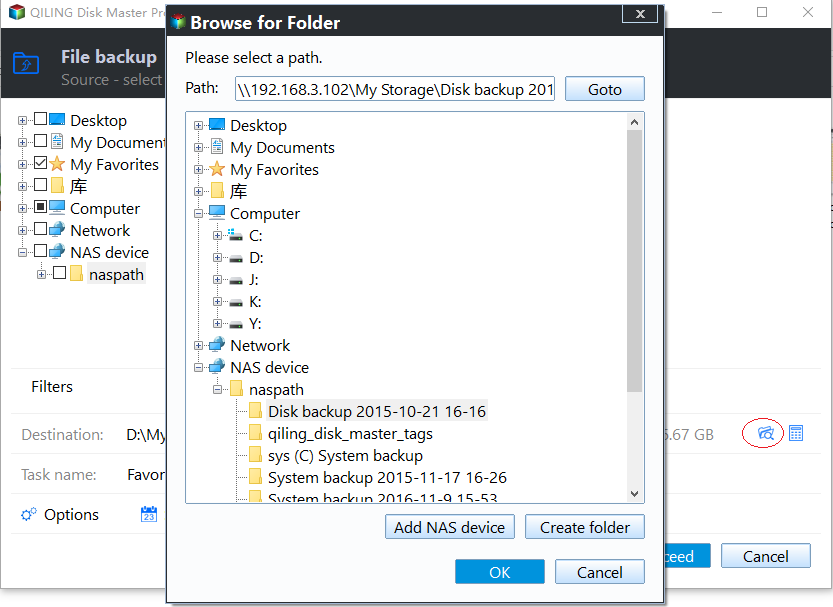
Step 6. Qiling Disk Master allows customers to backup data to both a third-party cloud drive and its own cloud drive.
To back up data to a cloud drive provided by a third party, select Local Drive, scroll down to add Cloud Device, and then add and log in to your account.
Step 7. To proceed with the backup process, click the "Proceed" button. Once finished, the backup job will be displayed as a card on the left side of the panel. You can then right-click on the backup job to manage it further.
You can create backups using images and clones and safely recover them in case of misfortunes, with advanced backup options for full, differential, incremental, and more, just schedule backups to protect your data.
You may also get interested in:
To Sum Up
While the HiDrive vs Google Drive comparison is not a fair fight for users worldwide, I still prefer Google Drive. Unlike HiDrive, which offers nothing for free, Google Drive comes with affordable rates and a range of excellent features, making it the better choice.
If you're looking for cloud platforms to back up your data, consider using Qiling Disk Master instead, which offers advanced features like syncing your data and making backup and restoration processes easy.
FAQs on HiDrive vs Google Drive
Here are some of the most frequent FAQs asked on HiDrive vs Google Drive. If you have similar queries hope this will help you.
1. What is a better option than Google Drive?
Alternatives to Google Drive include Dropbox and OneDrive, which offer similar file sharing capabilities, although often with an additional cost for advanced features.
2. Is HiDive worth it?
In my opinion, the only notable advantage of HiDrive is its secure cloud storage option, which can be easily achieved by restricting access, making it a feature that's not worth the extra cost.
3. Why is Google Drive no longer supported?
This message is usually triggered when the Google Drive sync client is outdated or the operating system does not support Drive.
Related Articles
- Top 10 Forensic Imaging Tools in 2024 (Best Free Digital Forensic)
- Best Free and Paid Disk Cloning Software for Windows 11
- 8 Solutions for Google Photos Not Backing Up Issue
- What Is A System Image? Everything You Need to Know About Creating System Image Backups
- Why Is My Windows 10 Backup Taking So Long? (Here's the Answer)
Windows 10 backup is taking too long, and you're wondering why. This article will explore the possible reasons behind the slow backup process and provide an alternative to the default Windows 10 backup solution. - A Quick Answer to: Will Updating My BIOS Delete Anything?
Updating BIOS is something you might have heard about. But have you ever been stuck on a question like, 'Will updating my BIOS delete anything?' This article will describe whether updating BIOS will delete anything on your PC and offer a tool called Qiling Disk Master to protect your data.
Products
Articles & Tutorials
- Data Recovery
- Data Backup
- File Recovery
- File Backup
- System Backup and Restore
- Disk and Partition Clone
- Technical articles
- Mobile articles
- Disk Master Help
- Windows Data Recovery Tutorials
- Windows Secure Delete Tutorials
- Windows Partition Management Tutorials
- Windows File Backup and Restore Tutorials
- Windows System Backup and Restore Tutorials
- Windows Disk Backup and Restore Tutorials
- Windows Clone Tutorials