Do I Need a Heatsink for My M.2 SSD?
Motherboards usually come with built-in NVMe heatsinks, but you may need an additional heatsink depending on the specific model and usage. It's essential to check your motherboard's specifications and consult with the manufacturer to determine if a separate heatsink is required. Additionally, some NVMe drives come with their own heatsinks, so it's also important to check the drive's specifications.
PCI Express-M.2 SSDs, being more compact and plug directly into the motherboard, have become a popular choice for upgrading storage. However, some users wonder if they need a heatsink for these SSDs, especially considering their smaller size. The answer is, it depends. M.2 SSDs can generate heat, especially during intense usage or when used in combination with other storage devices. If you're using a high-performance M.2 SSD, a heatsink can help dissipate heat and prevent throttling. However, if you're using a lower-capacity or lower-performance M.
Do I Need a Heatsink for My M.2 SSD
The NVMe SSD requires a heatsink, as it can overheat, especially when installed on gaming devices like the PS5. A radiator, also known as a heatsink, is a passive heat exchanger that transfers heat generated by the device to a fluid medium and dissipates it, regulating the temperature. This is why M.2 SSDs, including those used in the PS5, also need a heat sink to prevent overheating.
Here are some links related to NVMe and M.2 SSDs; check them to learn if you need help:
M.2 drives are fast and cable-free, but their high storage density can cause overheating, with NVMe SSDs reaching temperatures above 80°C, outside the normal range of 30°C - 65°C. To check if your M.2 SSD is at a normal or abnormal temperature, there is a professional tool available.
How to Check If the SSD Has Abnormal SSD Temperature
Checking the SSD SMART status and preventing overheat can be very important because overheat may lead to bad consequences, such as data loss, reduced lifespan, and even physical damage to the drive.
- Resulting in a decrease in overall device performance.
- Resulting in data loss, slow loading, and data corruption.
- Affecting the life of the system.
Checking the SSD SMART status and M.2 SSD temperature is necessary, and Qiling Disk Master can help check the temperature efficiently, marking abnormal temperatures in red, indicating the need for a heatsink.
This tool allows you to check the temperature and SMART status of your SSD/HDD or other external hard drives. Download it to get an instant update on your drive's temperature.
Step 1. Launch Qiling Disk Master and click the blue arrow to activate the "Disk Health" feature under the "Discovery" section.
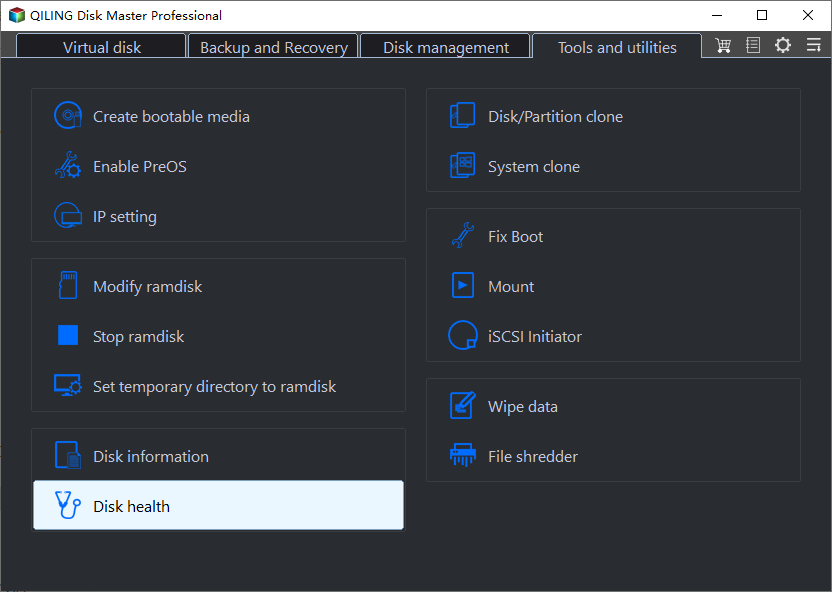
Step 2. Select the target disk and click the "Refresh" button. This will display the health condition of your disk, allowing you to view its status.
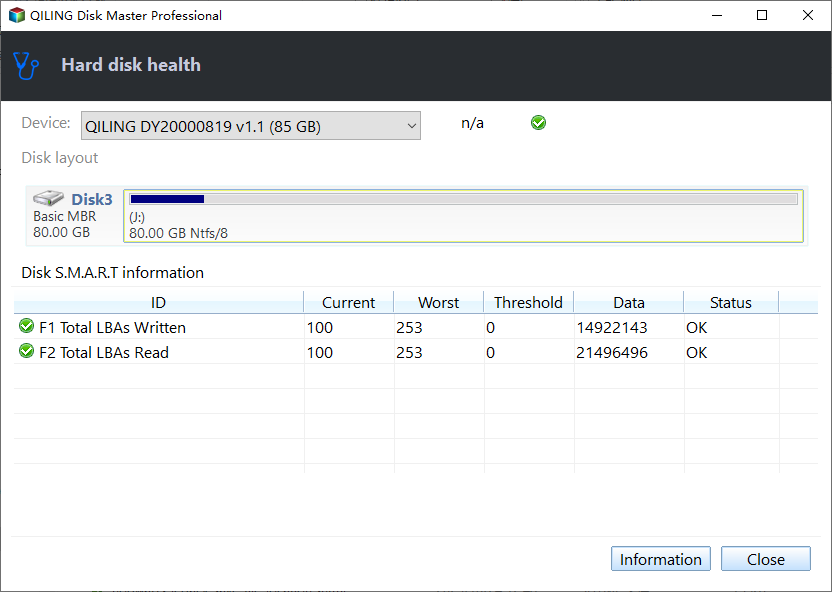
Qiling Disk Master has helped check NVMe SSD temperature and provide other details related to SMART status, making it a useful tool to download.
To determine if your M.2 SSD needs a heatsink, check the temperature reading from Qiling Disk Master. If it's high, a heatsink may be necessary. If you do need a heatsink, installation is the next step. To install a heatsink on your device, you can continue reading for further instructions.
How to Install Heatsink for My M.2 SSD
To install an M.2 heatsink, follow professional guidelines, as the process can be complex. Installing a cooler on an M.2 SSD is generally beneficial, especially for Gen 4 NVMe SSDs. If this tutorial helps you install the heatsink, consider sharing it to assist others.
Check the tutorial below:
Step 1. Remove the bottom/base of the heatsink, apply a thermal pad (making sure to peel off the plastic film for proper adhesion), and reassemble.
Step 2. Place the M.2 SSD on the thermal pad, ensuring the notch on the heat sink aligns with the screw location of the SSD. Apply a second thermal pad on top of the SSD.
Step 3. Now, it's time to place the heatsink on our SSD and tighten the screws. Snap the heatsink into place, ensuring it's properly aligned.
You may also like the following topics related to "Heat and SSDs," so check them to get more:
Conclusion
Most motherboards, especially those with 2nd Gen Ryzen, come with an M.2 cooler, but it's often insufficient to keep the drive cool. As a result, you may need to install an additional heat sink for your M.2 NVMe SSD, especially if your motherboard only has one M.2 slot, which can be placed in an awkward location, such as under the GPU, compromising airflow. Regularly checking the NVMe SSD temperature is essential to ensure its health.
Extended Reading: Is RAID 0 SSD Worth It for Gaming
Do I Need a Heatsink for My M.2 SSD FAQs
M.2 heatsinks are a crucial component for computer enthusiasts and builders, providing a necessary solution for cooling high-performance M.2 SSDs. By dissipating heat away from these small storage devices, M.2 heatsinks help prevent overheating, maintain optimal performance, and prolong the lifespan of the SSD.
1. Do motherboards come with M.2 SSD heatsinks?
Many modern motherboards come with built-in M.2 coolers, which can be a significant advantage for PC builders. However, it's essential to note that the included heatsinks often lack sufficient metal and surface area, which can limit their ability to dissipate heat effectively. As a result, it's still crucial to monitor the temperature of your device to ensure it's running within a safe range.
2. What is the best M.2 SSD heatsink?
A heatsink is a component of the motherboard that helps dissipate heat from the drive, allowing SSDs to run longer and maintain sustained read and write performance. Cost-effective heatsink options are available, enabling users to optimize their SSD's performance without breaking the bank.
- Micro Connectors M. 2 SSD Heatsink
- Sabrent M. 2 2280 SSD Rocket Heatsink
- Jonsbo M. 2-2 ARGB M. 2 SSD Cooler
- Jonsbo M. 2-3 M. 2 SSD COOLER
- Cryorig FROSTBIT M. 2 Heatsink
3. Does the Samsung SSD 980 need a heatsink?
The Samsung 980 Pro can function without a heatsink, but it's recommended to install one, especially for gaming, to prevent overheating and potential issues such as slow write speeds or crashing.
Related Articles
- How to Factory Reset Windows 10 Without Settings | 3 Ways🔥
- Repair Time Machine Backup (Solved): Time Machine Backup Failed, Corrupted, Missing
- What Does Shrink Volume Do? How to Safely Shrink Volume?
- [5 Quick Fixes] Samsung Data Migration Not Working
- How to Fix Dev Error 6634 in Warzone in Windows 10/11
Dev error 6634 is a Windows error caused by outdated operating system or graphic card drivers, which can be resolved by updating the drivers or ensuring the device is up-to-date. - Different Ways to Fix Dragon Age Inquisition Crashing On Launch In Windows 10
Look for easy and effective ways to fix the Dragon Age Inquisition Crashing On Launch in Windows 10? This article can help you out with the 8 best solutions to kill the culprit and continue playing the game again.
Products
Articles & Tutorials
- Data Recovery
- Data Backup
- File Recovery
- File Backup
- System Backup and Restore
- Disk and Partition Clone
- Technical articles
- Mobile articles
- Disk Master Help
- Windows Data Recovery Tutorials
- Windows Secure Delete Tutorials
- Windows Partition Management Tutorials
- Windows File Backup and Restore Tutorials
- Windows System Backup and Restore Tutorials
- Windows Disk Backup and Restore Tutorials
- Windows Clone Tutorials