How to Fix Dynamic Mirror Showing Failed [Three Working Solutions]
Protecting and managing data with a dynamic mirror setup can be straightforward, but it may also lead to issues like the Dynamic Mirror Showing Failed error. This problem can occur due to various reasons, and fortunately, there are practical solutions available to resolve it. By understanding the root cause of the issue and implementing one of the three solutions, users can successfully fix the Dynamic Mirror Showing Failed error and maintain a smooth data management experience.
The error on your Windows computer can be caused by a variety of factors. To troubleshoot, let's identify the root cause. Once we understand what's causing the issue, we can dive into the solutions to resolve it.
What Caused Dynamic Mirror Showing Failed Error
The dynamic mirror showing failed errors in Windows can be caused by multiple factors. Some of the most common reasons include.
- Dynamic disk is offline or disconnected properly, cable disconnection, etc.
- Disk failures, including bad sectors, corrupted file systems, etc.
- Corrupted Dynamic Disk Mirroring system
- Power failure or unexpected shutdown during the mirroring process
- Operating system corruption or software issues
- Disk compatibility issues between different storage controllers or devices.
- Settings errors in the disk management utility
Regardless of who or what is causing the error, the following fixes should be helpful in resolving the issue.
How to Fix Dynamic Mirror Showing Failed Error
If you encounter the dynamic mirror failed issue, you can try any of the following fixes to resolve the problem and prevent it from happening in the future. You can start by trying any of the suggested steps and following the given instructions to troubleshoot and resolve the issue.
Fix 1. Make Sure the Disks Are Online
If your dynamic disk volumes show a "Failed" status, it's possible that your dynamic disk is offline. You can check the status and bring it back online using the Disk Management utility in Windows 11/10.
Step 1: Press the Windows button and search Disk Management.
Step 2: To create and format a hard disk partition, select the "Create and Format Hard Disk Partition" option at the top of the list.
Step 3: Right-click Disk 0 and choose Properties.
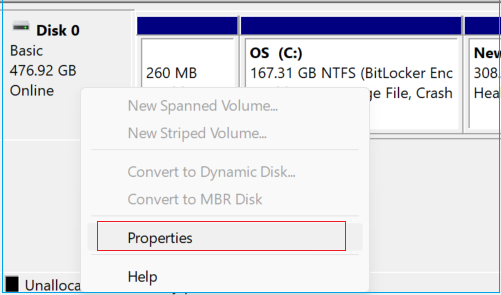
If the dynamic volume status is showing offline, you'll need to restart it manually. If that doesn't resolve the issue, try the following methods.
Fix 2. Repair File System
A damaged file system can be caused by various factors such as unexpected system failure, power loss, or unsafe drive ejection. In such cases, utilizing the efficient tool Qiling Disk Master can help. This tool, once installed, provides several useful features to repair file systems, potentially resolving issues like the Dynamic Mirror failed error.
This tool has a powerful disk check feature that scans and fixes file system errors, analyzing different parts of the disk for corrupted data, and allowing you to check if location, size, or other information pieces match the data available on the disk. It enables you to take proper actions based on the results, such as resizing, formatting, deleting, wiping, or creating a partition.
Step 1. Right-click the target partition that has a problem.
Step 2. Choose "Advanced" > "Check File System".
Step 3. Confirm if you want to hide the partition or not.
Step 4. In the Check File System window, select the "Fix the error on the disk" option to resolve the issue.
Step 5. Click "Proceed" to check errors on your partition.
What Else Can Qiling Disk Master Do
Qiling Disk Master is a full-featured tool that also supports more functions. It can:
- Check USB speed
- Check the hard drive temperature
- Improve SSD read and write speed
- Fix other disk and partition errors
Fix 3. Check Bad Sectors and Repair Damaged Hard Disk
Dynamic Mirror Showing Failed can be caused by corrupted partitions, bad sectors, and damaged Hard Disks. To resolve this, scan your disk with Qiling Disk Master, which has a Disk Surface test feature to check and repair bad blocks, and also clone a hard drive to prevent data loss from a damaged drive.
Hit the link and download Qiling Disk Master to fix Hard Disk's bad sectors.
Step 1. Open Qiling Disk Master. Right-click the disk that you want to check, and then click "Surface Test".
Step 2. The operation will be immediately performed and all bad sectors will be marked as red.
Qiling Disk Master is an excellent disk manager. You can find the solution to any problem. If you want to check the health of your hard disk fully, click the link below.
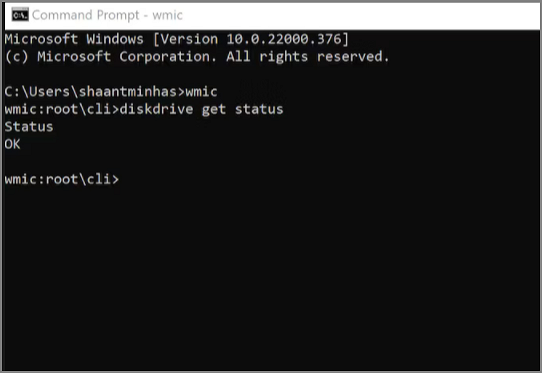
How to Check Hard Drive Health in Windows
To maintain your hard drive health in Windows 11 and Windows 10, it's essential to regularly check for disk errors, run disk cleanup and disk defragmentation, and keep your operating system and software up-to-date. This will help prevent crashes and data loss caused by hard drive failures.
Conclusion
The Dynamic Mirror feature in Windows failed to show the dynamic mirror status, but using Qiling Disk Master can recover data from the Dynamic Mirror and minimize data loss risks.
FAQs About Dynamic Mirror Showing Failed
This FAQ section aims to provide answers to users who have further questions about Dynamic Mirror Showing Failed, helping to clarify any doubts or concerns they may have about this specific issue.
1. What happens when a mirrored drive fails?
In mirrored drives, the two drives have identical data, allowing one to take over if the other fails, and read speeds are generally faster than write speeds.
2. What makes a basic or dynamic volume's status is failed?
If a drive shows a failed status, it may be due to corruption or damaged blocks, preventing it from starting automatically and potentially indicating data loss. To resolve this, a third-party tool like Qiling Disk Master can be used to repair the drive.
3. How do I fix a dynamic hard drive to basic?
To convert a basic disk to a dynamic disk using the command line, you can use the following command: `convert m: /fs:dynamic`. Replace "m:" with the actual drive letter of the disk you want to convert.
To open the Command Prompt and run the Diskpart command, press the Windows key + R, type "cmd" and press Enter. Then, type "diskpart" and press Enter. In the Diskpart command prompt, type the following commands: list disk, select disk, clean, convert gpt, and format fs=ntfs label=*.
- list disk
- select disk n
- convert dynamic disk
Related Articles
- [Solved] How to Show Hard Drives on Mac Desktop
- How to Erase All Content and Settings on Mac [macOS Ventura/Monterey]
- How to Unblock Websites on School Chromebook 2024
- How to Solve LG TV Not Recognizing USB [Ultimate Guide]
- How to Open Control Panel in Windows 10
Windows 10 still contains the Control Panel. Some settings appear only in the Control Panel, some in the Settings app, and some in both. This guide provides a step-by-step breakdown of different ways to open the Control Panel in Windows 10. Please give it a read and try them out yourself later. - What Is Chrome.exe *32 and How to Remove Chrome.exe *32 Malware
If you're experiencing issues with Chrome and notice that a Chrome.exe *32 process is running, it may indicate a problem. This post will discuss Chrome.exe *32 and provide guidance on how to remove any associated malware.
Products
Articles & Tutorials
- Data Recovery
- Data Backup
- File Recovery
- File Backup
- System Backup and Restore
- Disk and Partition Clone
- Technical articles
- Mobile articles
- Disk Master Help
- Windows Data Recovery Tutorials
- Windows Secure Delete Tutorials
- Windows Partition Management Tutorials
- Windows File Backup and Restore Tutorials
- Windows System Backup and Restore Tutorials
- Windows Disk Backup and Restore Tutorials
- Windows Clone Tutorials