SSD Showing RAW File System? All Fixes Here 2023
You're trying to use your hard drives for storing, but suddenly, you see an error on your SSD showing the RAW file system. This error can be frustrating, but don't worry, this article will explain why SSD drives become RAW and provide a solution to tackle this issue.
Why SSD Showing RAW File System
When a RAW partition is detected on Windows, it indicates that the operating system is unable to recognize the file system on the partition. This can occur when a drive formatted for macOS is connected to a Windows PC, or when a partition or volume becomes corrupted, causing it to show up as RAW.
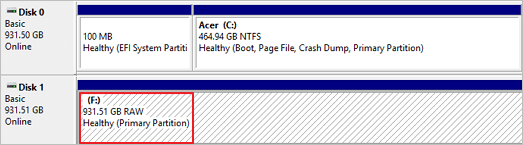
A Solid-State Drive (SSD) can become RAW due to various reasons, including sudden changes or gradual transformations over time, often caused by modifications to the file system. Let's examine the underlying causes of RAW drives on Windows PCs.
- Bad Sectors: A bad sector on a hard disk is a damaged area of the storage unit where information is lost, and the operating system ignores it while reading or scanning that portion.
- Virus Corruption: A virus or malware attack can corrupt your hard drive, causing it to become inaccessible and displaying a RAW file system instead of the usual file system, often resulting from improper formatting of the disk.
- File System Errors: A RAW drive is a type of drive that doesn't have a file system, making it undetectable and unreadable by Windows.
- Improper Use: If you're not taking proper care of your hard drive, it can lead to errors due to physical contact, heat, sudden power surges, and other factors that can damage the drives.
To eliminate these errors, you can follow these steps:
How to Fix SSD Showing RAw File System Issue - 2 Ways
If your hard drive becomes RAW or damaged, it doesn't mean it's permanently damaged. We can repair it, but it may result in losing some data. There are two ways to fix this issue.
Way 1. Fix SSD Showing RAW File System Issue via Qiling Disk Master
To fix RAW drive issues on Windows, you can use Qiling Disk Master, a software that manages and handles hard drives and their partitions. It offers a simple and quick process to repair and handle disk-related utilities, with a free trial and pricing models to choose from.
Step 1. Launch Qiling Disk Master.
Right-To format a RAW partition or RAW external hard drive/USB/SD card, click on the RAW partition or device you need to format and select the "Format" option.
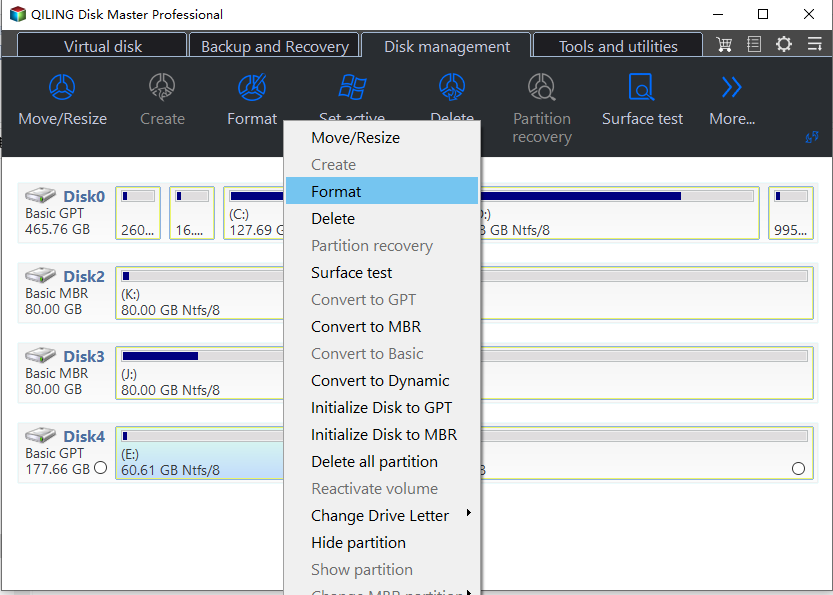
Step 2. Format RAW Partition and reset the file system.
Assign a new partition label, set the file system to NTFS/FAT32/EXT2/EXT3/EXT4/exFAT, and cluster size to the selected partition.
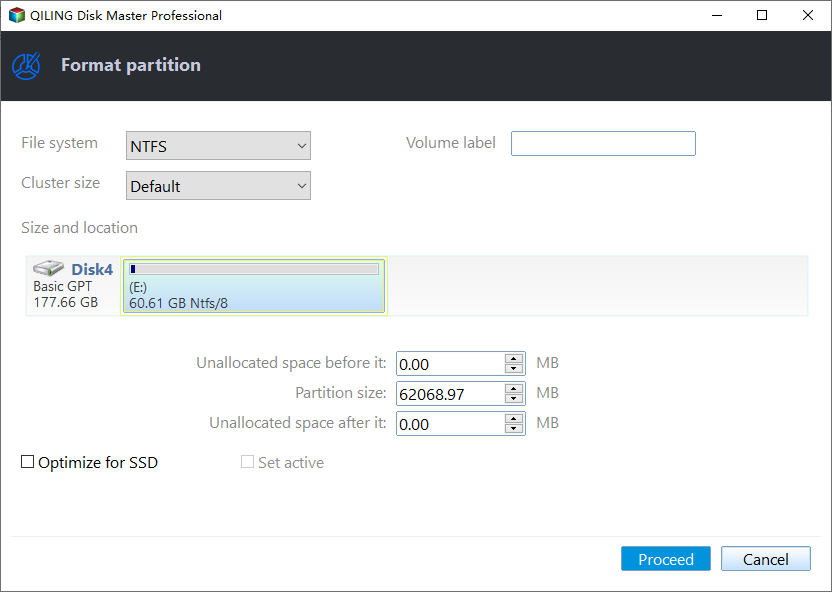
Step 3. Execute the operations.
To proceed, you need to click the "Proceed" button to start formatting your RAW partition/USB/SD/external hard drive.
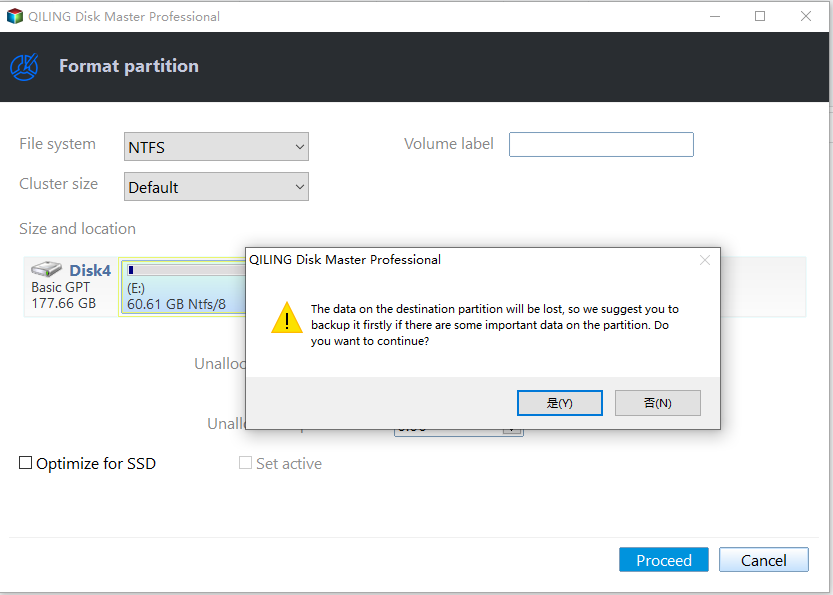
Step 4. In the Warning window, click "Yes" to continue.
By clicking "Yes" to allow the program to format the target RAW partition to the selected file system format on your drive.
Qiling Disk Master offers extensive features, including the ability to upgrade to a new hard drive without reinstalling the Windows system and applications. It also allows for troubleshooting low disk space on hard drives, making it a useful tool for managing and maintaining your computer's storage.
Key Features of Qiling Disk Master:
- Format RAW SD card/USB
- Format RAW Micro SD card
- Create/delete/move/resize partitions
- Convert FAT32 to NTFS or vice versa
- Repair RAW drive on Windows 10/11/8/7
The Qiling Disk Master is a highly efficient tool that can solve any disk-related issues, providing easy solutions and data security to support new technological advancements. It features a user-friendly interface that makes it easy to diagnose and manage disk-related problems. By downloading the Qiling Disk Master, users can enjoy a hassle-free experience and take full advantage of its capabilities to support their technological needs.
Way 2. Fix SSD Showing RAW File System Issue via Diskpart
You can manually fix your RAW hard drive by using a command prompt, but this will format it. To do this, you'll need to follow a series of Diskpart commands and use a Windows Utility tool to repair the issue.
Steps to fix SSD Showing RAW File System Issue using Command Prompt:
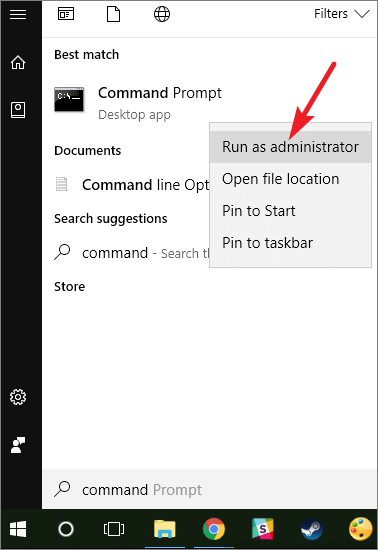
Step 1. To open the command prompt as Administrator, open the Command Prompt in Administrator mode by right-clicking on the Start button and selecting "Command Prompt (Admin)" or by opening the Command Prompt, pressing Windows + R to invoke the "Run" function, typing "cmd", and then pressing Control + Shift + Enter.
You can also manually search for the command prompt and run it as administrator.
Do you see? It can be difficult, isn't it? Click the buttons to share this complete tutorial with other users.
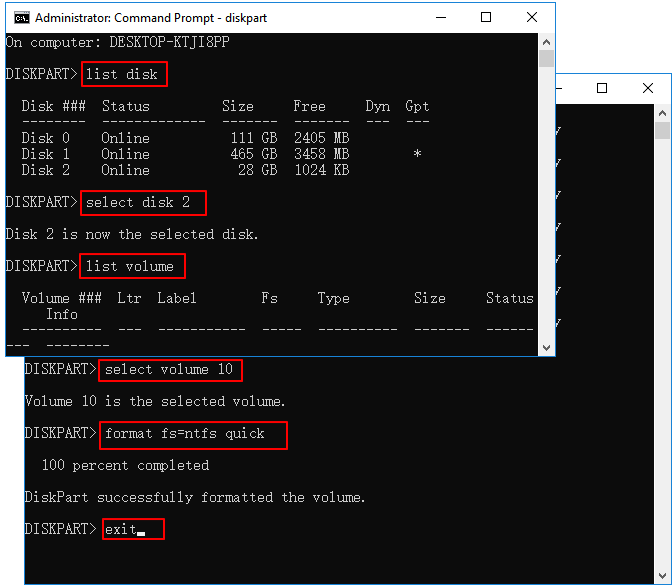
Step 2. You can see all the partitions on your system, including a RAW hard drive, by running the following Diskpart commands below.
- diskpart
- list disk
- select disk 1 (1 refers to the number of the RAW disk)
- list volume
- select volume 10 (10 refers to the number of the RAW list volume)
- format fs=ntfs quick
- exit
The Final Verdict
A hard drive becomes RAW when its file format is unknown to the operating system, causing it to display the SSD showing RAW file system on the computer. This can be due to corrupt portions, bad sectors, or other factors, but it doesn't necessarily mean the data is lost forever.
To fix the issue, you can use either Qiling Disk Master or Diskpart Commands on Windows OS. Qiling software can make the process easier, or you can use Diskpart Commands to achieve the same result.
SSD Showing RAW File System FAQs
The most frequent FAQs asked on the topic include questions that are similar to yours. If you have such queries, this information should be helpful to you.
1. How do I change my SSD from RAW to NTFS?
You can use Diskpart to convert RAW to NTFS or Disk Management without formatting, but make sure to back up your data first to avoid data loss. Alternatively, you can use professional software tools like Qiling Disk Master to easily convert RAW to NTFS in simple steps.
2. What is RAW SSD?
A RAW SSD is an unformatted hard drive that needs to be formatted into a file system like NTFS to be usable and detected by the OS.
3. Why is my internal hard drive RAW?
When an internal hard drive encounters issues such as corrupt files, physical damages, or bad sectors, it can become RAW, leading to errors like an SSD showing a raw file system.
Related Articles
- How to Fix Error Code 100060 on Mac [Step-by-Step Tutorial]
- Right-click Not Working on Mac [6 Methods]
- Which Is Best Hard Drive Format for Mac [Full Comparison]
- How to Fix An Error Occurred While Installing the Selected Updates
- MBR Error 1 on Windows? Reason & Fixes
If you're experiencing MBR error 1, as this error can cause Windows to fail to boot. Fortunately, there are three effective ways to fix it, which will be covered in this article. - What Is MBR Maximum Size [Full & Quick Guide]
This article details MBR maximum size and provides an easy way to convert MBR to GPT without losing data.
Products
Articles & Tutorials
- Data Recovery
- Data Backup
- File Recovery
- File Backup
- System Backup and Restore
- Disk and Partition Clone
- Technical articles
- Mobile articles
- Disk Master Help
- Windows Data Recovery Tutorials
- Windows Secure Delete Tutorials
- Windows Partition Management Tutorials
- Windows File Backup and Restore Tutorials
- Windows System Backup and Restore Tutorials
- Windows Disk Backup and Restore Tutorials
- Windows Clone Tutorials