Tekken 8 Save File Location & Config File Location How to Back Up It
Tekken 8 The latest part of the iconic game franchise, this fighting game features multiple characters with unique fighting styles and special moves, available on both mobile platforms and Windows.
In Tekken 8, saving your progress and configurations is crucial, so you can safeguard your achievements and tailor your gaming experience by backing up your game success, ensuring peace of mind.
This article provides a straightforward guide on how to access the save file location and config file location for Tekken 8, along with a simple method to back up your data using Qiling Disk Master for free.
How to Find Tekken 8 Save File Location
When playing Tekken 8 on a Windows PC, it's essential to save your progress to avoid losing your hard-earned victories. To find the game file location of your Tekken 8 save file, follow these steps: you can access the save file by navigating to the "My Documents" folder, then the "My Games" folder, followed by the "Bandai Namco" folder, and finally the "Tekken 8" folder, where you'll find your saved game files. This process ensures a seamless transition and allows you to save your progress with ease.
Step 1. Open Windows Explorer using the Win + E shortcut.
Step 2. Go to the C: drive > Users > Your Username.
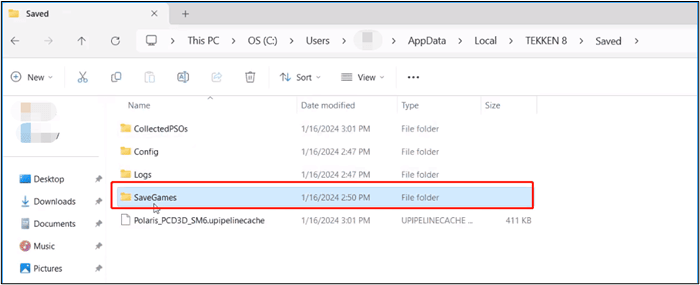
Step 3. Access the hidden AppData folder and proceed to Local > TEKKEN 8 > Saved.
Step 4. Open the SaveGames folder.
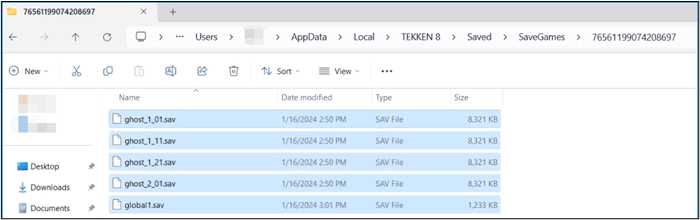
Step 5. Within the SaveGames folder, there is a subfolder with your Steam ID, containing .sav files that represent your game progress.
How to Locate Tekken 8 Config File Location
Customizing the game experience in Tekken 8 involves configuring the game's settings through its configuration file. The config file holds multiple settings, but configuring it can seem daunting. To configure Tekken 8, follow these steps.
Step 1. Open Windows Explorer using the Win + E shortcut.
Step 2. Go to the C: drive > Users > Your Username.
Step 3. To access the hidden AppData folder, navigate to Local > TEKKEN 8 > Saved > Config > Windows within it.
Step 4. Use the Win + R shortcut and enter %LOCALAPPDATA%\TEKKEN 8\Saved\Config\Windows\ in the run dialog. Alternatively, use the Win + R shortcut and enter %LOCALAPPDATA%\TEKKEN 8\Saved\Config\Windows\ in the run dialog.
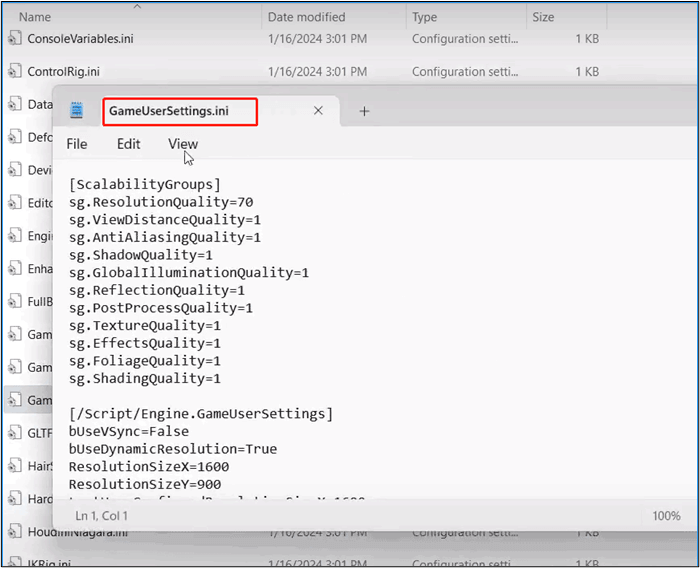
Step 5. The GameUserSettings.ini file, located within the Windows folder, contains all the settings for Tekken 8's graphics and visuals.
Backup Tekken 8 Save Files to Safeguard Game Data
To save your progress in Tekken 8, you can use the built-in save feature or external backup tools to ensure your digital progress is secure. This allows you to pick up where you left off, even after a system shutdown or other disruptions.
Qiling Disk Master Free is a data backup tool that efficiently backs up PC game files and has comprehensive tools to secure digital assets against data loss, providing a seamless solution for backing up and restoring applications.
This tool provides customizable backup options, including incremental and differential backups, disk cloning, and system migration, to suit various needs. It supports local and cloud storage, ensuring secure and accessible data. Users can set up recurring backups using its robust scheduling feature.
Features:
- *️⃣File Backup: It offers a comprehensive file backup feature to selectively back up specific folders and files or entire drives.
- *️⃣Disk Imaging: The software can create exact replicas of entire disk partitions or hard drives, allowing users to make precise copies of their data.
- *️⃣Incremental and Differential Backups: This backup software supports both incremental and differential backup methods, enabling users to optimize backup efficiency and conserve storage space.
- *️⃣Schedule and Automatic Backup: Qiling Disk Master provides a robust scheduling feature for backup tasks, allowing users to automate backups based on custom schedules or specific events.
Download this tool with confidence and follow the steps to back up your Tekken 8 game save files, ensuring your game data remains safe and sound.
Step 1. Click "backup and recovery" tab page.
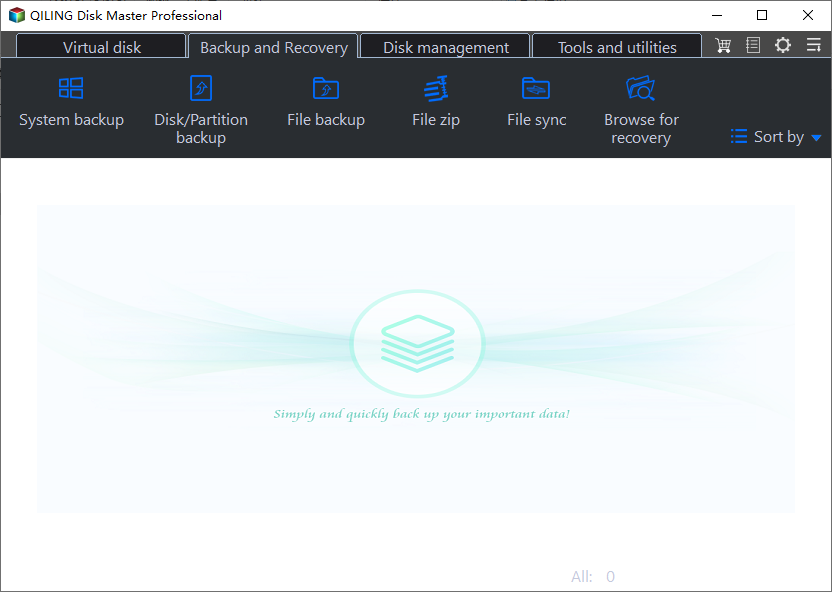
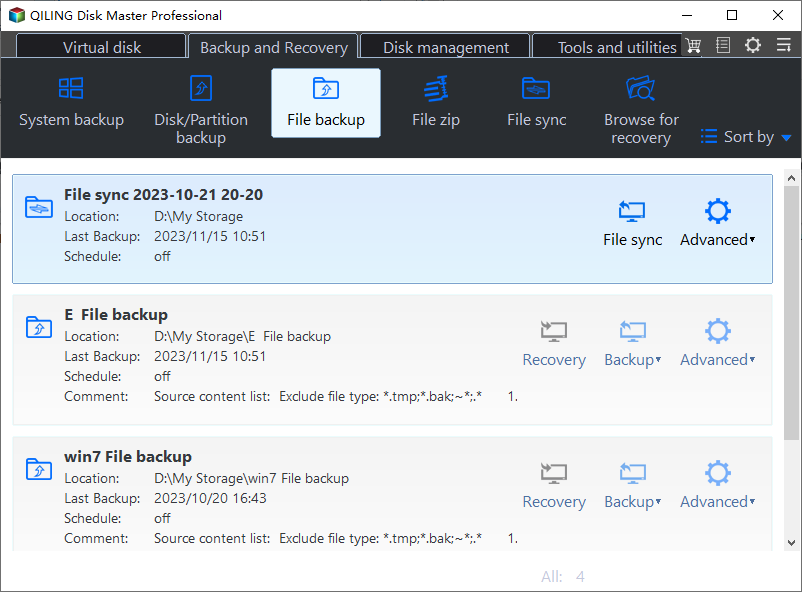
Step 2. There are four data backup categories: File, Disk, System, and Sync. To proceed, click on the "File backup" option.
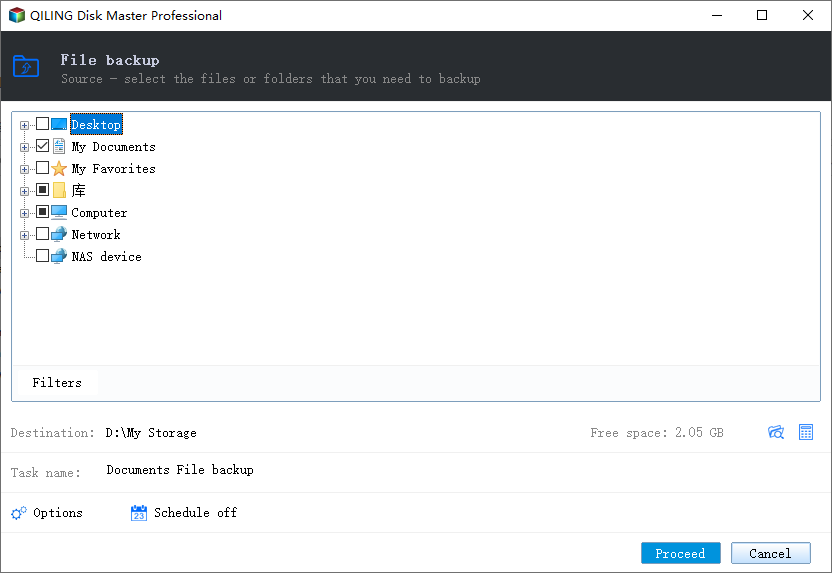
Step 3. Local and network files will be displayed on the left side, allowing users to extend the directory and select specific files to back up.
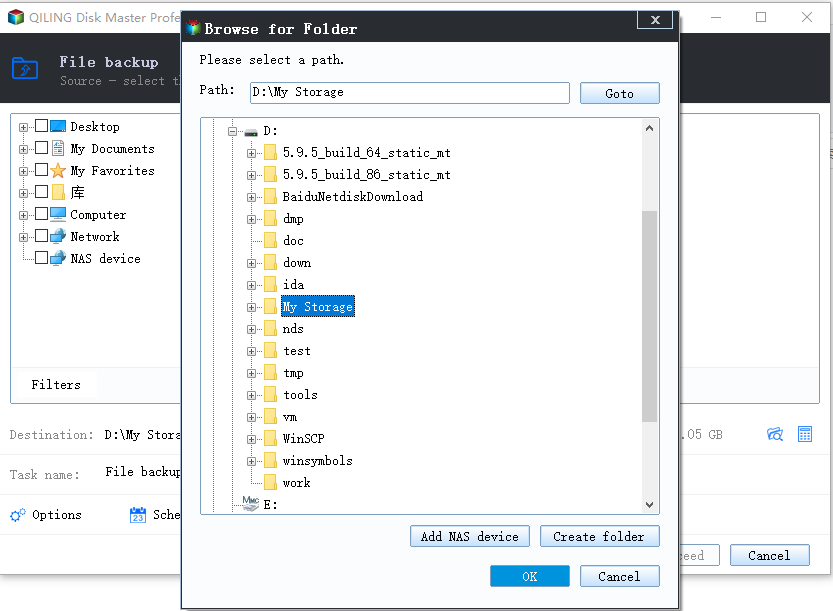
Step 4. To store the backup, select the desired location by following the on-screen instructions.
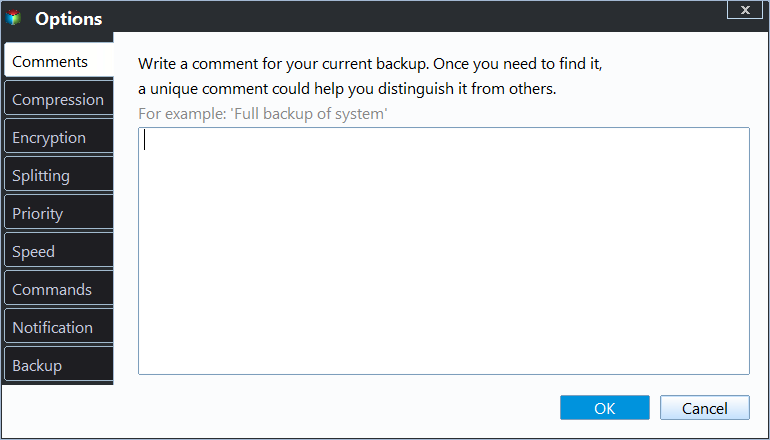
To encrypt the backup with a password, set up a backup schedule, and choose to initiate a backup at a certain event, click on "Options" in the "Backup Options" and "Backup Scheme" sections. This allows for various customization options for the backup process.
Step 5. You may save the backup to a local disk, Qiling's online service, or a NAS.
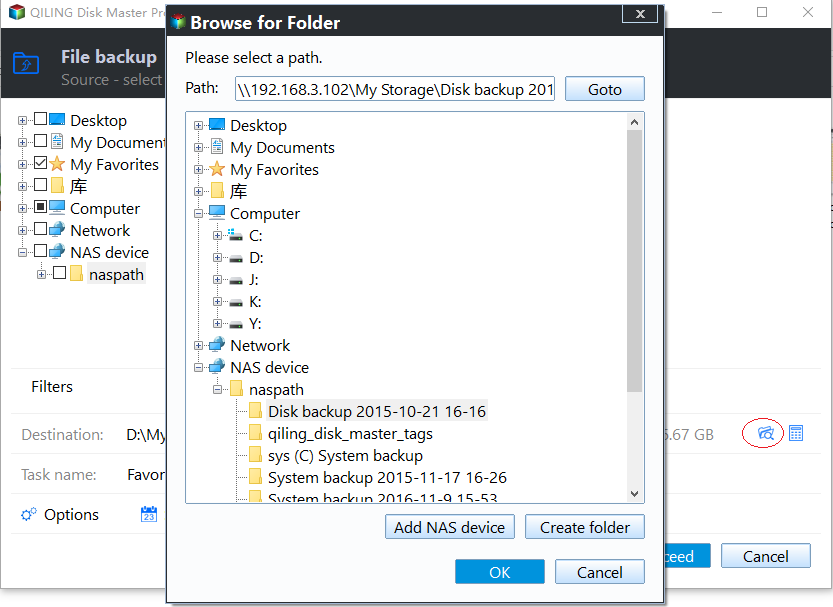
Step 6. Qiling Disk Master allows users to back up data to both a third-party cloud drive and its own cloud drive.
To back up data to a third-party cloud drive, select Local Drive, scroll down to add Cloud Device, add your account, and log in.
Step 7. To start the backup process, click "Proceed". Once the backup process is complete, the backup job will be displayed as a card on the left side of the panel. To further manage the backup job, right-click on it.
Written In the End
Tekken 8's save file and config file locations The article provides detailed steps to find Tekken 8 save file location and config locations, allowing players to access and manage their game progress and settings with confidence.
You can back up game data to create a safety net against unforeseen challenges. Qiling Disk Master Free is a reliable data backup solution to save Tekken 8 save files and config files, allowing users to back up and restore app data easily.
FAQs about Tekken 8 Save File Location
How do I delete a Tekken save file?
To delete a Tekken save file, follow these steps: locate the save file on your console or device, select it, and confirm the deletion. This will remove the existing save and allow for a fresh start.
- Step 1. Open Windows Explorer using the Win + E shortcut.
- Step 2. To locate your Tekken save file, navigate to the directory where your Tekken game is installed. Look for the file named "Save.dat" or "Save.
- Step 3. YYou can access the save file directory by pressing Win + R, entering %LOCALAPPDATA%\TEKKEN 8\Saved\SaveGames\, and clicking OK.
- Step 4. Select the specific save file you want to delete, which is usually represented by a .sav extension.
- Step 5. Choose the file and select Delete from the context menu.
- Step 6. Confirm the deletion.
What's the canon ending for Tekken 8?
The canon ending for Tekken 8 is unclear, with no official confirmation from the publisher. However, Jin's ending is considered by some to be the most significant in terms of narrative and character development, as it shows his journey and pivotal decisions that shape the storyline.
Related Articles
- How to Stop Windows 10 Update in Progress in 3 Ways
- PowerShell Check If File Exists | 4 Examples
- Internet Browsers Not Working after Windows Upgrade? Fix It Now!
- Call of Duty Warzone File Location [All You Want to Know]
- What Is the Best Rasberry SD Card Format [Full Guide]
This article provides a comprehensive guide on formatting an SD card for use with a Raspberry Pi, ensuring it is set up for optimal performance. - How to Fix Raw SD Card Won't Format Error [3 Efficient Solutions]
If your SD card appears as “Raw” and won't format to NTFS, FAT32, exFAT, or other compatible file systems.
Products
Articles & Tutorials
- Data Recovery
- Data Backup
- File Recovery
- File Backup
- System Backup and Restore
- Disk and Partition Clone
- Technical articles
- Mobile articles
- Disk Master Help
- Windows Data Recovery Tutorials
- Windows Secure Delete Tutorials
- Windows Partition Management Tutorials
- Windows File Backup and Restore Tutorials
- Windows System Backup and Restore Tutorials
- Windows Disk Backup and Restore Tutorials
- Windows Clone Tutorials