Beginner's Guide on Linux File System Types [Detailed Explanation]
Linux is a popular operating system that runs in the digital ecosystem, competing with Windows OS and macOS. To understand its functionality, it's essential to know about its file system types. Linux file systems are used by developers and are crucial for data management. This article provides an overview of the Linux file system, starting with its definition, to help you grasp the key to managing data effectively.
What Is Linux File System?
We'll start by discussing the Linux file system, which will provide a foundation for understanding its definition and key components. This will be the first step in our exploration of the file system.
The file system holds the collection of data or files stored within the computer's hard disk or storage device, defining the location and positioning of files, which is crucial for the computer's functioning, and Linux provides its own dedicated set of file systems for storing data required for booting up the Linux systems.
The Linux file system operates in the background, continually maintaining data within a system. It functions similarly to a standard file system, serving as a built-in layer of the Linux operating system. In addition to crediting and managing data, it also provides services such as tracking file name, size, creation date, and other details.
Besides, there are some links for you if you meet problems in Linux, such as:
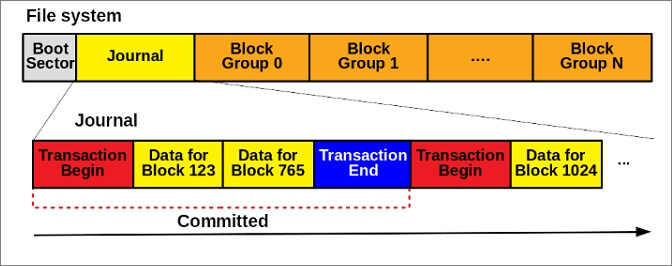
Linux uses various types of file systems, including ext2, ext3, ext4, and XFS, among others, with ext4 being the most widely used and highly reliable one, offering features like journaling, which helps maintain file system integrity and speed up recovery in case of crashes, and support for large file sizes and storage capacities, making it suitable for a wide range of applications and use cases.
What Are the Linux File System Types?
Linux file system formats come in various types, each with its own characteristics. The major types include ext2, ext3, ext4, XFS, JFS, and ReiserFS. ext2 is a simple file system, while ext3 adds journaling for improved reliability.
The first file system type developed for supporting the Linux kernel, EXT, was implemented in 1992. It had limitations, including a file name length of 255 characters and a maximum partition size of 2GB, as well as a reported issue with timestamping.
2. EXT2
In 1993, Linux users switched from EXT to EXT2, which retained the internal structure and enhanced system functionality, but had no journaling, resulting in file corruption and performance issues.
3. EXT3
By the 2000s, the EXT3 file system was introduced, offering journaling capabilities and improved reliability to prevent corruption and performance loss, building on the same functionality as its predecessors.
4. EXT4
EXT4 is the default file system type for Linux, outperforming other file systems in terms of performance and operability. Its reliability and stability make it a standout choice, and its compatibility with SSD further solidifies its position as a versatile and diverse file system in the market.
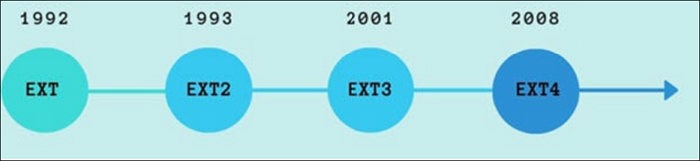
The main difference between EXT2, EXT3, and EXT4 is the journaling system and the features they support. EXT2 is an older file system that doesn't support journaling, while EXT3 introduced journaling to improve performance and reliability.

The Ext2, Ext3, and Ext4 file systems are formats used for storing data on Linux systems. Ext2 is an older format that was widely used in the past but has largely been replaced by newer formats. Ext3 is an extension of Ext2 that adds journaling, which improves reliability and performance.
In short, the choice between Ext2, Ext3, and Ext4 file systems depends on your specific needs and preferences. Ext2 is an older file system that is still supported but not recommended for new installations due to its limitations. Ext3 offers journaling, which improves performance and reliability, but is also outdated. Ext4, on the other hand, provides better performance, reliability, and features, making it the recommended choice for most users.
5. Xiafs
The Xiafs file system, a competitor to EXT2, was less powerful and functional, with a maximum file size of 64MiB, making it obsolete in Linux OS and no longer used.
6. JFS (Journaled File System)
The JFS (Journaled File System) was created by IBM and later released as an open-source option in the 1990s. Although it offered enhanced functionality, including support for multiple file systems, it has since been replaced by more robust and modern alternatives.
7. ReiserFS
The JFS file system was introduced as a replacement for EXT3, offering improved performance. Although it didn't quite meet expectations, it still had the advantage of supporting file extensions, a notable feature.

8. XFS
XFS was introduced in the 90s as one of the top-range file systems for Linux, known for supporting extremely large file systems and providing high-performance results, which is why it's still supported in many Linux distributions.
9. SquashFS
SquashFS, a read-only file system, was introduced in 2000, primarily suitable for embedded systems, where its restrictive nature was a deliberate design choice. Its limited functionality made it less versatile and less appealing for general use.
10. Reiser4
Reiser4 is a file system that succeeded ReiserFS, known for its efficient disk space usage, supporting large system files, and optimizing disk space by managing small files, with added encryption and enhanced performance.
11. btrfs (Better/Butter/B-tree FS)
You're describing a file system type that's not suitable for a production system due to its restrictive nature and features like snapshotting, drive pooling, and online defragmentation.
12. Bcachefs
The latest file system type introduced for Linux systems, Btrfs, boasts a copy-on-write functionality that outperforms EXT4. This advanced file system comes equipped with multiple features, including filesystem encryption, setting it apart from its predecessors.
Linux offers a variety of file systems to choose from, each with its own strengths and weaknesses. The most commonly used file systems include ext2, ext3, ext4, XFS, JFS, and ReiserFS, each with its own features and advantages.
What Is the Best Linux File System Type?
To determine the best Linux file system structure, we've compiled a table with extensive features to help you choose the right one for your needs.
| Features | EXT | EXT2 | EXT3 | EXT4 | JFS | ReiserFS | SquashFS | Xiaf |
|---|---|---|---|---|---|---|---|---|
| Max File Size | 2GB | 2TB | 2TB | 16TB | 4PB | 8TB | 16EB | 64MB |
| Max Volume Size | 2GB | 32TB | 32TB | 1EB | 32PB | 16TB | 16EB | 2GB |
| Compression | No | No | No | No | No | No | Yes | No |
| Encryption | No | No | No | Yes | No | No | No | No |
| Checksum | No | No | No | Partial | No | No | No | No |
| Metadata Only Journaling | No | No | Yes | Yes | Yes | Yes | No | No |
| Block Sub-allocation | No | No | No | No | Yes | Yes | No | No |
The table highlights the reliability and stability of EXT4 and EXT3 file systems, making them the best options for data management. These systems hold and manage data perfectly, and knowing their format allows you to format your device to these formats. A link is available to guide you through this process.
Conclusion
This article has provided a detailed overview of Linux file system types, helping you decide which one suits your current system best. The comprehensive feature analysis has enabled you to define the parameters for choosing the right file system. If you have further questions about Linux file system types, feel free to continue reading the next part.
FAQs About Linux File System Types
With such an in-Linux file systems come in various types, each serving a specific purpose. The most common ones include ext2, ext3, and ext4, which are journaling file systems that provide reliability and performance.
1. How many types of file systems are in Linux?
The Linux operating system supports almost 100 file systems, with EXT4 being the most widely used one currently.
2. What are the 3 types of files in Linux?
In Linux, there are three main file types: regular, directory, and special. Regular files are the most common type, containing data such as text, images, and videos.
3. What does XFS stand for?
XFS stands for Extents File System for Linux systems.
Related Articles
- 4 Ways to Fix Mac Won't Start in Safe Mode [Support macOS Ventura/Big Sur/Mojave]
- What Is Chrome.exe *32 and How to Remove Chrome.exe *32 Malware
- Fixes for Windows 10 Corrupt/Crash in Boot
- Fix Internet Explorer Keeps Crashing/Freezing/Not Responding Error
- Top 7 Best Product Key Extractor for Windows 11/10
Looking for the best product key extractor for Windows 11/10? Discover the top 7 tools to recover lost Windows, Office, and software product keys quickly and easily. - Quick Fixes for Windows Stuck on Repairing Disk Error in Windows 10/8/7
If your Windows 10/8/7 computer is stuck on "Repairing disk errors" or fails to boot with this error message, don
Products
Articles & Tutorials
- Data Recovery
- Data Backup
- File Recovery
- File Backup
- System Backup and Restore
- Disk and Partition Clone
- Technical articles
- Mobile articles
- Disk Master Help
- Windows Data Recovery Tutorials
- Windows Secure Delete Tutorials
- Windows Partition Management Tutorials
- Windows File Backup and Restore Tutorials
- Windows System Backup and Restore Tutorials
- Windows Disk Backup and Restore Tutorials
- Windows Clone Tutorials