Clone Windows to a Samsung 970 EVO Plus SSD
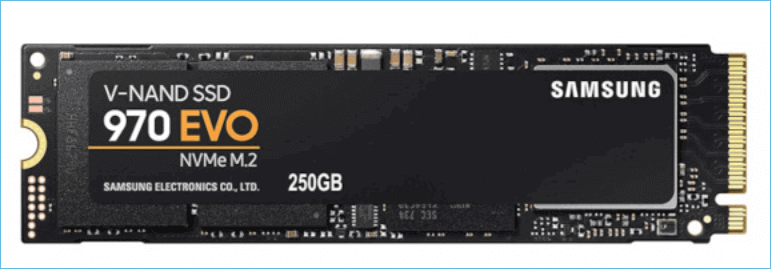
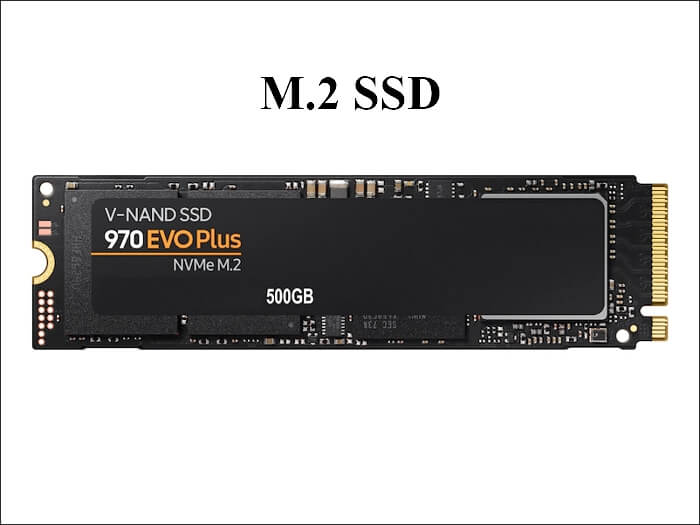
The Samsung 970 EVO Plus is a PCIe 3.0 NVMe SSD in the familiar M.2 2280 format. It is a popular upgrade for older laptops and desktops because it is much faster than a hard drive or a SATA SSD while staying compatible with systems that do not support PCIe 4.0.
This guide explains what the drive offers, how to plan the upgrade around its PCIe 3.0 interface, which preparation steps prevent boot problems, and how to clone Windows to it with Qiling Disk Master. It also covers when Samsung Data Migration is the better choice.
PAGE CONTENT
- What the Samsung 970 EVO Plus Offers
- Plan the Upgrade Around PCIe 3.0
- Prepare the Drive and the Clone Target
- Clone with Qiling Disk Master
- Boot From the 970 EVO Plus and Verify
- FAQs About Cloning to a 970 EVO Plus
- Back Up Before You Clone
What the Samsung 970 EVO Plus Offers
- PCIe 3.0 x4 NVMe. The drive uses four PCIe 3.0 lanes and is rated for sequential reads of up to about 3,500 MB/s, close to the practical limit of that interface.
- M.2 2280 format. At 22 mm by 80 mm it fits most NVMe slots in laptops and desktops, and it needs no 2.5-inch bay or SATA cable.
- TLC V-NAND. Samsung uses three-bit TLC memory, which balances endurance and price better than the QLC memory found in some budget drives.
- In-house controller. Samsung designs its own controller, so the drive behaves predictably with Samsung Magician and firmware updates.
- Wide compatibility. The drive works in PCIe 4.0 slots at PCIe 3.0 speed and in PCIe 2.0 slots at a lower speed, so an older machine can still use it.
The main limitation is the interface, not the drive. On a PCIe 3.0 system the 970 EVO Plus is a strong upgrade, but it cannot exceed the bandwidth of the slot it sits in. Plan the clone around that fact and the result will match your expectations.
Plan the Upgrade Around PCIe 3.0
- Check the slot type. Some M.2 slots accept only SATA drives. Confirm in the manual that the slot supports PCIe NVMe before you buy the drive.
- Expect PCIe 3.0 speed. In a newer PCIe 4.0 slot the drive still runs at PCIe 3.0 speed. That is normal and does not mean the clone failed.
- Pick a connection method. Desktops can use a free M.2 slot or a PCIe adapter card. A laptop with a single slot needs a USB NVMe enclosure for the new drive.
- Match or exceed capacity. The target must hold the used space on the source. The same size is simplest; a larger drive gives room to grow.
- Plan for heat. Long writes warm the drive, so keep the motherboard heatsink in place or choose an enclosure with a metal case.
A USB enclosure is the usual route for a laptop with one M.2 slot. Prefer a USB 3.2 Gen 2 enclosure over an older 5 Gbps model, because the faster link shortens the clone and reduces the time the drive spends generating heat.
Prepare the Drive and the Clone Target
- Check health and firmware. Open Samsung Magician, read the SMART values, and install any firmware update before you copy a working system.
- Suspend BitLocker. Pause BitLocker protection on the system drive so the clone is not interrupted by encryption prompts. Re-enable it after the first boot.
- Free up space. Delete temporary files and old downloads. A smaller used footprint means a shorter clone and a better fit on the target.
- Initialize the new drive. A bare retail drive may appear as uninitialized in Disk Management. Initialize it as GPT or MBR to match the source.
- Disconnect spare drives. Unplug extra storage during the clone so the source and destination lists are unambiguous.
If the 970 EVO Plus is the new drive, none of this touches your data; the old disk stays intact until you decide to erase it. If you are cloning from a failing drive instead, copy personal files first and then clone with bad-sector skip enabled.
Clone with Qiling Disk Master
Qiling Disk Master clones any NVMe or SATA drive and keeps the boot layout intact. It can align partitions for SSDs, resize them when the target is larger, and skip bad sectors when the source is unstable. For a Samsung target it is a practical alternative when Samsung Data Migration refuses the job.
Watch the video tutorial below to clone the drive step by step with Qiling Disk Master.
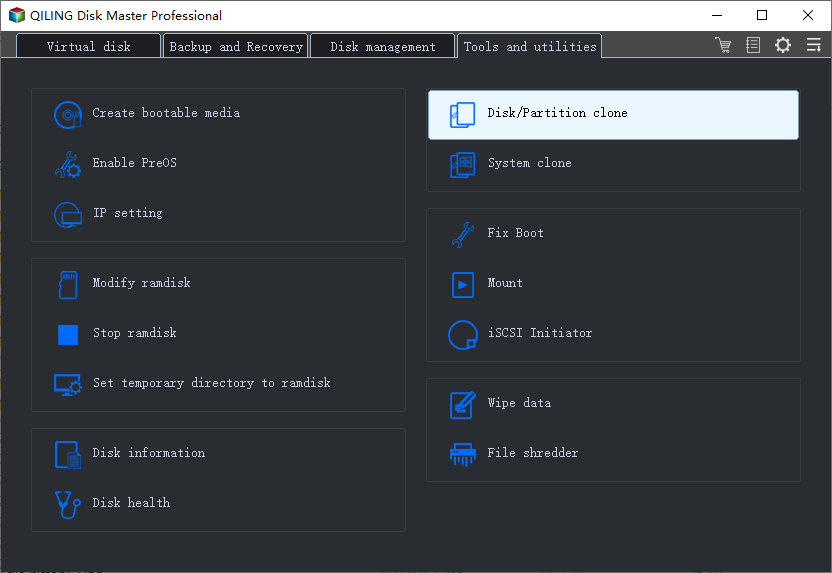
Step 1. Open Qiling Disk Master, choose Clone, and then select Disk Clone.
Step 2. Select the source disk and click Next.
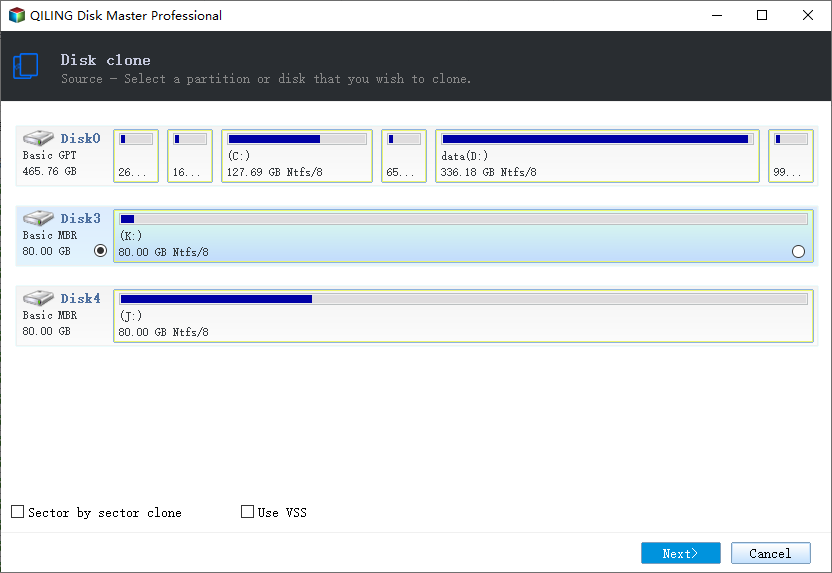
Step 3. Select the destination SSD and confirm that its data will be replaced.
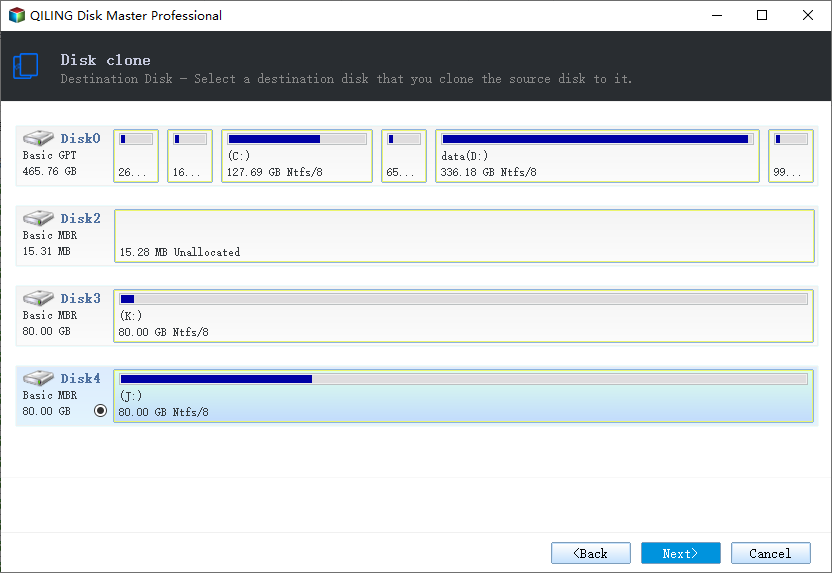
Step 4. Choose the clone mode and adjust the partition size if the target is larger.
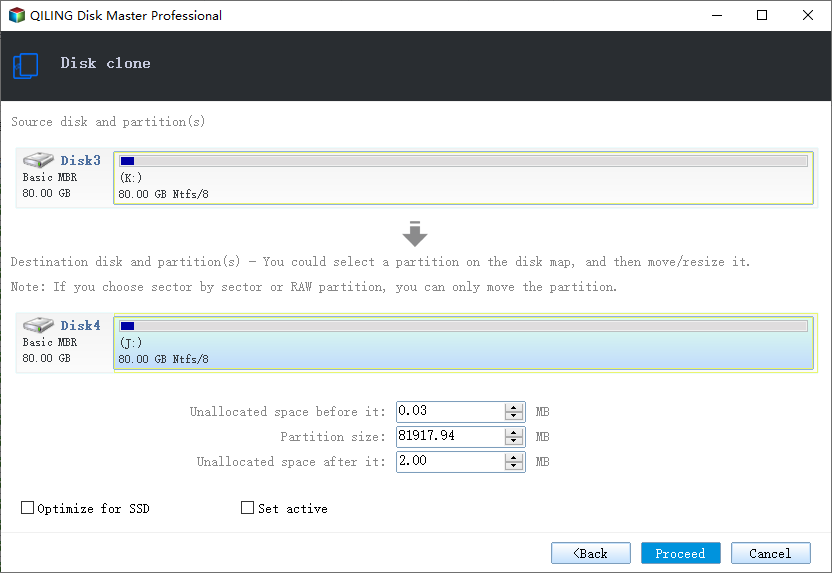
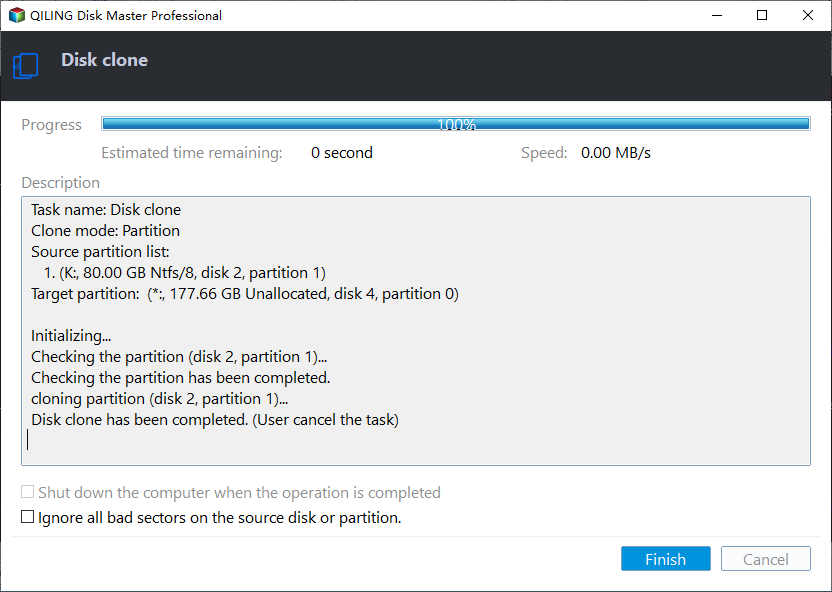
Step 5. Click Proceed, wait for the copy to finish, then shut the machine down before you remove any cable.
Boot From the 970 EVO Plus and Verify
- Shut down fully. Use Shut down, not sleep or hibernate, so no cached writes remain when you remove the drive.
- Install the drive. Put the 970 EVO Plus in the slot the old drive used, or move it from the enclosure into the internal slot.
- Set the boot order. Enter BIOS or UEFI and make the new drive the first boot entry. Disable the old drive in the boot menu if it is still attached.
- Boot and check. Open Disk Management and confirm the drive holds the system, boot, and recovery partitions.
- Verify performance. Run a short read test in Samsung Magician and confirm the drive reports a PCIe 3.0 x4 link and healthy SMART values.
If Windows starts but a data partition has no drive letter, assign one in Disk Management. If the machine ignores the new drive entirely, recheck the slot seating and the boot mode: a GPT clone needs UEFI, while an MBR clone needs legacy or CSM support.
FAQs About Cloning to a 970 EVO Plus
Will the 970 EVO Plus run at full speed in a PCIe 4.0 laptop?
Yes, but at PCIe 3.0 speed. The drive negotiates the fastest link both sides support, and the 970 EVO Plus tops out at PCIe 3.0 x4. You lose benchmark numbers, not reliability.
Can Samsung Data Migration clone to a 970 EVO Plus?
Yes, when the target is a Samsung SSD and you are copying the current system disk. It cannot clone a secondary data drive, resize partitions, or skip bad sectors, so use Qiling Disk Master for those cases.
My laptop has only one M.2 slot. How do I clone to the new drive?
Put the 970 EVO Plus in a USB NVMe enclosure, clone to it, shut down, then swap it into the internal slot. The enclosure only affects speed during the copy.
Do I need to reinstall Windows after cloning?
No. A disk clone copies Windows, drivers, and activation. Reinstall only if the clone fails repeatedly or the source is too damaged to read.
Why is the clone slower than the rated 3,500 MB/s?
A USB enclosure, many small files, and thermal throttling all reduce real-world speed. The rated figure describes large sequential reads, not a mixed Windows system volume.
Back Up Before You Clone
A clone writes over the target disk and depends on a readable source. Back up the system first so a failed job, a power loss, or a bad sector never leaves you without a working Windows installation.
Watch the video tutorial below to back up Windows and restore it if the clone fails.
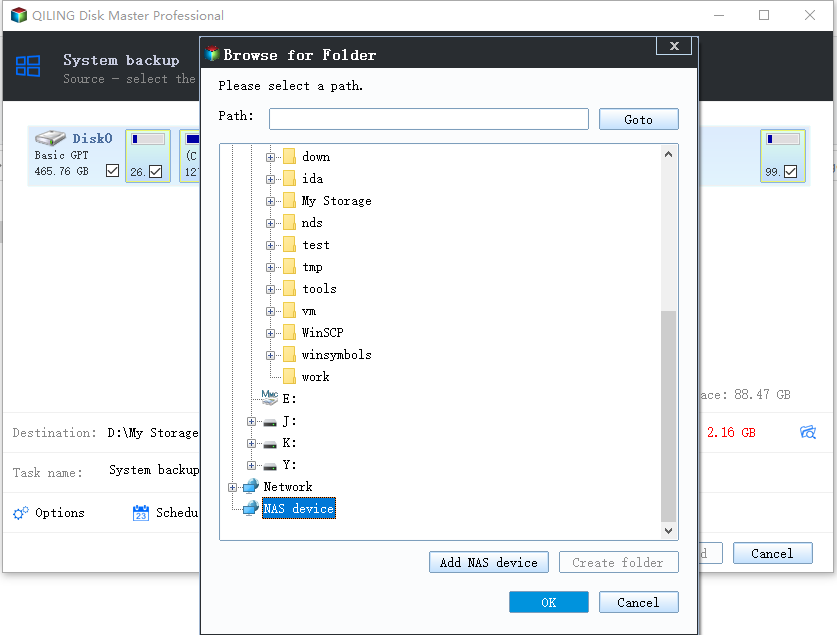
Step 1. Open Qiling Disk Master and select System Backup to include the boot partitions.
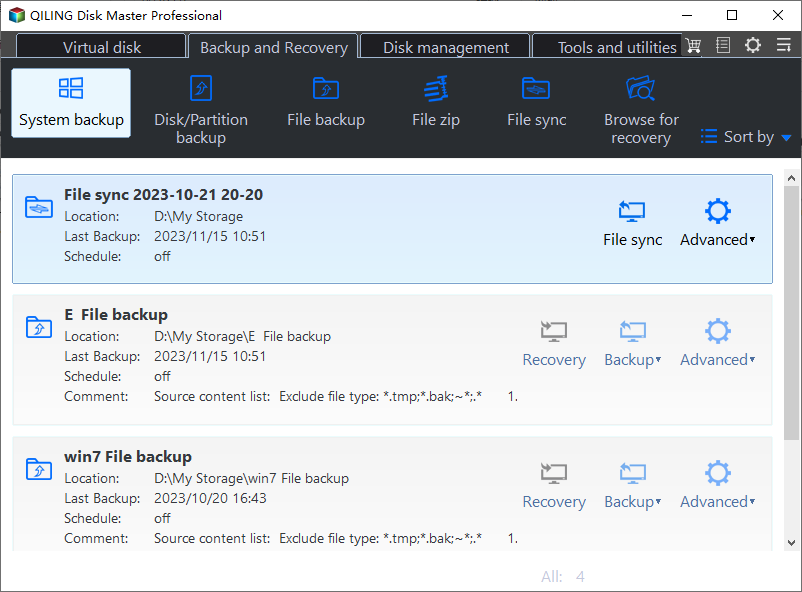
Step 2. Save the image to a drive other than the target disk and start the backup.
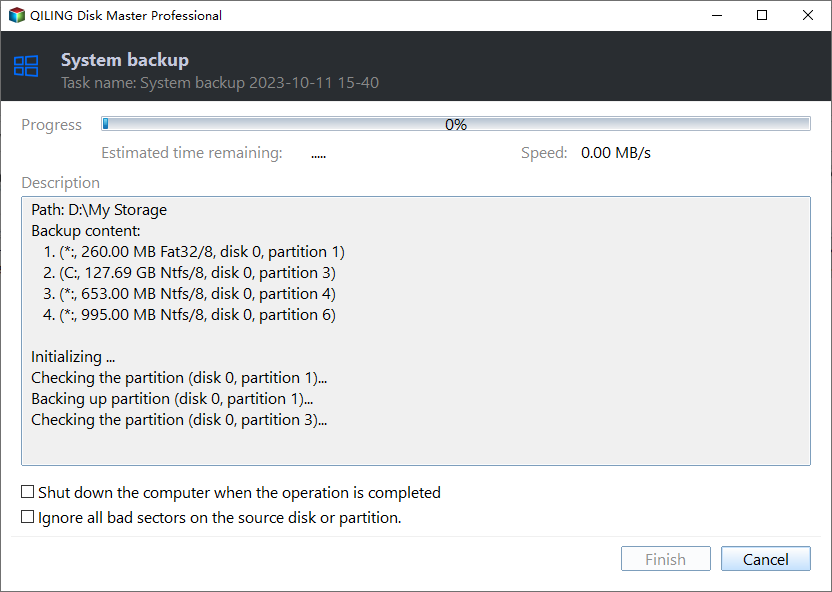
Step 3. Click Proceed to start the system backup and wait patiently until it finishes. You can also tick Shut down the computer when the operation is completed to power off automatically.
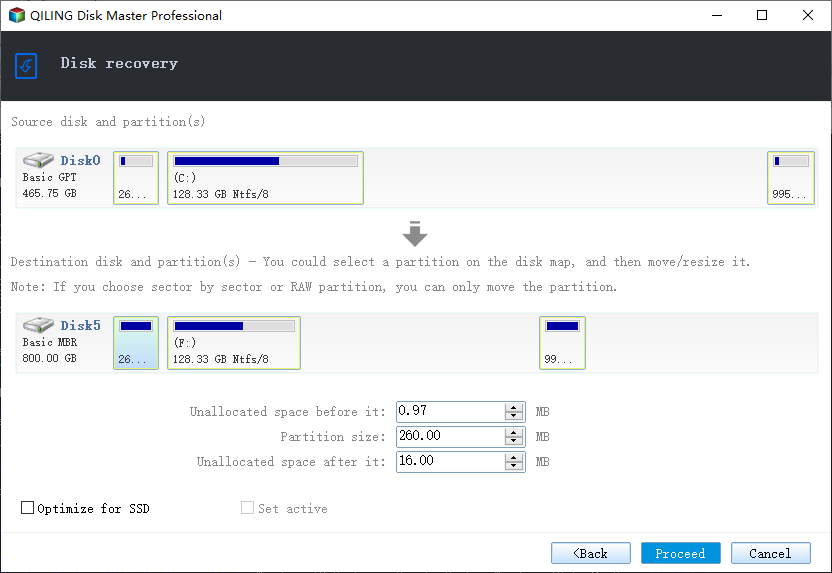
Step 4. If the clone fails, restore the image and check the source disk before you retry.
Conclusion
Cloning to a Samsung 970 EVO Plus is straightforward once you respect its PCIe 3.0 interface. Confirm the slot, prepare the target, suspend BitLocker, and boot from the new drive before you wipe the old one. The result is a faster machine with the same Windows installation and no reinstall.
For related guides, see How to Clone a Samsung 990 PRO SSD to a New Drive, How to Switch From IDE to AHCI After Cloning, How to Clone an M.2 SSD With Only One Slot, and Best Free SSD Cloning Software.
Related Articles
- How to Clone a Samsung 990 PRO SSD to a New Drive
The 990 PRO is a PCIe 4.0 flagship. This guide covers cloning it to a larger drive, cooling, and recovery from a failing unit. - How to Clone an NVMe SSD to a Larger NVMe SSD
Move a smaller NVMe system drive to a larger NVMe SSD without reinstalling Windows, including partition resizing. - How to Clone an HDD to an NVMe SSD on Windows 11
Steps to clone an older hard drive to an NVMe SSD on Windows 11, with boot checks and common fixes. - Samsung Data Migration Not Working? Fix Clone Errors
Fix Samsung Data Migration errors such as target not detected, clone failed, and unsupported partition layouts. - Cloned Drive Won't Boot? How to Fix It
Repair boot records, EFI entries, and BIOS settings when a cloned drive refuses to start Windows.
Products
Articles & Tutorials
- Data Recovery
- Data Backup
- File Recovery
- File Backup
- System Backup and Restore
- Disk and Partition Clone
- Technical articles
- Mobile articles
- Disk Master Help
- Windows Data Recovery Tutorials
- Windows Secure Delete Tutorials
- Windows Partition Management Tutorials
- Windows File Backup and Restore Tutorials
- Windows System Backup and Restore Tutorials
- Windows Disk Backup and Restore Tutorials
- Windows Clone Tutorials