Storage Pool Metadata Corrupted After a Power Loss
Quick Navigation:
- Where Pool Metadata Lives
- Why Initialize and Format Make It Worse
- Read-Only Mount and a Full Image First
- Rebuild the Pool Only After the Copy
- Frequently Asked Questions
A power loss rarely damages the disks themselves. It damages the copies of the pool configuration that were being written when the power went away, and a pool that cannot agree with itself reports the disks as Primordial or refuses to mount the virtual disk. The data is often still there; what is missing is the map the pool needs in order to describe it.
Where Pool Metadata Lives
Every member disk carries a reserved region holding a copy of the pool configuration: the disk identifiers, the slab map, the virtual disk definitions, and the health records. At mount the pool reads those copies and assembles one consistent view of the array.
The copies are written independently. A sudden power loss can leave one disk with an older generation than another, and if enough copies disagree the pool cannot decide which one is current. It then reports the disks as Primordial, the storage subsystem's word for disks it can see but cannot place in any pool.
The disks are usually fine. The association between them is what was lost, which is why the recovery effort belongs on the metadata rather than on the hardware.
Why Initialize and Format Make It Worse
Initialize writes a fresh partition table at the start of the disk. Format writes a new file system on top. Neither touches the pool configuration in any useful way, and both can overwrite the region that holds it.
The same caution applies to the reset and remove options in the pool interface. They rewrite configuration on the disks that are still readable, which is exactly the evidence a recovery needs.
Keep the disks out of any write path until the copies have been captured. If Windows offers to initialize a disk it does not recognize, dismiss the prompt and disconnect the disk if the prompt returns.
Read-Only Mount and a Full Image First
Shut the machine down cleanly if it is still running, then confirm that every disk is detected with the capacity and serial number you expect. A disk that is absent altogether is a separate failure and changes the plan, as covered in a Storage Spaces disk that reports Unknown.
If the pool can be brought online read-only, do that and change nothing else. Read-only access lets you confirm which volumes were defined without committing new metadata to the members.
Image every member disk before you attempt a rebuild. The metadata copies must be compared across disks, and an image preserves each copy exactly as it was found. Write the images to disks outside the pool and verify them before the originals are touched again.
Distinguish the two failure modes. If one disk is missing or slow and the others agree, the pool can usually assemble with reduced resiliency and the fault is that single disk. If every copy disagrees or the pool reports no configuration at all, the metadata itself is damaged.
Rebuild the Pool Only After the Copy
Rebuilding is a decision you make after the images exist, not before. Qiling Disk Master captures each member disk as a full image and can mount that image later to pull files out, so the pool can be recreated without gambling on the old configuration.
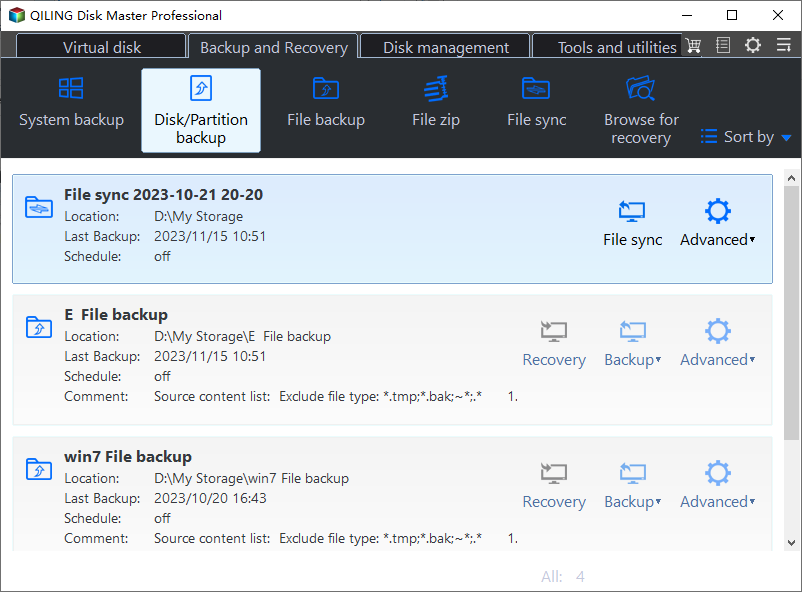
Step 1. Image Each Member Disk
Open Disk Backup and create one image per member. Name them by disk number and serial so the copies can be matched to the physical drives later.
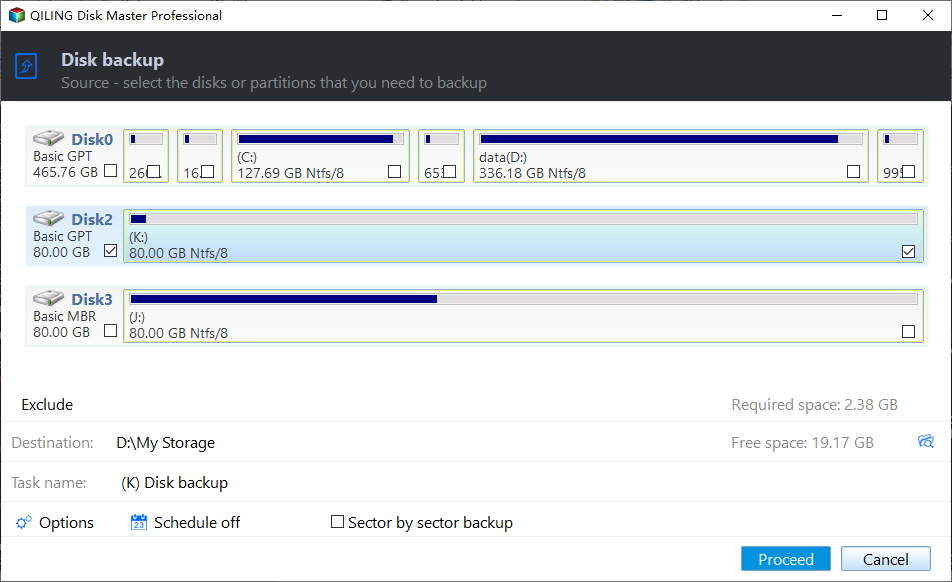
Step 2. Tick the Disks in the Source List
Tick each pool disk in the source list and compare the capacity with the physical label. Leave out any disk that was never part of the pool.
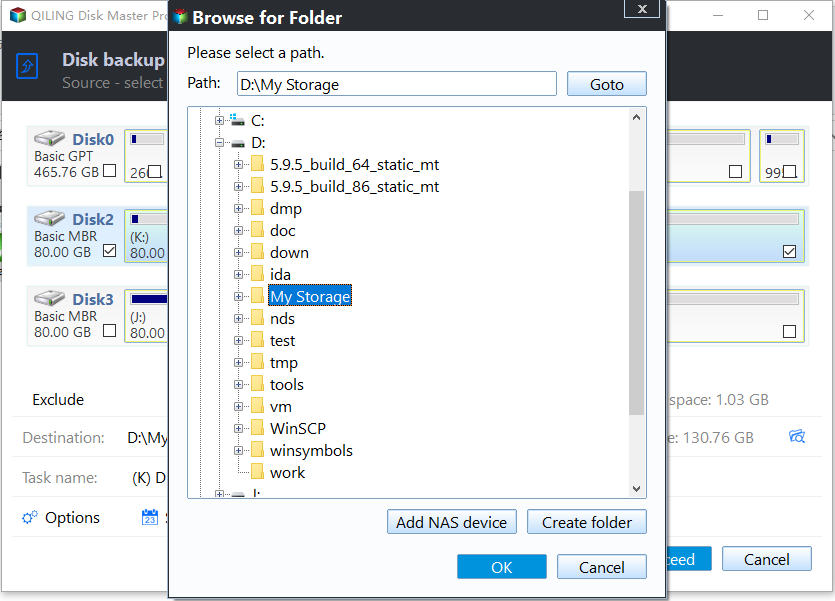
Step 3. Set the Destination and Proceed
Point every image at a disk outside the pool with room for the used data, preview the pending operation, then click Proceed. A task that stops early is telling you which member has a read problem.
Frequently Asked Questions
Can Windows repair the pool on its own?
Sometimes. When a majority of the metadata copies agree, the pool can roll forward on mount. If it has already failed to mount twice, stop retrying and image the disks.
Should I initialize the disks to make them usable?
No. Initializing makes the disks usable and destroys the map to the old pool. Do it only after the images are verified and the data has been extracted.
Does a file system check help?
No. A file system check works above the pool and may write to structures that are already inconsistent. It is a Microsoft tool that is not part of Qiling Disk Master, so leave it alone for now.
A rebuild that never finishes is a different problem from a pool that will not start, and it is covered in a Storage Spaces Direct job that stays stuck.
Related Articles
- Virtual Disk Detached: Majority Disks Unhealthy in S2D
- Storage Spaces Disk Missing and Cannot Be Removed
- Storage Spaces Reduce Resiliency Warning
- Server 2025 Storage Pool Will Not Extend
- Tiered Virtual Disk Will Not Come Online in S2D
Products
Articles & Tutorials
- Data Recovery
- Data Backup
- File Recovery
- File Backup
- System Backup and Restore
- Disk and Partition Clone
- Technical articles
- Mobile articles
- Disk Master Help
- Windows Data Recovery Tutorials
- Windows Secure Delete Tutorials
- Windows Partition Management Tutorials
- Windows File Backup and Restore Tutorials
- Windows System Backup and Restore Tutorials
- Windows Disk Backup and Restore Tutorials
- Windows Clone Tutorials