How to Download Windows 11 23H2 Update from Microsoft✅
Microsoft released the Windows 11 23H2 update on October 31, 2023, which is an indispensable Operating System for over a billion users. Versions 22H2 and 23H2 of Windows 11 share the same core operating system and file set, making it possible for users to update directly from 22H2 to 23H2 by downloading the Windows 11 23H2 enablement package.
| Download Method | Efficiency | Difficulty |
|---|---|---|
| 1️⃣Microsoft Official Website | High - Official source of Windows 11 23H2 downloading. | ⭐⭐ |
| 2️⃣Media Creation Tool | Medium It needs a new SSD and some data transfer effort. | ⭐⭐⭐ |
| 3️⃣Windows 11 ISO Downloader | High - It provides a one-click Windows 11 ISO file downloader. | ⭐ |
To get the latest Windows 11 23H2 update and renew your system, follow this guideline to download the update and experience the new features and improvements.
What Are New Available Features?
Before updating Windows 11, review what is new in this release. This update brings many improvements, including interface refinements, productivity features, security updates, and system performance enhancements.
♻️The Edge browser now features a generative AI-assisted copilot, previously only available in the Edge web browser, offering users a unique experience with AI-driven suggestions and content generation capabilities.
📍Microsoft's Outlook mail app now enables users to compose emails that are clear and to the point, while also allowing them to manage multiple accounts in a single platform.
🪟Microsoft's built-The Clipchamp app now offers new features, including one-click background blur and the ability to remove and replace the background of an image, enabling users to edit photos and videos with professional-level quality.
🧲The Windows 11 update simplifies backing up and restoring Windows files from the cloud, making it easier to access and manage data.
⚖️This update adds native passkey functionality to improve security.
Get the latest Windows 11 23H2 update with your friends. The update can be downloaded from the Microsoft Update Catalog website.
How to Download Windows 11 23H2 Update
Microsoft provides two official ways to download the Windows 11 23H2 update and another software to download Windows ISO files from a safe source.
Preparations for Windows 11 23H2 Update
Before downloading the Windows 11 23H2 update, ensure you meet the following requirements:
- Check if the power and internet connections are stable.
- Ensure your Windows computer satisfies the Windows 11 requirements.
- Prepare an external hard drive with at least 8GB storage space in FAT32 format.
If you are ready, please follow the how-to guide below:
Method 1. Microsoft Official Website
To manually download the 2026 Update, you can visit the Windows 11 23H2 update download page, where you can follow the detailed steps to obtain the update.
Step 1. Search and open the Microsoft software download website.
Step 2. Under the "Download Windows 11 Disk Image (ISO) for x64 devices" section, choose the latest edition for Windows 11.
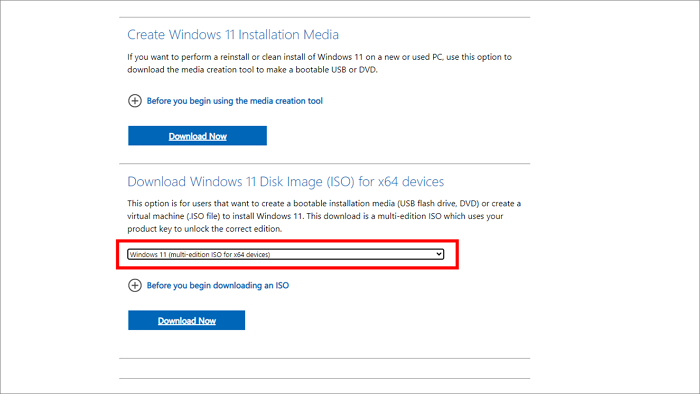
Step 3. Click the "Download" button after reading the "Before you began" part.
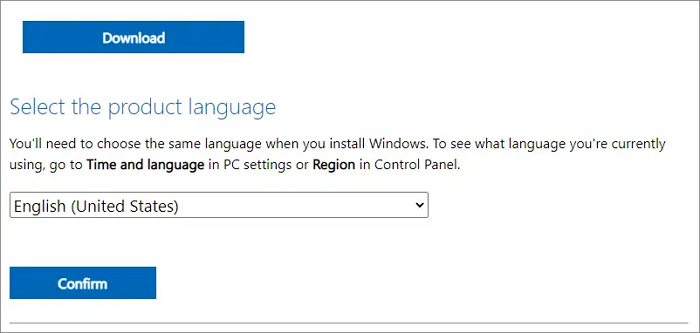
Step 4. Set the installation language and select "confirm" to download the software and complete the installation.
Method 2. Media Creation Tool
You can also download the Windows 11 2026 Update ISO file on a media creation tool and use it to update your Windows system, which may take a longer time to complete. To do this, follow the how-to instructions provided.
Preparation: To download the Windows 11 ISO file, prepare an external hard drive and connect it to your computer.
Step 1. Open the Microsoft software download website as method 1.
Step 2. Select the "Download tool now" option in the "Create Windows 11 installation media" tab.
Step 3. Double-click the MediaCreationToolW11.exe file to launch the tool, and then choose "Accept" then "Next" to proceed.
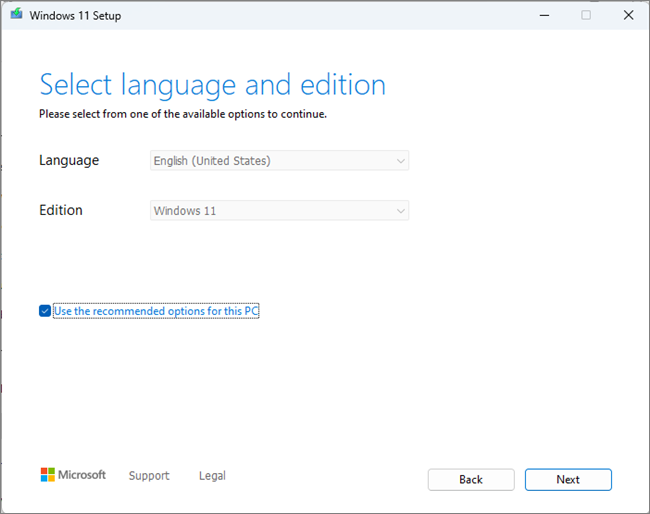
Step 4. Tick the "ISO file" option and click "Next" to continue.
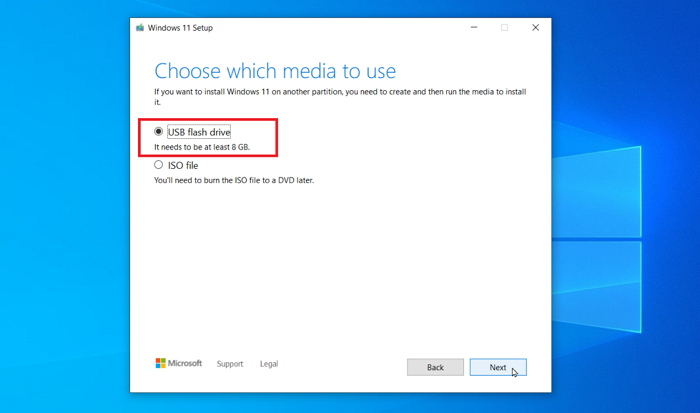
Step 5. Select the destination location for the ISO file in the media creation tool, name it, and click "Save" > "Finish".
Method 3. Windows 11 ISO Downloader - Qiling Disk Master
The second method of downloading Windows ISO files is complex and may cause harm to your system if done incorrectly. It is recommended to use Qiling Disk Master Professional, a full-featured ISO file downloader that supports all Windows versions and has a feature to download ISO files from Microsoft with just a few clicks.
Step 1. Install and launch the software, then go to the "Tools" menu and select "Create Bootable Media" from the dropdown.
Step 2. Select the Windows 11 version you want to download from Microsoft, and it will automatically detect the latest version for you.
Step 3. Select the burn device and location, then choose "Proceed" to download and install the Windows 11 23H2 update.
You can also check other effective Windows 11 23H2 ISO downloaders in this article.

Top 3 Windows 11 23H2 ISO Downloader With Newest Guide
This post will provide three reliable Windows 23H2 ISO downloaders and a step-by-step guide to help you upgrade your computer's Windows OS to the latest version.
Bonus Tip for Windows 11 23H2 Download and Update
You can request Qiling experts to download and install the latest Windows 11 update on your PC, taking advantage of their manual service. This allows you to delegate the task to the Qiling tech support team, who will handle the download and installation of the update for you.
Qiling experts are available 24/7 to provide one-on-one manual services to help fix various Windows configuration issues, offering free evaluation services and using their decades of experience to diagnose and resolve Windows update errors, installation, and daily OS issues.
- 1. To fix Windows update errors, such as update failure or unable to upgrade Windows, try restarting your computer, checking for corrupted system files using the System File Checker (SFC) tool, and running the Windows Update Troubleshooter. Additionally, ensure that your internet connection is stable, disable any third-party antivirus software, and try updating Windows in clean boot mode.
- 2. You can download and install the latest Windows operating system on your PC by following these steps: Ensure your PC meets the system requirements for the latest Windows version, then visit the Microsoft website to download the installation media, either the Media Creation Tool or the ISO file. Follow the prompts to create a bootable USB drive or DVD, then restart your PC and boot from the installation media.
- 3. To resolve daily Windows system errors, focus on updating drivers, running the System File Checker (SFC) and DISM tools to repair corrupted system files, and checking for Windows updates. Additionally, ensure proper permission settings for files and folders, and troubleshoot account settings issues, such as login problems or incorrect user account control (UAC) settings. Regularly clean up temporary files, disable unnecessary startup programs, and run a full disk cleanup to free up space and improve system performance.
Conclusion
To download the Windows 11 23H2 update, which includes new features, you can follow three practical methods: checking for updates in Settings, using the Windows Update Assistant, or creating a bootable USB drive with the update. This update offers various improvements and features, and following these methods will allow you to install it efficiently.
FAQ: Download Windows 11 23H2 Update
If the above content cannot satisfy your curiosity, read this FAQ part for more first-hand information about the Windows 11 23H2 Update:
1. Is Windows 11 23H2 available?
The Windows 11 23H2 version is currently available, and can be obtained from Windows Server Update Services, Windows Update for Business, and the Volume Licensing Service Center.
2. How do I force Windows 11 to update?
To upgrade your Windows 10 computer to Windows 11, navigate to the Windows 11 Installation Assistant section of the Download Windows 11 page, click the "Download Now" option, and launch the Windows 11InstallationAssistant.exe file. After clicking the "Accept" and "Install" buttons, your Windows 10 computer will be upgraded to Windows 11.
3. Where do you download Windows 11 22H2?
Check the detailed tutorial for downloading and installing Windows 11 22H2:
- Navigate to Windows 11 Settings, choose "Windows Update," and press the "Check For Updates" button.
- If the Windows 11 22H2 update appears, select Download & Install and let the process continue.
- Restart your Windows PC and sign in.
Extended Reading: How to Get the Windows 11 22H2 ISO File
Related Articles
- How to Upgrade PS4 Hard Drive [Step-by-Step Tutorial]
- [SD Card Unavailable] Fix SD Card Wont Mount on Android & PC
- Free Download SD Memory Card Formatter for All Memory Cards
- Which Is The Best File System Format for (Bootable) USB/External Hard Drive
- Extend System Drive but Recovery Partition is in the Way Windows 11/10/8/7
To extend the system drive in Windows 11/10/8/7 or in a Virtual Machine or VMware, but with a recovery partition in the way, you can use a third-party tool like Qiling Partition Master instead of Disk Management. - How to Extend Windows Server Partition [Server Guide]
To extend a Windows partition, you can follow these steps: First, ensure there is unallocated space available on the disk. Then, open the Disk Management tool, right-click on the partition you want to extend and select “Extend Volume”. - Windows 11 23H2 End of Support: November 10, 2026 Guide
Products
Articles & Tutorials
- Data Recovery
- Data Backup
- File Recovery
- File Backup
- System Backup and Restore
- Disk and Partition Clone
- Technical articles
- Mobile articles
- Disk Master Help
- Windows Data Recovery Tutorials
- Windows Secure Delete Tutorials
- Windows Partition Management Tutorials
- Windows File Backup and Restore Tutorials
- Windows System Backup and Restore Tutorials
- Windows Disk Backup and Restore Tutorials
- Windows Clone Tutorials