Top 3 Windows 11 23H2 ISO Downloader With Newest Guide
Overview of the Windows 11 23H2 ISO Downloader
Windows 11 has released the 2026 Update, which offers a streamlined update experience and limited new features, providing users with a fast and reliable upgrade.
Qiling Software introduces three reliable Windows Disk image (ISO File) download tools, highlighting their advantages and disadvantages. These tools enable users to download the Windows 11 23H2 update and more, with varying ease of use and features. The article provides a comprehensive overview of these tools, allowing readers to make informed decisions when choosing the best one for their needs.
Before downloading the Windows 11 23H2 ISO, make sure:
- You have a stable internet connection.
- Your computer meets Windows 11 requirements.
Was it helpful? Please share these two prerequisites with others.
When choosing a Windows ISO download tool, consider factors such as safety, compatibility, and efficiency. To download Windows 11 23H2 ISO files, three tools are available, each with its pros and cons, which can be compared in the table provided.
| Comparison | Pros | Cons |
|---|---|---|
| 🥇Qiling Disk Master |
|
|
| 🥈HeiDoc Windows ISO Downloader |
|
|
| 🥉Windows Media Creation Tool |
|
|
Qiling Disk Master is a versatile tool that can automatically find the download entrance for the genuine Windows 11 23H2 ISO file and directly burn the Windows ISO file to USB, allowing you to complete the update of Windows 11 23H2.
Top 3 Windows 11 23H2 ISO Downloader [Updated Checklist]
This section provides an in-depth look at the pros, cons, compatibility, and other features of three tools. By comparing their advantages and disadvantages, you can make an informed decision and choose the safest and most reliable one that meets your specific needs.
#1. Qiling Disk Master
Qiling Disk Master Professional is an all-in-one tool that allows users to update their computer to Windows 11 23H2. It enables direct searching and downloading of the Windows 11 23H2 ISO file without having to search for download entrances individually. After downloading the image, the tool's "Burn ISO" function can be used to burn the ISO file to a USB, completing the installation and update process.
Main Future:
- Download the Windows 11 ISO file
- Create bootable USB for Windows 11
- Reset Windows 11 password
- Burn Windows 11 ISO file to USB
Here are the reviews of the tool:
If you're looking for a reliable tool to download a Windows ISO and update to Windows 11 23H2 safely and efficiently, don't miss this software!
#2. HeiDoc Windows ISO Downloader
The HeiDoc Windows ISO Downloader allows you to download genuine Windows disk images (ISOs) directly from Microsoft's servers, including Windows 7, 8.1/10, and 11. Additionally, it provides options for DELL, Insider Preview, and New Additions, enabling you to select a suitable Windows disc image for your device or identity.
Unfortunately, the ISO Downloader does not actually allow you to download the Windows 7 ISO file due to Microsoft's removal of the file. However, a download button for Windows 7 is still provided in the ISO Downloader.
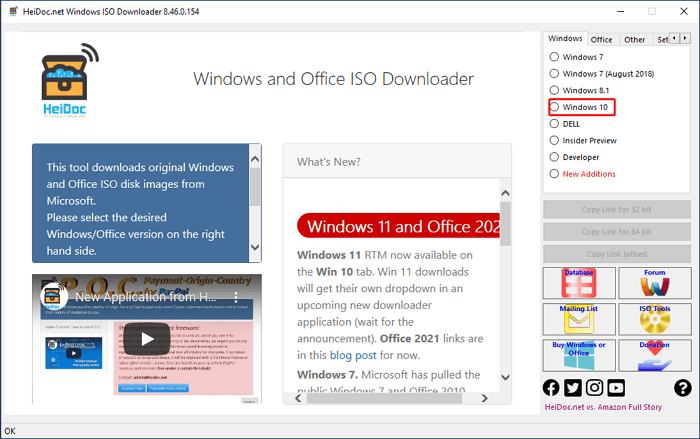
Main Feature:
- Support Windows 7 or newer versions
- Require Internet Explorer 8 or newer
- Support Office
- Review on HeiDoc Windows ISO Downloader
Download Site:
https://www.heidoc.net/joomla/technology-science/microsoft/67-microsoft-windows-and-office-iso-download-tool
#3.Windows Media Creation Tool
The Windows Media Creation Tool is a utility released by Microsoft that allows you to download the official ISO file of the Windows system. Once you have the correct Windows ISO file, you can use it to create installation media, such as a USB device or DVD, using the Windows USB/DVD Download Tool or Qiling Disk Master. This installation media can then be used to clean-install Windows on another PC.
The Windows Media Creation Tool allows you to directly upgrade your current PC by running the tool, navigating to the "What do you want to do" section, clicking "Upgrade this PC now", and following the instructions to complete the process.
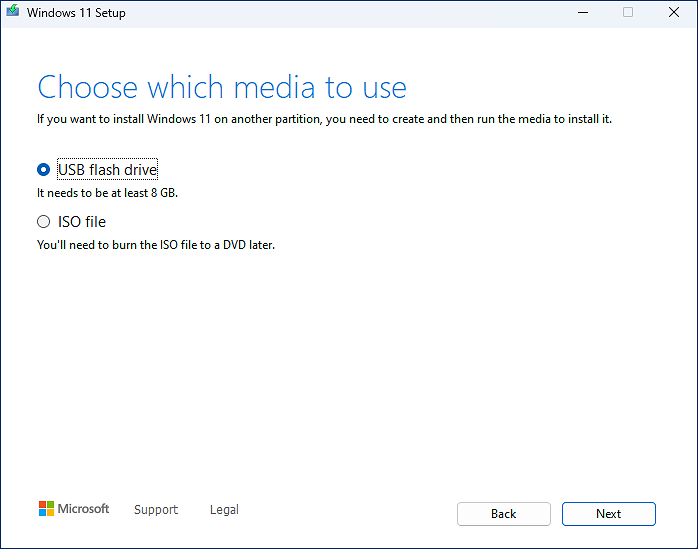
Main Feature:
- Update the current OS
- Safe to use
- Windows ISO official download entrance
Review:
Download Site:
https://www.microsoft.com/en-us/software-download/windows10
I found Qiling Disk Master to be the most efficient tool during the investigation. It allows for one-click download of the correct Windows 11 23H2 ISO file and direct burning to a bootable USB, eliminating the need for other burning tools. This tool was very useful.
Conclusion
Microsoft released Windows 11 23H2 to the Release Preview channel on September 26, 2023. Users can download the ISO file via the Windows Insider ISO download page or use one of three reliable tools to obtain the Windows 11 23H2 ISO files, making the new operating system more accessible and convenient to install.
Windows 11 23H2 ISO Download Tool FAQs
I don’t have information about Windows 11 23H2.
1. Is Windows 11 23H2 available for download?
Windows 11 Version 23H2 is now available for download through Windows Server Update Services, Windows Update for Business, and the Volume Licensing Service Center.
2. How do I install Windows 11 23H2 now?
To install Windows 11 23H2, download the Windows 11 23H2 ISO file from Microsoft, use a tool like Windows USB/DVD Download Tool or Qiling Disk Master to burn the ISO to a USB, and then follow the on-screen instructions to install Windows 11 23H2 after inserting the bootable USB into the target PC.
3. Where to download 23H2?
You can access Windows 11 version 23H2, which was previously available through the Windows Insider program, by visiting the official download page at https://www.microsoft.com/en-us/software-download/windows11, as it has now been officially released on October 31.
Related Articles
- How to Fix Windows 11 Slow Startup? Your Complete Guide
- How to Safely Delete Recovery Partition in Windows 10/8/7 PC and Laptop
- How to Create a (New) Partition in Windows 8? [QuickStart]
- Fixes for Windows Stop Code Inaccessible Boot Device 💡
- Best Diskpart Alternatives for Windows 11, 10, 8, 7 (New Guide 2022)
When the Disk Management utility can't solve your hard disk partitioning problems, Diskpart is a reliable alternative that can help. However, even Diskpart has its limitations, which is why you may need to look for alternatives. - How to Perform Diskpart Quick Format in Windows [Easy & Efficient Ways]
This page provides a comprehensive guide on performing a quick format using Diskpart, including a full quick format on diskpart. It also offers a professional format tool to assist with the process. - Windows 11 23H2 End of Support: November 10, 2026 Guide
Products
Articles & Tutorials
- Data Recovery
- Data Backup
- File Recovery
- File Backup
- System Backup and Restore
- Disk and Partition Clone
- Technical articles
- Mobile articles
- Disk Master Help
- Windows Data Recovery Tutorials
- Windows Secure Delete Tutorials
- Windows Partition Management Tutorials
- Windows File Backup and Restore Tutorials
- Windows System Backup and Restore Tutorials
- Windows Disk Backup and Restore Tutorials
- Windows Clone Tutorials