Can Windows 10 Be Cloned [2024 Fullest Guide]
Cloning a hard drive on Windows 10 is a straightforward process that simplifies transferring your data to a new storage device. This is especially useful when you've purchased a new storage for your PC, as it allows you to upgrade to a newer drive with improved performance, increased storage capacity, and support for cutting-edge features like UEFI or GPT (GUID Partition Table) disks. By cloning your hard drive, you can extend the lifespan of your PC for several years, making it a worthwhile investment. With a little practice, you'll be able to create a clone disk with ease, making it a crucial skill to have when upgrading your PC's storage.
Windows 10 can be cloned using a professional tool, allowing users to create a duplicate of their existing Windows 10 installation. This process involves using software designed specifically for cloning operating systems, which can save time and effort compared to manually reinstalling and reconfiguring Windows 10 on a new device.
Can Windows 10 Be Cloned
Windows 10 can be cloned, allowing users to back up or transfer data by making a copy of their hard disk. This process also enables users to transfer their Windows 10 installation while preserving their preferences and settings.
Cloning your Windows 10 hard disk is preferable to copying and pasting everything over because it avoids potential issues such as apps not locating program files, and it ensures the new drive is bootable and organized.
Cloning your new drive with your operating system is a more reliable method than copying and pasting, as it creates an exact replica of your original drive, making the new drive your primary drive and the older drive a storage location.
Main Advantages of Cloning Windows 10:
- Easy to get system backup
- Can avoid manually reinstalling
- Free up hard drive space on the original hard drive
- The cloned disk can be used immediately, greatly reducing downtime.
Now that we understand what cloning a hard drive on Windows 10 means and its advantages, let's move on to the next section, where you'll learn how to clone Windows 10 using the professional tool Qiling Disk Master.
A Professional Tool to Clone Windows 10
You can easily clone Windows 10 using the professional tool Qiling Disk Master, which includes a tool called Clone OS disk that allows you to copy the operating system and associated partitions to a new drive with just a few simple steps. The entire process is straightforward and easy to do.
Download Qiling Disk Master and follow the on-screen instructions to begin the process.
Features of Qiling Disk Master
- Transfer OS to SSD
- Clone a bigger HDD (Hard Disk Drive) to a smaller SSD
- Clone an SD card on an external hard disk
- Clone Windows to an external hard disk
- Clone external hard disks, USB drives, or SD cards
- After cloning, reformat a hard drive
Cloning Windows to a new hard disk using Qiling Disk Master is a straightforward process that allows you to start Windows from the cloned drive, and it enables quick OS transfer to an HDD or SSD with minimal effort.
Here are the steps to use this tool:
- Notice:
- To clone an SD/USB/external hard drive with data to a new device, connect the external storage device to be cloned and a new removable device (SD/USB/external hard drive) with a bigger capacity to your PC in advance.
Step 1. Clone external storage device (SD/USB/external hard drive)
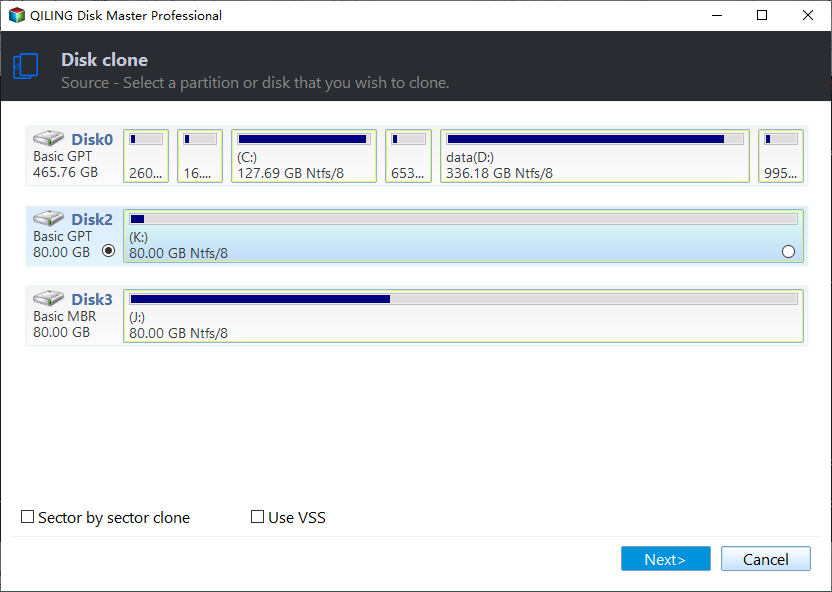
- 1. Click the "Tools" tab and select the "Disk/partition Clone" option. Then, click "Next" to proceed.
- 2. Choose a source disk and select a new device (SD/USB/external hard drive/hard drive) as target disk, then click "Next".
- 3. Click "Yes" to confirm the warning message.
Step 2. Keep all changes
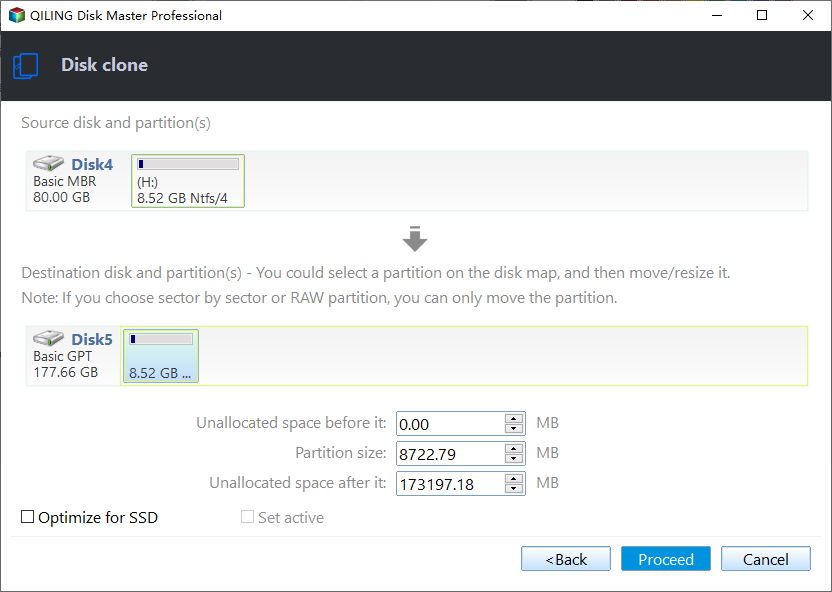
- 1. Check the source disk layout, which can be edited by clicking "Autofit the disk" or "Clone as the source" to see the disk's configuration.
- 2. Click the "Proceed" to start cloning.
- 3. Wait for the cloning process complete.
Conclusion
Disk cloning is a great technique to create an exact duplicate of a hard drive, providing additional storage space or upgrading from a traditional hard disk drive (HDD) to a solid-state drive (SSD).
Cloning is a simple and versatile process that can be used for backing up, upgrading, or transferring data to a new PC, and is the most effective way to transfer an operating system and files to a new hard drive.
When selecting disk cloning software, it's essential to consider your specific needs. For the majority of users, Qiling Disk Master is more than sufficient, making it a great option for cloning Windows 10. This software can help you get a clear understanding of the cloning process, making it a valuable resource for those looking to clone their Windows 10 operating system.
Can Windows 10 Be Cloned FAQs
If you have any more questions about cloning Windows 10, check out the frequently asked questions and their answers below:
1. Can I clone my Windows 10 to another computer?
You can transfer Windows 10 to a new PC by restoring a Windows backup image or cloning the hard disk, depending on the new PC's hardware, and using a USB-to-SATA cable to connect the target drive.
2. Can I clone a Windows 10 hard drive?
You can copy and move any HDD to a different computer, using third-party software to create a bootable disk and clone the hard disk, ensuring a successful system boot-up on the new PC.
3. Is it better to reinstall Windows or clone?
If your hard drive and Windows operating system are working fine, you just need disk/partition cloning software. But if the OS and hard drive are not functioning properly, you should opt for a Windows Clean Install.
Related Articles
- Fixed: We Couldn't Format the Selected Partition | 0x8004242d Error [2024 Tutorial]
- Can't Change Letter or Unable to Assign Drive Letter to D/E/F/G
- 3 Solutions to File Record Segment is Unreadable
- Best Bootable Manager Software for Windows 2024 Recommend
Are you having an issue with booting on your PC? Do you need to manage the boot configuration? Then follow this complete guide to download and get the best bootable manager software to better manage Windows computers on their own without booting into Windows. - Fix Unable to Shrink C Drive on Windows 11/10/8/7
Windows is unable to shrink the C drive, a common issue that can be frustrating to resolve. The primary reason behind this error is that the drive is already too small or has insufficient free space to be shrunk. Once you've created enough space, you can try shrinking the drive again. - Full Guide to Upgrade PS4 to SSD [Quick & Easy]
Are you looking for a way to improve your PS4 performance? Here is a detailed guide to upgrading PS4 to SSD to make your experience more seamless.
Products
Articles & Tutorials
- Data Recovery
- Data Backup
- File Recovery
- File Backup
- System Backup and Restore
- Disk and Partition Clone
- Technical articles
- Mobile articles
- Disk Master Help
- Windows Data Recovery Tutorials
- Windows Secure Delete Tutorials
- Windows Partition Management Tutorials
- Windows File Backup and Restore Tutorials
- Windows System Backup and Restore Tutorials
- Windows Disk Backup and Restore Tutorials
- Windows Clone Tutorials