How to Perform SD Card Lifespan Test
The lifespan of an SD card is unpredictable and can vary greatly due to several factors, making it difficult to determine how long it will continue to store memories. Unlike other storage devices, SD cards don't have a predetermined lifespan, which can lead to frustration when crucial data is lost due to a malfunction. This unpredictability means that the number of years an SD card can last is hard to pinpoint, leaving users with uncertainty about the reliability of their storage.
You can assess the health of your SD card and predict its remaining life by monitoring its performance, identifying signs of wear and tear, and taking necessary measures to enhance its lifespan. Qiling will equip you with techniques to do this, helping you get the most out of your SD card.
What Is the Lifespan of An SD Card?
SD cards have a limited lifespan influenced by the number of write/erase cycles, but can last over 30 years with 10,000 cycles, or 10-12 years due to other factors.
Key factors that related to the SD card's life span:
- Quality of the SD Card: SD cards can vary in quality, with higher-grade cards featuring better flash memory and lasting longer. When shopping for an SD card, look for reputable brands that offer endurance ratings or warranties, as these can give you a sense of the card's reliability and durability.
- Usage: Frequent writing and deleting of data, especially with large files, significantly shortens the lifespan of a storage device.
- Environment: Extreme temperatures, humidity, and physical shocks can damage the delicate components inside an SD card, so it's best to avoid storing it in direct sunlight, hot cars, or excessively humid environments.
- Capacity: Higher-capacity memory cards often use lower-grade flash memory to keep costs down, which can lead to a shorter lifespan compared to lower-capacity cards with higher-quality memory.
- Formatting Times: Formatting an SD card involves writing data, but it's a one-time event with minimal impact on its lifespan. You should only format it when you switch devices or if the card malfunctions, and avoid frequent formatting to prevent wear and tear.
The lifespan of an SD card is difficult to predict, but it can be maximized by selecting high-quality cards and following proper usage guidelines, such as using Qiling Disk Master to monitor storage capacity and other factors that may impact lifespan.
How to Check the Remaining Life of An SD Card?
When testing the lifespan of an SD card, there isn't a tool that can accurately predict its remaining life. However, you can monitor its health and predict potential issues using Qiling Disk Master Professional, which can assess the SD card's health status, including free space, health, temperature, and performance.
- User-friendly, Secure and safe
- Comprehensive Functionality
- Efficient Performance Optimization
Follow the steps to check the health status of your SD card:
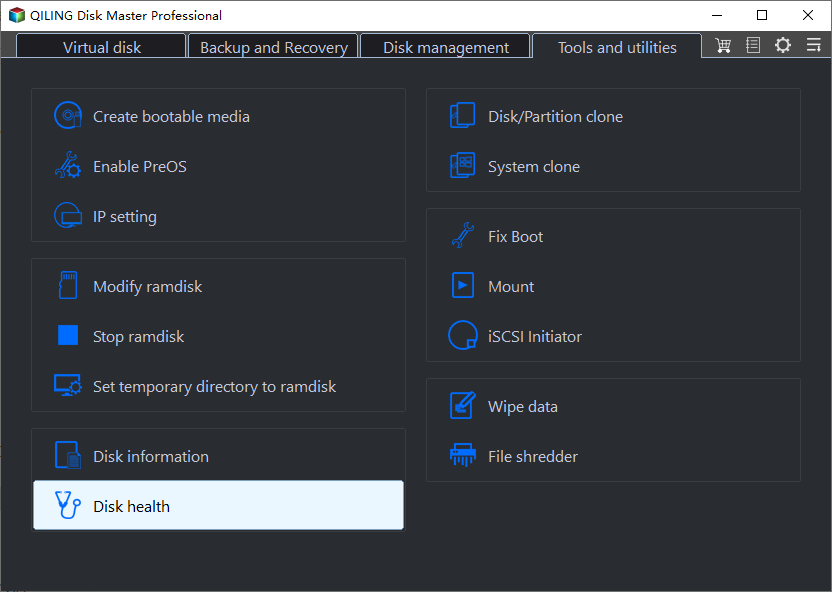
Step 1. Launch Qiling Disk Master, click the blue arrow in the "Disk management" section, and activate the "Disk Health" feature.
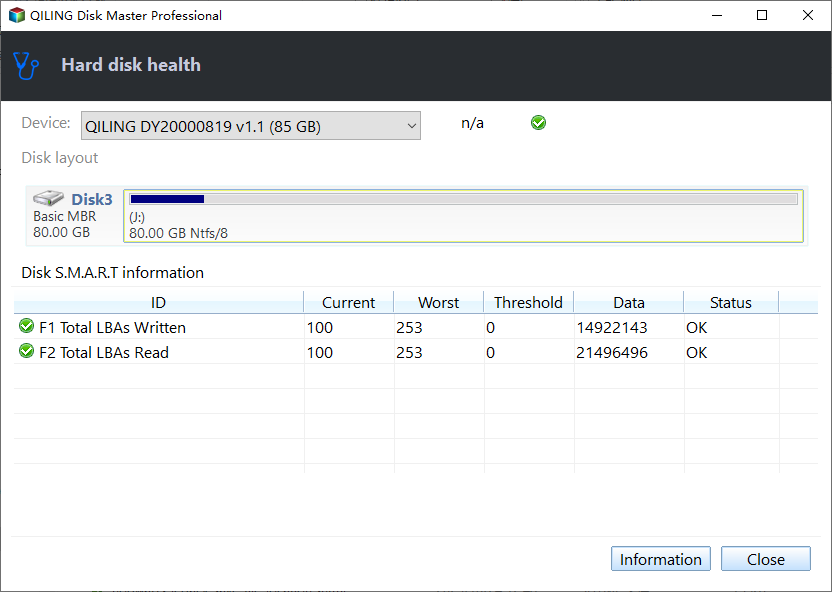
Step 2. To check the health condition of your disk, select the target disk and click the "Refresh" button. This will display the current status of your disk.
Key features of Qiling Disk Master:
- SD card speed test
- Scan and find soft bad sectors on the SD card
- Check SMART status in Windows
- Specify SD card temperature
Explore the capabilities of Qiling Disk Master, a user-friendly tool that allows you to assess and enhance the lifespan of your SD card. Download and try it for comprehensive SD card management.
How to Extend the Life Span of Your SD Card?
Monitoring your SD card's health is crucial for preventative care, and the Qiling Disk Master Professional can be a valuable tool to do so, helping to extend the lifespan of your SD card by monitoring, checking, and repairing it efficiently.
1. Check and Repair SD Card Errors
Step 1. Right-click the target partition that has a problem.
Step 2. Choose "Advanced" > "Check File System".
Step 3. Confirm if you want to hide the partition or not.
Step 4. In the Check File System window, select the "Fix the error on the disk" option.
Step 5. Click "Start" to check errors on your partition.
2. Surface Test SD Card - Locate and Repair Bad Sectors
Step 1. Open Qiling Disk Master, right-click the disk you want to check and select "Surface Test".
Step 2. The operation will be immediately performed and all bad sectors will be marked as red.
You can also learn other ways to check the SD card's health, such as running a built-in diagnostic tool on your device, using third-party apps, or checking for physical damage like scratches or corrosion. Additionally, you can try formatting the SD card and then reinserting it to see if it resolves any issues.

To check the health of an SD card on Windows, follow these steps: Insert the SD card into your computer, right-click on the Start menu and select "Device Manager." In the Device Manager, expand the "Disk drives" section, find your SD card, and right-click on it.
Windows users can check the health of their SD card using two safe and efficient methods.
3. Clean Up SD Card
The article highlights several powerful features, including the features listed below. For more information on these features, you can explore the following articles.
To extend the lifespan of your SD card, utilize the comprehensive features of Qiling Disk Master. This efficient tool is available for download and can help with optimal SD card maintenance.
Conclusion
SD cards, despite being incredibly useful, have a limited lifespan. Factors such as quality and usage patterns can impact their longevity, but taking proactive measures can help extend their lifespan.
This guide has equipped you with the knowledge to assess your SD card's health and take steps to optimize its performance. Routine monitoring with a tool like Qiling Disk Master is key, providing insightful diagnostics and functionalities with a streamlined interface to monitor and repair disks, ultimately contributing to an extended SD card lifespan.
FAQs About SD Card Lifespan Test
What is the lifespan of a SanDisk SD card? The lifespan of a SanDisk SD card is typically around 10 to 100 years, depending on the model and usage.
1. What is the average life expectancy of an SD card?
SD cards have a variable lifespan, influenced by factors such as data read/write frequency. While theoretically they could last over 30 years with 10,000 cycles, practical usage often results in a 10-12 year lifespan.
2. How do I check the health of my SD card?
To monitor the health of your SD card, you can utilize tools like Qiling Disk Master. Download and install the software, then follow the steps to assess the condition of your SD card and ensure optimal performance. This will help you identify any potential issues and take necessary actions to maintain the health and performance of your SD card.
3. Do SD cards fail over time?
SD cards can fail due to usage, environmental conditions, or manufacturing defects, leading to data loss and corruption.
Related Articles
- Guide to Check Disk Space Using PowerShell [2024 Tutorial]
- How to Fix 'Can't Extend Volume' in Windows Server [2024 Guide]
- How to Resize NTFS Partition in Windows 11/10 [Full Guide]
- [Useful Guide] How to Free Up Disk Space on PC
To free up disk space on your PC when it's running low, consider deleting unnecessary files, uninstalling unused programs, and emptying the Recycle Bin. You can also use the Disk Cleanup tool to remove temporary files, system logs, and other items you don't need. - Upgrade to Windows 11: What You Need to Know?
Can Windows 10 be updated to Windows 11? How to upgrade to Windows 11? Should I upgrade to Windows 11? Refer to the post for answers to those questions. - About Windows 11 22H2 Update--What You Want to Know
Windows 11 22H2 update will become the biggest system update after it's released for 1 year. You can get some details about it and preparer your PC for this update in advance.
Products
Articles & Tutorials
- Data Recovery
- Data Backup
- File Recovery
- File Backup
- System Backup and Restore
- Disk and Partition Clone
- Technical articles
- Mobile articles
- Disk Master Help
- Windows Data Recovery Tutorials
- Windows Secure Delete Tutorials
- Windows Partition Management Tutorials
- Windows File Backup and Restore Tutorials
- Windows System Backup and Restore Tutorials
- Windows Disk Backup and Restore Tutorials
- Windows Clone Tutorials