[Solved] SQL Server Error 3013/3266: Backup Database Is Terminating Abnormally
Overview of MS SQL Server Error Code 3013/3266
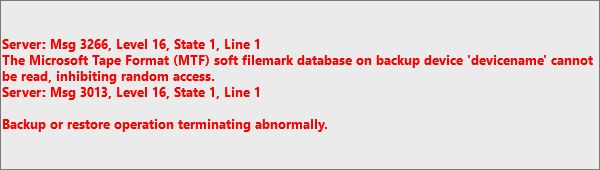
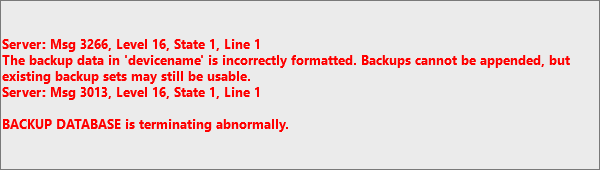
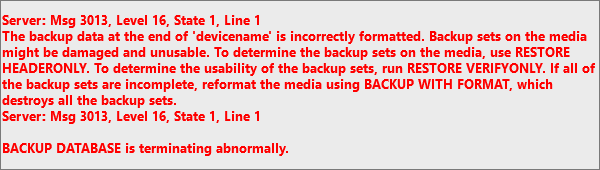
When attempting to perform a database backup to a disk or tape, or a restore from disk or tape, error 3013/3266 may occur, resulting in different messages for different SQL users.
For SQL Server 7.0 Users:
For SQL Server 2000 Users:
For SQL Server 2005 Users:
What Can Cause Error Code 3013/3266
Here are the possible reasons for the "BACKUP DATABASE is terminating abnormally" error:
- Media failure in which the data backup has been stored.
- "A write failure during backup execution can cause simultaneous issues, potentially leading to data loss or corruption."
- Connectivity loss occurred during the network backup procedure.
- The 2 GB database is too large to be restored in the existing database because the existing database is larger than 2 GB.
- The database is unable to read the file mark, which is available in a backup device or inaccessibility of file mark itself.
Method 1. Manually Fix MS SQL Error 3013
To fix the error manually, follow the solutions below:
1. Delete or Erase the Device
To resolve the issue, delete or erase the device to allow new backups to the backup device, but first back up your database to avoid losing important data.
BACKUP DATABASE mydatabase TO DISK='C:\MyDatabase.bak' with FORMAT
2. Run Query Analyzer
If the error message occurs during a restore operation, it may be possible to retrieve other backup sets from the device by specifying the file number. Run the following command to retrieve the backup from Query Analyzer. This can be done by specifying the file number, which may allow you to retrieve other backup sets from the device.
RESTORE HEADERONLY FROM DISK='C:\MyDatabase.bak'
To indicate a specific backup set, you can use a code in the output. Each backup set has one entry in the output. This allows you to specify which backup set you're referring to, making it easier to manage and track your backups.
RESTORE DATABASE mydatabase FROM DISK='C:\MyDatabase.bak WITH FILE = FileNumber
To restore a backup set, you can use the following command: `restic restore --verbose --host
Method 2. Fix Microsoft SQL 3013 Error with Qiling MS SQL Recovery
If error 3013 persists even after trying manual solutions, consider restoring data from a corrupt .bak file, or use Qiling MS SQL Recovery to fix the issue. This advanced database repair software can repair corrupted MDF or NDF SQL server databases and resolve SQL database problems. It offers additional capabilities such as database repair and problem-solving.
- The tool repairs corrupted SQL server database components, including tables, triggers, indexes, keys, rules, and stored procedures.
- Undelete SQL records from SQL Database.
- To save the database scan results, you can use the "Scan and Save" option in the data recovery software. This will allow you to save the scan results to a file, which can then be used to resume data recovery at a later stage.
- Export the repaired file to CSV, MDF, HTML, and MDF formats.
1) Stop the database service. 2) Run the database repair tool.
Step 1: Select the corrupted database for recovery
- Launch Qiling MS SQL Recovery.
- Select the corrupted database file by clicking "Browse" (the two dots) or "Search".
- After selecting the file, click the "Repair" button to initiate the Analyzing process.

Note: To use this software, you need to stop the SQL Server service.
Step 2: Repair the corrupted database
- The software displays all recoverable items in a tree-like structure, with items shown in the left pane.
- To recover a desired component, click on it from the window and then select the "Export" button.

Step 3: Export to the database or as scripts
- You can either export the database objects to a database, or export the items as scripts, depending on your specific needs and preferences. This decision will depend on factors such as the type of database objects you are working with, the complexity of the database schema, and the intended use of the exported data.
- Enter the required information to export to the target database.

- A window will appear, asking you to provide your credentials to connect to the server and specify the destination to save the recovered items. To initiate the repair process, simply click "OK".
Note: The SQL Server service needs to be restarted before clicking "OK" to complete the process.
Related Articles
- How to Export MS SQL Server Database to CSV File
- SQL Database Restore Failed Database Is in Use
- MS SQL Database Restore with Recovery and Norecovery Options
- How to Recover Deleted SQL Server Database without Backup
- How to Repair Corrupt RAW Photos on Windows PC🖼️
Is it hard to repair corrupt RAW photos? The answer is NO. You can easily repair corrupt RAW photos with professional photo repair software, Deep Data Recovery. We'll also introduce how to open corrupt RAW photos with the Windows Photos app and convert RAW pictures to other formats. - [SOLVED] Repair Corrupted Photos: JPG/JPEG Repair on Windows
Can I repair corrupted photos? You won't miss learning about five easy ways to repair corrupted photo issues! To understand more, continue to read the entire passage and download the practical image repair tool - Qiling Fixo.
Products
Articles & Tutorials
- Data Recovery
- Data Backup
- File Recovery
- File Backup
- System Backup and Restore
- Disk and Partition Clone
- Technical articles
- Mobile articles
- Disk Master Help
- Windows Data Recovery Tutorials
- Windows Secure Delete Tutorials
- Windows Partition Management Tutorials
- Windows File Backup and Restore Tutorials
- Windows System Backup and Restore Tutorials
- Windows Disk Backup and Restore Tutorials
- Windows Clone Tutorials