External Hard Drive Heating Up: Everything You Should Know
If your external hard drive is overheating, it's likely a sign that it's not functioning properly. When external hard drives get too hot, usually above 50 degrees Celsius, it can lead to data loss or corruption. To protect your data, it's essential to keep your external drive at standard working temperatures, especially when using it for resource-intensive activities like gaming. Regularly checking your external hard drive's temperature and taking steps to prevent overheating can help ensure the safety and integrity of your data.
This article provides a comprehensive guide on the external hard drive overheating issues and offers practical solutions to prevent it. It delves into the reasons behind overheating, such as poor ventilation, high-performance usage, and environmental factors, and provides tips on how to keep your external hard drive cool, including using a cooling pad, placing it in a well-ventilated area, and monitoring its temperature. By following these guidelines, you can ensure your external hard drive operates within a safe temperature range and prolong its lifespan.
Extend Reading: External Hard Drive Temperature Range
What Happens If External Hard Drive Heating Up
Proper temperature storage can extend the lifespan of external hard drives. If they overheat, users may experience issues such as reduced performance, data corruption, and even complete drive failure. Regular cleaning, adequate airflow, and avoiding exposure to direct sunlight or high ambient temperatures can help maintain optimal temperatures for the drive, ensuring it runs smoothly and efficiently.
- Files cannot be opened One of the most common issues with an overheating external drive is that it can cause data loss or corruption, leading to a loss of important files and information. This can be frustrating and time-consuming to resolve, especially if the drive contains sensitive or irreplaceable data.
- Slow opening speed Heating causes your drive to slow down, resulting in the drive head spinning slower.
- Bad sector error message appears A bad sector error on an external drive can occur due to mechanical damage or overheating, leading to data loss and rendering the drive unusable.
- Strange noises Screeching or unusual sounds from your HDD indicate that your drive is not functioning properly and is more likely to fail.
- Fans are running longer and louder than usual When the fans on your external drive start to spin faster to keep it cool, it's a sign that the drive is getting hot and needs more airflow to maintain its performance.
- Data gets corrupted or deleted Overheating issues can cause data loss on your drive.
- "Blue Screen of Death" The "Blue Screen of Death" is a Windows error that causes the OS to crash, requiring users to run diagnostics and potentially reinstall the OS.
- Notice:
- Regular checkups and maintenance are crucial to ensure a smooth and safe experience with your external hard drive, as errors are prevalent across Windows, macOS, and Linux devices. To maintain your drive's health, you should run regular checkups to identify any potential issues. In the next part, we'll explore how to check if your disk is failing.
External hard drives can indeed overheat, just like internal hard drives. To check if your external hard drive, such as a WD, Seagate, or Sandisk, is overheating, you can follow some troubleshooting steps. This tutorial is designed to help you identify and address overheating issues with your external hard drive.
How to Check If External Hard Drive Heating Up
Now that you know what errors you might face with your external hard drive heating up, here are some quick and effective solutions. The easiest way to run these methods is by using software known as Qiling Disk Master, which can be downloaded from here.
This drive management app helps you keep your hard drives running smoothly and monitor their health to safeguard your data. To fix your heating hard drives, follow the methods below.
Way 1. Check External Hard Drive Temperature
Temperature detection allows you to see if the external hard drive's temperature is regular, preventing errors and keeping it working perfectly. To run this scan, use the "Check Disk Health" tool in the Qiling Disk Master app, which can check the hard drive's temperature. This process is quick and easy.
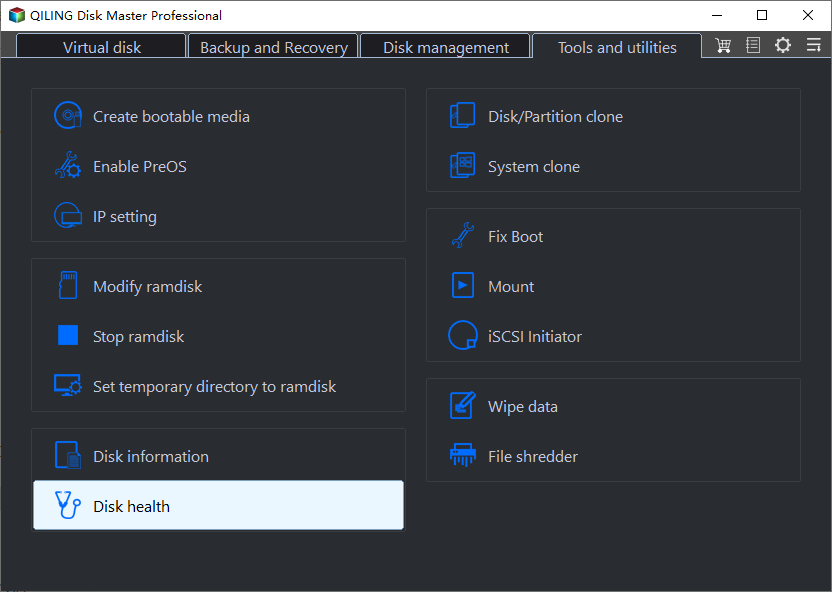
Step 1. Launch Qiling Disk Master and click the blue arrow to activate the "Disk Health" feature under the "Tools and utilities" tab page.
Step 2. Click the "Refresh" button on the target disk to see its health condition.
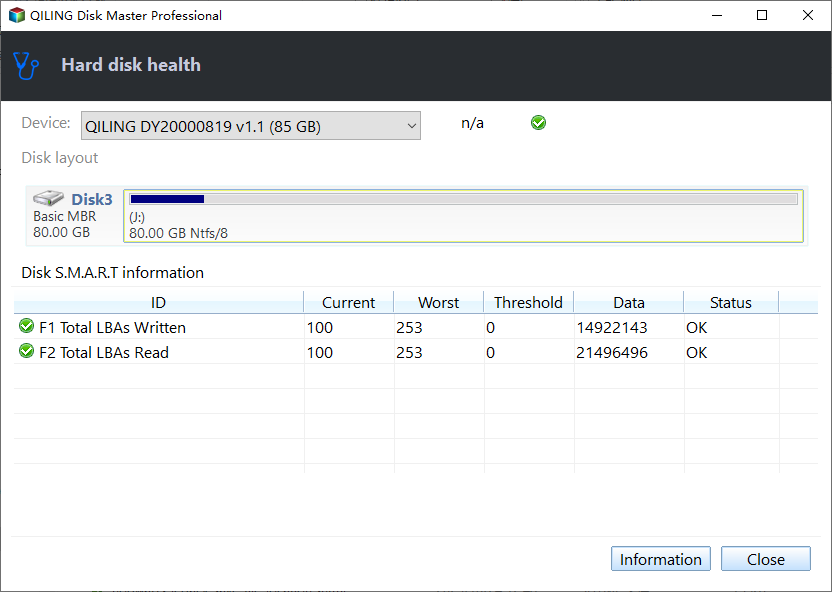
Qiling Disk Master is a tool that provides detailed information about your drive's status. When you check hard drive health, it not only shows the temperature data but also gives a performance score of your drive. If you find it useful, you can share it with others by clicking the buttons below.
Way 2. Check External Hard Drive Bad Sector
"Bad Sector" detection is used to identify if a failure is causing the computer to struggle to load files, resulting in slower hard drive performance and extended loading/lookup times.
To solve the issue of external hard drive errors, you can use Qiling Disk Master's "Disk Surface Test" tool to scan your drive for "Bad Sector" errors. This tool can help identify any problems with your external hard drive, allowing you to take corrective action and prevent further issues. To use this tool, follow the process outlined in the instructions.
Step 1. Open Qiling Disk Master, right-click the target disk, and select "Surface Test".
Step 2. The operation will be performed immediately, and all bad sectors will be marked as red.
Qiling Disk Master is a powerful tool that can fix small errors and is related to disk partition. It can help with partition errors.
- Tip
- Formatting the external hard drive and scanning it with Partition Master may help resolve the heating issue, but be sure to back up your files first.
How to Fix External Hard Drive Overheating and Keep Hard Drive Cool
Qiling Disk Master will alert you when your external hard drive gets too hot, allowing you to monitor its temperature condition with its professional temperature detection tool. If your external hard drive is overheating, follow these essential tips to keep it cool:
- Improve air circulation: Place your computer where you can move freely around it.
- Clean the vents: Dust accumulation in the vents can hinder airflow, ultimately affecting the fan's ability to cool the device effectively.
- Upgrade the cooling system: To improve the cooling system, consider installing a more powerful fan or a liquid cooling system, also known as a "liquid water cooling system" or "cash water cooling system" (note: the latter is likely a typo and should be "liquid" instead of "cash").
- Pay attention to usage: Avoid opening multiple programs and files at a time.
There are various ways to cool the temperature of your hard drive, including reducing its loading burden and removing malware, which can help to cool the drive and prevent overheating.
Conclusion
With everything covered, we've reached the end of the article. Hopefully, the fixes above have helped you resolve your overheating external drive issue and safeguard your data. Additionally, you now have a better understanding of potential problems that can arise if your hard drive overheats.
I highly recommend using Qiling Disk Master to manage and maintain the health of your external drive, allowing you to monitor activity and prevent heating issues.
FAQs About External Hard Drive Heating Up
While we have covered everything above, you might have some queries left. So, if you still have questions about your external hard drive heating up, follow the FAQs below.
1. Why is my external hard drive overheating?
Your external hard drive might be overheating due to various reasons. Common causes include a faulty cooling system, dust accumulation, or a malfunctioning fan, which can prevent the hard drive from dissipating heat properly. Additionally, issues with the drive's power supply or a malfunctioning thermal sensor can also contribute to overheating.
- Blocked airflow
- Malfunctioning fans
- Dust clogging vents
- Excessive power draw
- OS creating extra load and performance lag
- Too many file transfers
- Storage capacity is nearly full
To prevent external hard drive failure and overheating issues, keep your drive safe and run regular health checks to ensure your data remains secure. Additionally, maintain a backup of your data to avoid losing it in case your external drive fails. This simple proactive approach will safeguard your valuable files and prevent potential data loss.
2. Is it normal for an external hard drive to get hot?
External hard drives can run warm when in use, but if they get too hot to touch, overheating might be an issue. Most can be used 24/7 without problems, and some high-end models have a built-in fan for cooling.
To avoid overheating and prolong the lifespan of your hard drive, ensure that any covering or obstruction, such as a laptop stand or a thick case, doesn't block the vent. Additionally, allow the hard drive to rest periodically to prevent excessive wear and tear.
3. How hot should the external hard drive be?
The standard operating temperature for external hard drives is between 0 °C (32°F) to 60°C (140°F), and manufacturers generally recommend staying within this range. It's a good idea to check your hard drive's temperature and performance to ensure it's working normally and not overheating.
Download Qiling Disk Master to check your external hard drive's health with the "Check Disk Health" tool, which also offers other benefits and lets you monitor your hard drive health without affecting its performance, and even format and fix errors with one click.
4. Do I need an external hard drive with fan?
External drives can overheat when running multiple programs or playing games, but whether they need a fan depends on their model and design. Some enclosures are designed for cooling and don't require a fan, while others may need one to dissipate heat and extend the drive's lifespan.
Related Articles
- MacBook Error Code 50: How to Fix the Mac Error on External Hard Drive
- How to Solve the Mac Error Code 100006 [ 8 Proven Ways]
- 3 Ways to Force Shut Down Mac
- Not Enough Space for macOS Sonoma on MacBook Pro/Air [4 Proven Fixes]
- 7 Days to Die Save File Location [Every Detail You Want to Know]
The 7 Days to Die save location is a file that can be tricky to find. This article aims to guide you in locating it and creating a backup, which is essential for future game saves. - What Is Apple Universal Control, All You Need to Know
Apple Universal Control is a feature that allows users to control multiple Apple devices with a single keyboard and mouse, making it easy to switch between Mac and iPad.
Products
Articles & Tutorials
- Data Recovery
- Data Backup
- File Recovery
- File Backup
- System Backup and Restore
- Disk and Partition Clone
- Technical articles
- Mobile articles
- Disk Master Help
- Windows Data Recovery Tutorials
- Windows Secure Delete Tutorials
- Windows Partition Management Tutorials
- Windows File Backup and Restore Tutorials
- Windows System Backup and Restore Tutorials
- Windows Disk Backup and Restore Tutorials
- Windows Clone Tutorials