What Does SMART Status Mean, Here Is Everything You Want
This guide explains what SMART status means and shows you how to thoroughly inspect your hard disk using it. SMART (Self-Monitoring, Analysis, and Reporting Technology) status indicates the health and reliability of your hard disk drive, providing valuable information for maintenance and troubleshooting.
Yes, there are ways to check the health of your hard drive and predict its lifespan. You can use built-in tools like the built-in disk check utility in Windows or the Disk Utility app in macOS to scan for errors and bad sectors. Additionally, you can use third-party software like CrystalDiskInfo or HD Tune to monitor your hard drive's performance, temperature, and other metrics.
Modern hard drives use S.M.A.R.T. status to assess their stability and determine if they will fail. S.M.A.
What Does SMART Status Mean
S.M.A.R.T. is a monitoring system that tracks and reports various drive reliability indicators to predict potential hardware failures in solid-state drives and hard disk drives.
The SMART status alerts the user of a potential impending drive failure, allowing them to take action to avoid data loss and replace the failing drive to maintain data integrity, making regular SMART status checks crucial.
Unfortunately, Command Prompt only allows you to view the very basic S.M.A.R.T. status in Windows, so if you want to see this data in full, you'll need to use a third-party app.
A Professional Tool to Check SMART Status
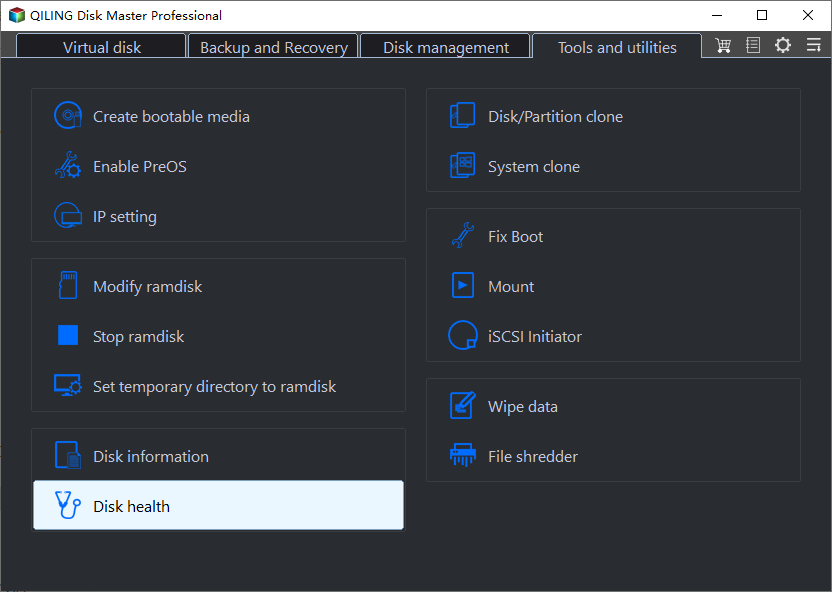
You can quickly and easily check the SMART status with a few clicks using Qiling Disk Master, whose "Disk Health" feature is straightforward to find on its user-friendly interface in the discovery section.
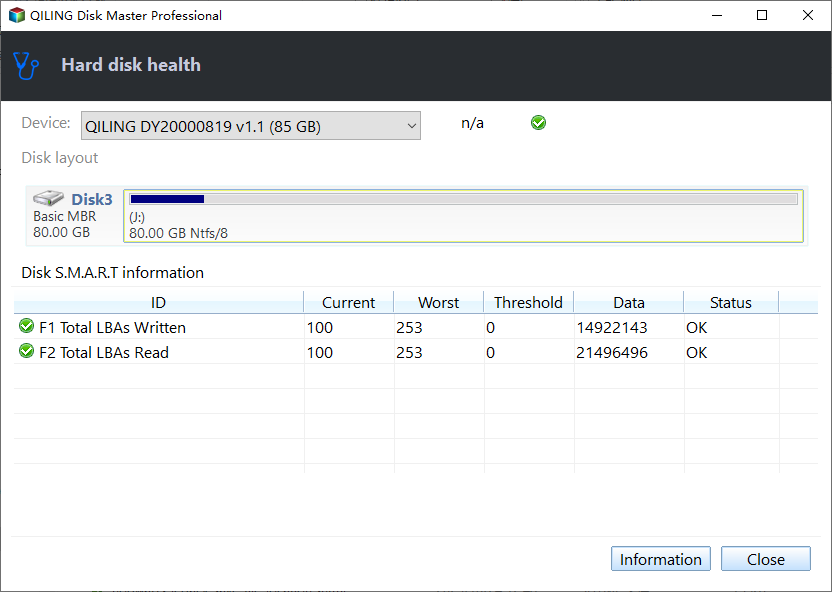
Here are the parameters that can be found in the SMART status of your drive using the Qiling Disk Master: The number of hours the drive has been in use, the number of times the head has been moved, the number of times the drive has been powered on, the number of hours the drive has been powered on, the number of times the drive has been started, the number of times the drive has been stopped, the number of times the drive has been accessed, the number of times the drive has been written, the number of times the drive has been read, and the number of times the drive has been bad sectors detected.
- Temperature
- Unsafe shutdowns
- Controller busy time
- Hard drive/SSD status
- Total host writes/reads
- Power cycles and more
Download this tool and use it to check the health condition of your hard drive or SSD now.
Step 1. Launch Qiling Disk Master, click the blue arrow to activate the "Disk Health" feature under the "Tools and utilities" section.
Step 2. Select the target disk, and you can see the health condition of your disk.
Qiling Disk Master offers a range of features that make it a powerful tool for disk management. With its ability to create bootable USB drives, clone disks, and recover data from damaged disks, it provides a comprehensive solution for various disk-related tasks.
- Check disk
- Check hard drive health
- Check SSD temperature Windows 10/11
- Repair bad sectors on SD card/external hard drives
- Check SSD health on Windows 10 and Windows 11\8\7\Vista/XP
- Resize/delete/create/move/ partitions to manage your hard drive well
Qiling Disk Master allows you to check the SMART status without needing any commands, making it user-friendly even for beginners.
Conclusion
If your disk fails, you risk losing data, system lag, and monetary loss. Regularly checking your drive health is essential to minimize or avoid these issues.
SMART status is a blessing as it helps monitor the health condition of your drives without using a single command. Using a credible third-party tool like Qiling Disk Master, you can check the health condition of your hard drive and SSD. Download the Qiling Disk Master tool to see the SMART status of your drives.
What Does SMART Status Mean FAQs
The article provides a comprehensive overview of SMART status and its role in determining a disk's health, as well as providing a tool to check the SMART status of your drive.
However, if you still have questions about the software or your drives, please check the FAQs below.
1. What does SMART status failing mean?
If your SMART status is failing, it means your hard disk or SSD may crash or become corrupted at any time, requiring immediate attention. However, you don't need to panic as you can take a backup of your data and have the drive replaced or repaired.
2. What is SMART status in BIOS?
The SMART status links the BIOS of your device and the storage drive, enabling the BIOS to handle data from the storage device and determine whether to write a warning message about a potential drive failure. This feature is enabled by default in the BIOS, requiring no changes for it to work.
3. How do you read SMART status?
To quickly check the SMART status of your drive using Command Prompt, follow these steps: Open Command Prompt as an administrator, type "chkdsk /r" and press Enter. This will scan the drive for errors and display the SMART status. If the drive is in good condition, the SMART status will be displayed as "OK" or "Good". If the drive is in bad condition, the SMART status will be displayed as "Bad" or "Failing".
Step 1. Open the "Command Prompt" terminal on your Windows PC.
Step 2. The command "wmic diskdrive get model, status" is a Windows command-line utility used to retrieve information about the disk drives connected to a system. When you run this command in the Terminal, it will display a list of disk drives along with their model and status.
Related Articles
- Restore Deleted/Crashed Notepad ++ Files from Backup
- Fix WD External Hard Drive Not Showing Up/Recognized Error [2024 Tutorial]
- Fix CS:GO "VAC Was Unable to Verify Your Game Session"
Struggling with the error: VAC was Unable to Verify Your Game Session? This guide has 5 best solutions to fix the issue within a few minutes. - [Detailed Guide] How to Fix Cyberpunk 2077 Saves Missing
Losing game progress is a total nightmare, but if your Cyberpunk 2077 save files disappear, there are steps you can take to prevent it from happening again. You can follow simplified ways to fix the issue and ensure your progress is safe. - How to Uninstall Sonoma Without Losing Data
Do you want to discover how to uninstall Sonoma without losing data on your Mac? Let's learn efficient fixes and backup methods for a worry-free process. - Universal Control Not Working? How to Fix on Mac/iPad
Consider this article to learn about the Universal Control not working error on the macOS and iPadOS. If you're wondering how to fix Universal Control not working on macOS, it shows the top 6 ways to eliminate the error.
Products
Articles & Tutorials
- Data Recovery
- Data Backup
- File Recovery
- File Backup
- System Backup and Restore
- Disk and Partition Clone
- Technical articles
- Mobile articles
- Disk Master Help
- Windows Data Recovery Tutorials
- Windows Secure Delete Tutorials
- Windows Partition Management Tutorials
- Windows File Backup and Restore Tutorials
- Windows System Backup and Restore Tutorials
- Windows Disk Backup and Restore Tutorials
- Windows Clone Tutorials