How to Clone an M.2 2230 NVMe SSD to a New Drive
The M.2 2230 SSD is a short NVMe drive used in compact devices such as Microsoft Surface tablets, the Steam Deck, the ROG Ally, and thin ultrabooks. It is only 30 mm long, so it fits where a standard 2280 drive cannot. Upgrading one means cloning the existing 2230 to a larger 2230, or to a 2280 through an adapter when the device supports the longer size.
This guide explains the 2230 form factor, which devices use it, how M.2 keys and PCIe lanes affect compatibility, and the steps to clone a 2230 SSD without reinstalling Windows or the device's operating system.
PAGE CONTENT
- What Is an M.2 2230 SSD?
- 2230, 2280, Keys and PCIe Lanes
- Choose the Right Replacement Drive
- Clone the 2230 SSD with Qiling Disk Master
- Install the New Drive and Boot
- FAQs About 2230 SSD Cloning
- Back Up the 2230 SSD First
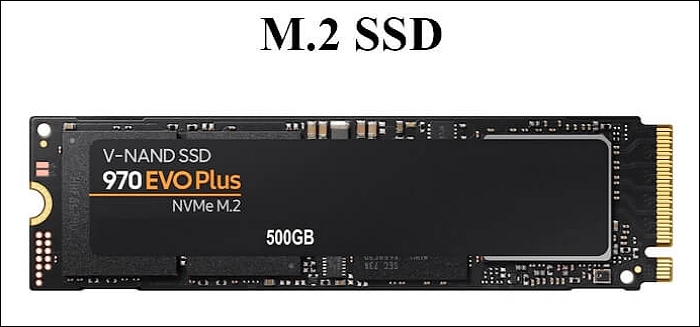
What Is an M.2 2230 SSD?
- 22 mm by 30 mm. The 2230 name means 22 mm wide and 30 mm long, much shorter than the common 2280 drive.
- Single-sided chips. Most 2230 SSDs put all memory chips on one side to keep the profile slim for tablets and handhelds.
- Low power and heat. Smaller controllers and fewer chips mean lower power draw and less heat inside a tight enclosure.
- Common in compact devices. Surface Pro 7 Plus and later, Surface Laptop 3 and later, Steam Deck, and ROG Ally use 2230 drives.
- Capacities up to 2 TB. 2230 drives are available from 256 GB to 2 TB, though 4 TB models are still rare.
Because a 2230 SSD is so small, it often uses a x2 PCIe link instead of x4. This limits top speed compared with a full 2280 NVMe, but it is still much faster than a SATA SSD. Check the device's manual to see whether its slot uses x2 or x4 lanes.
2230, 2280, Keys and PCIe Lanes
- M key for NVMe. NVMe SSDs use the M key notch, which has five pins and supports up to four PCIe lanes.
- B key for SATA. SATA M.2 drives use the B key; an M.2 slot can accept one or both depending on the notch.
- 2230 to 2280 adapter. A small adapter extends a 2230 drive to fit a 2280 slot, but it cannot make a 2280 fit a 2230-only slot.
- x2 or x4 lanes. A 2230 SSD may run on two PCIe lanes in some devices, capping speed even if the drive supports x4.
- Check the slot length. Some devices have a 2230-only screw position and cannot physically accept a 2280 drive.
If the device has a 2230-only slot, you must replace the SSD with another 2230 drive. If the slot also supports 2280, you can use a 2280 drive directly, which gives you more capacity and speed options. The M key must be present for any NVMe drive to work.
Choose the Right Replacement Drive
- Match the length. Use a 2230 drive if the slot is 2230 only; use a 2280 if the slot supports it.
- Check the key. Buy an M-key NVMe drive, not a B-key SATA drive, for an NVMe slot.
- Pick enough capacity. The target must be at least as large as the used space on the source 2230 SSD.
- Watch the thickness. Some 2230 drives are double-sided and may not fit under the device's heatsink or shield.
- Beware soldered drives. On some ultrabooks and tablets the 2230 SSD is soldered to the board and cannot be replaced.
For a Surface device, check the teardown guides before buying. Many Surface models use a standard 2230 M.2 drive under a kickstand cover, but a few have the storage soldered. The Steam Deck and ROG Ally both accept a single 2230 M.2 2230 SSD under the back cover.
Clone the 2230 SSD with Qiling Disk Master
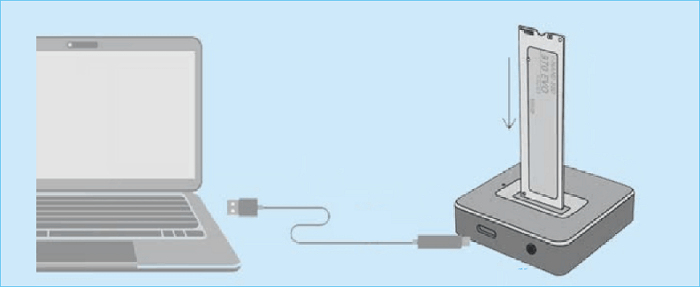
Because most 2230 devices have only one M.2 slot, the easiest workflow is to remove the 2230 SSD, put it in a USB NVMe enclosure, clone it to the new drive, and then swap the drives. Qiling Disk Master aligns the partitions for SSD and preserves the boot layout.
Watch the video tutorial below to clone the drive step by step with Qiling Disk Master.
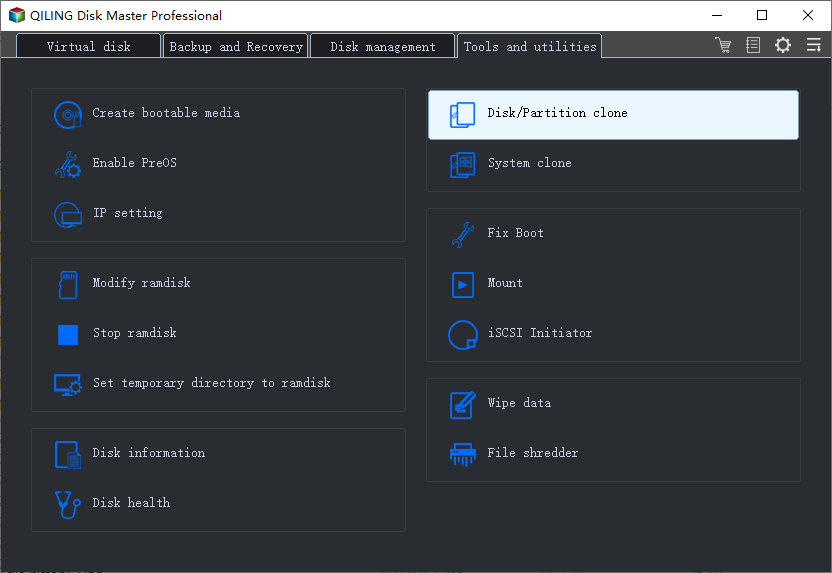
Step 1. Open Qiling Disk Master, choose Clone, and then select Disk Clone.
Step 2. Select the 2230 SSD in the USB enclosure as the source disk and click Next.
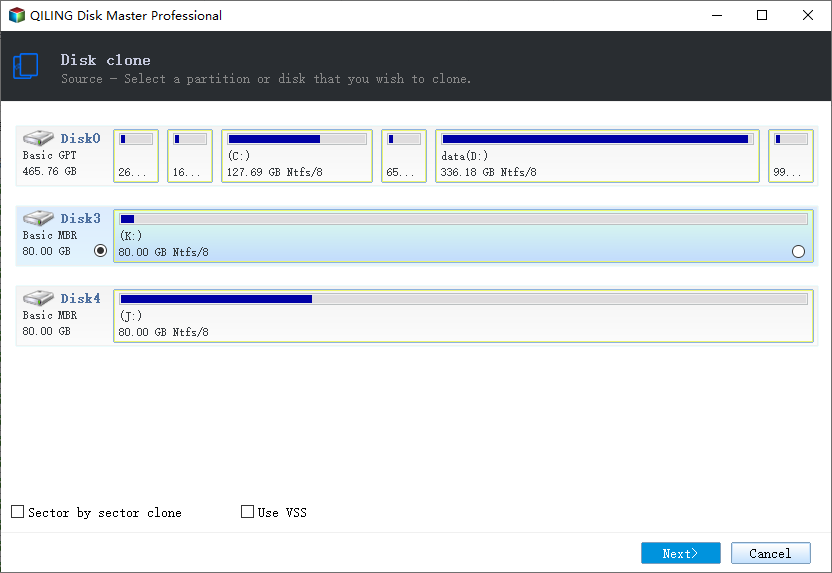
Step 3. Choose the new 2230 or 2280 SSD as the destination and confirm it will be overwritten.
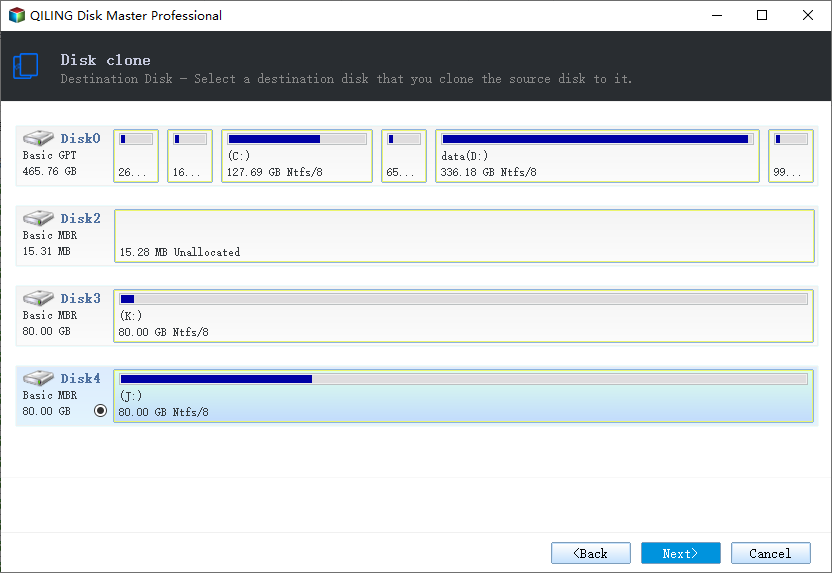
Step 4. Enable SSD Alignment and review the partition layout so the system partition keeps the correct letter.
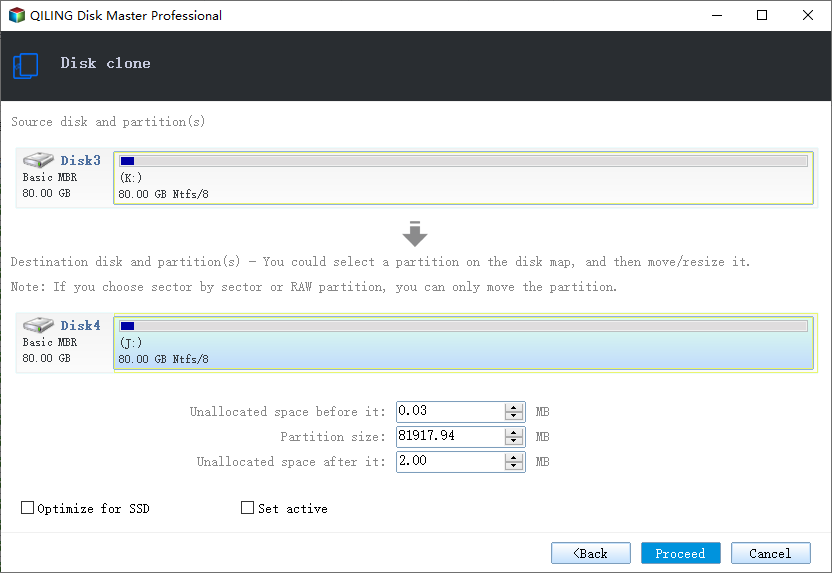
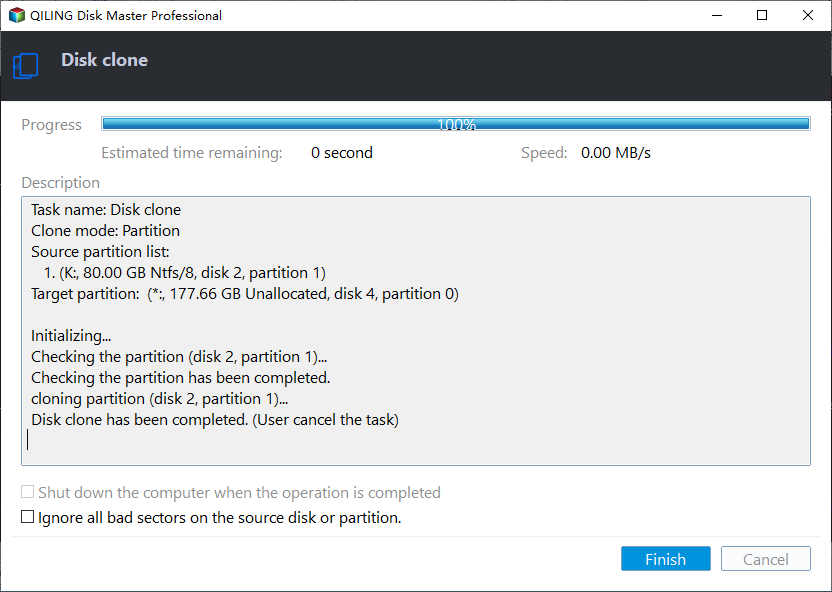
Step 5. Click Proceed, wait for the clone to finish, then shut down before installing the new drive into the device.
Install the New Drive and Boot
- Power off the device. Fully shut down the Surface, Steam Deck, or laptop before opening it.
- Ground yourself. Wear an anti-static strap to protect the SSD and the motherboard from static damage.
- Swap the SSD. Unscrew the old 2230 SSD, slide it out, insert the new one, and tighten the screw.
- Reattach any shield. Put the heatsink or metal shield back in place so the new drive stays cool.
- Power on and test. Start the device and confirm it boots into Windows or the device's operating system.
On the Steam Deck, after cloning the SSD you may need to boot into the SteamOS recovery environment once so it expands the file system to fill the larger drive. On Windows devices, the cloned system boots directly, though you should extend the Windows partition if the new drive has more space.
FAQs About 2230 SSD Cloning
Can I clone a 2230 SSD to a 2280 SSD?
Yes, as long as the device's M.2 slot physically accepts a 2280 drive. If the slot is 2230 only, you must use another 2230 drive.
Why is my 2230 SSD slower than advertised?
Many compact devices only wire two PCIe lanes to the M.2 slot, so a x4 2230 SSD runs at half speed. This is normal and the device still benefits from NVMe latency.
Will cloning the Steam Deck SSD keep my games?
Yes. A sector clone copies the entire SteamOS installation and all installed games. After the swap, let SteamOS resize the partition to use the full capacity.
Can I upgrade the SSD in every Surface device?
No. Some Surface models have soldered storage. Check the teardown for your exact model before buying a replacement 2230 SSD.
Do I need to reinstall Windows after cloning a 2230 SSD?
No. A good clone copies Windows, drivers, and all files. The device should boot directly to the desktop on the first start.
Back Up the 2230 SSD First
Opening a compact device and swapping its SSD carries some risk, and a failed clone can leave the original drive unbootable. Make a full backup image of the 2230 SSD before you remove it so you can restore if the new drive does not work.
Watch the video tutorial below to back up Windows and restore it if the clone fails.
Step 1. Open Qiling Disk Master and select System Backup to image the 2230 SSD while it is in the USB enclosure.
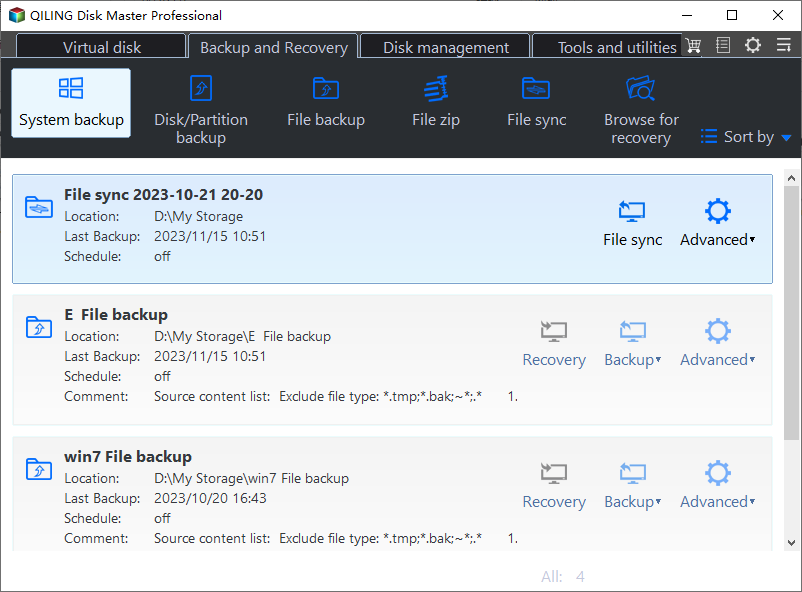
Step 2. Save the backup image to an external drive large enough to hold the whole 2230 SSD content.
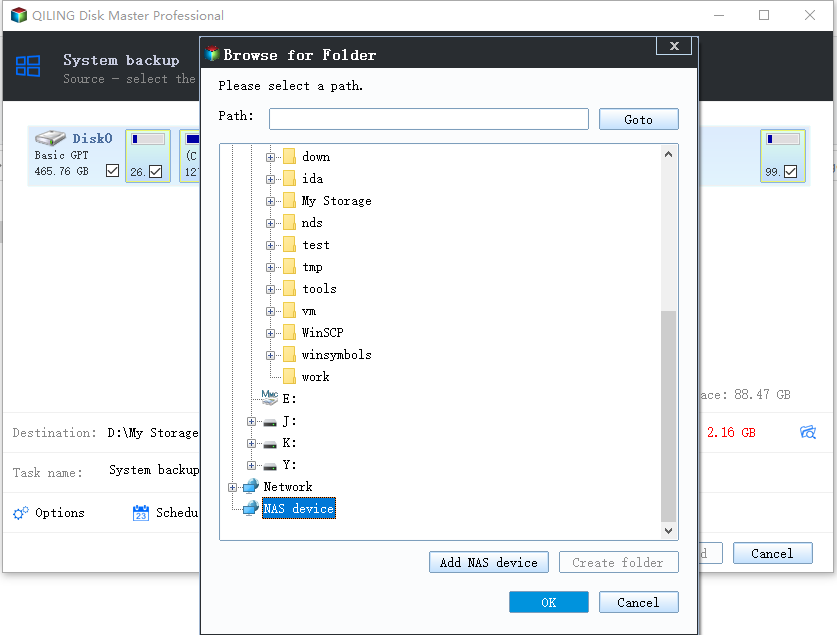
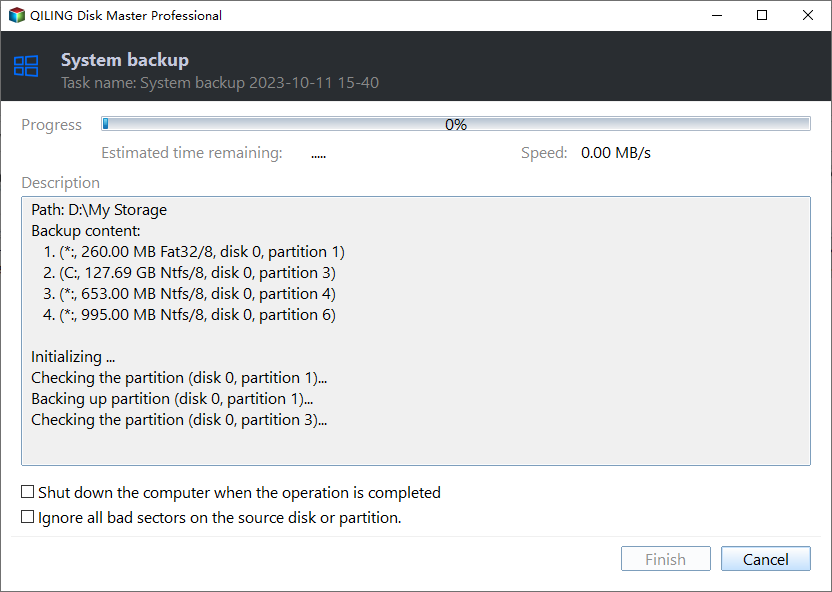
Step 3. Click Proceed to start the backup and wait until the image file is fully written.
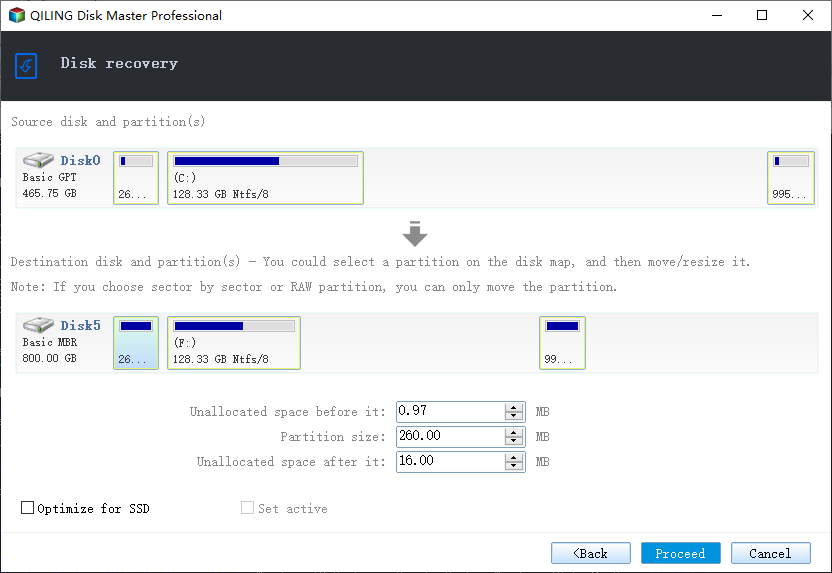
Step 4. If the cloned drive does not boot, restore the image to the new 2230 SSD and try the boot again.
Conclusion
Cloning an M.2 2230 SSD is straightforward once you confirm the form factor, the M key, and the PCIe lane count. Remove the 2230 SSD, clone it to the new drive through a USB enclosure with SSD alignment enabled, then swap the drive in the device. If the slot only accepts 2230, buy another 2230 drive; if it supports 2280, you can use a longer, faster, higher-capacity model.
For more on NVMe and SATA cloning, see Clone an NVMe SSD to a Larger NVMe, Clone a SATA SSD to an NVMe SSD, Clone an External Hard Drive to an Internal SSD, and 4K Alignment When Cloning an SSD.
Related Articles
- Clone a Microsoft Surface SSD
Upgrade the 2230 SSD in a Surface tablet or laptop. - Clone a Steam Deck SSD
Replace the Steam Deck 2230 SSD and keep all games. - MSI Claw SSD Upgrade: Clone the Handheld Drive
Clone over USB, swap the compact M.2 SSD, and check drivers after the swap. - Clone an M.2 SSD with Only One Slot
Clone an M.2 drive when the laptop has a single slot. - Clone an M.2 SSD to a SATA SSD
Move data from an M.2 drive to a 2.5 inch SATA SSD.
Products
Articles & Tutorials
- Data Recovery
- Data Backup
- File Recovery
- File Backup
- System Backup and Restore
- Disk and Partition Clone
- Technical articles
- Mobile articles
- Disk Master Help
- Windows Data Recovery Tutorials
- Windows Secure Delete Tutorials
- Windows Partition Management Tutorials
- Windows File Backup and Restore Tutorials
- Windows System Backup and Restore Tutorials
- Windows Disk Backup and Restore Tutorials
- Windows Clone Tutorials