How to Check Samsung SSD Health on Windows
Samsung SSDs, like other solid state drives, require maintenance to ensure optimal performance and lifespan. Periodically checking the health status of your SSD provides an overview of its working condition. This helps maintain its performance and ensures it continues to function properly.
This guide will help you monitor and ensure the optimal performance of your Samsung SSD by checking its health status in real-time, using the necessary tools to identify any potential issues.
Why Do I Need to Check Samsung SSD Health
We all know that a solid-SSDs are significantly faster than traditional hard disk drives, but their lifespan is often overlooked. SSDs have a limited lifespan and can be affected by how they are used, making it essential to check their health if you experience certain scenarios, such as frequent power outages, overheating, or physical shocks.
- Your computer crashes repeatedly
- The system is taking a long time to save files
- Most files systems aren't working properly
- Encountering unexpected bad sectors
- Multiple files are showing read-only errors
- Access to storage functions slower than before
- Hard drive temperature exceeds the SSD temperature range
How to Check Samsung SSD Health
This section guides you through the two most advanced software for checking your Samsung SSD health, using the professional SSD S. M. A. R. T check tool - Qiling Disk Master Free.
Samsung Magician is a dedicated tool designed by Samsung's manufacturer to help users manage and optimize their Samsung SSDs. It provides a range of features, including a health check, a benchmark, and a secure erase, to ensure the optimal performance and lifespan of the drive.
| Comparison | ||
|---|---|---|
| 🔍Items to Check |
|
|
| 🗃️Supported Device Types | Suitable for SSD, HDD, SD card, USB |
Only Samsung SSD |
| ❤️ Repair Function | Repair bad sectors and file system | Without the repair function |
| 👩💻 Suitable Users | Simple for all | Complex, for experts |
Qiling Disk Master has more features to check Samsung SSD health and is free. You can download it and follow the steps to test its efficiency.
Way 1. Check Samsung SSD Health via Qiling Disk Master
Qiling Disk Master Free provides users with a comprehensive health status of their Samsung SSD, allowing them to check for system issues and access their SSD health report with just a few clicks. It offers a range of features to help users check their Samsung SSD health easily and quickly, including:
- Simple interface and is compatible with all Windows versions.
- Provide real-time results for the corrupted or faulty sectors.
- Offer the right actions if any potential problems are detected.
- Monitor Samsung SSD's health and fix bad sectors and errors.
Download this tool to obtain comprehensive reports on SSD health conditions and follow the guide to get started.
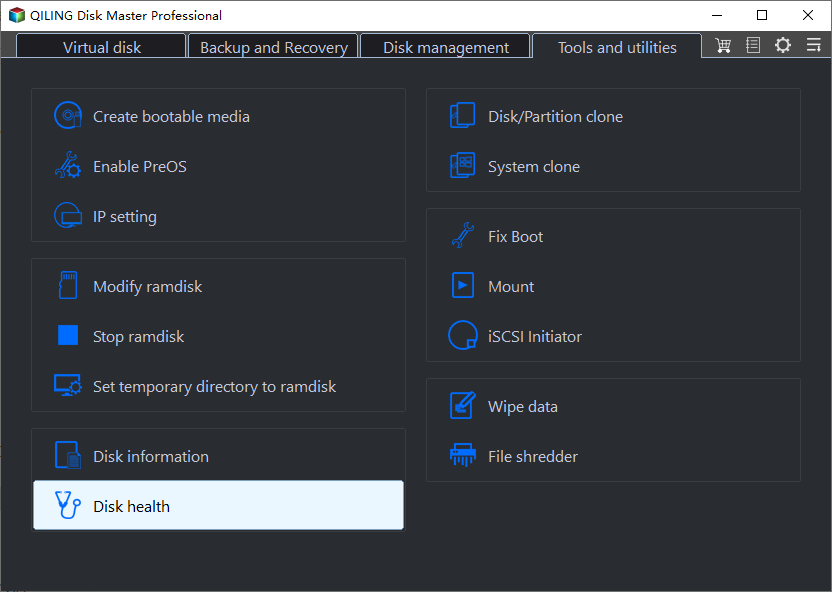
Step 1. Launch Qiling Disk Master, click the blue arrow to activate the "Disk Health" feature under the "Discovery" section.
Step 2. Select the target disk and click the "Refresh" button to view the health condition of your disk.
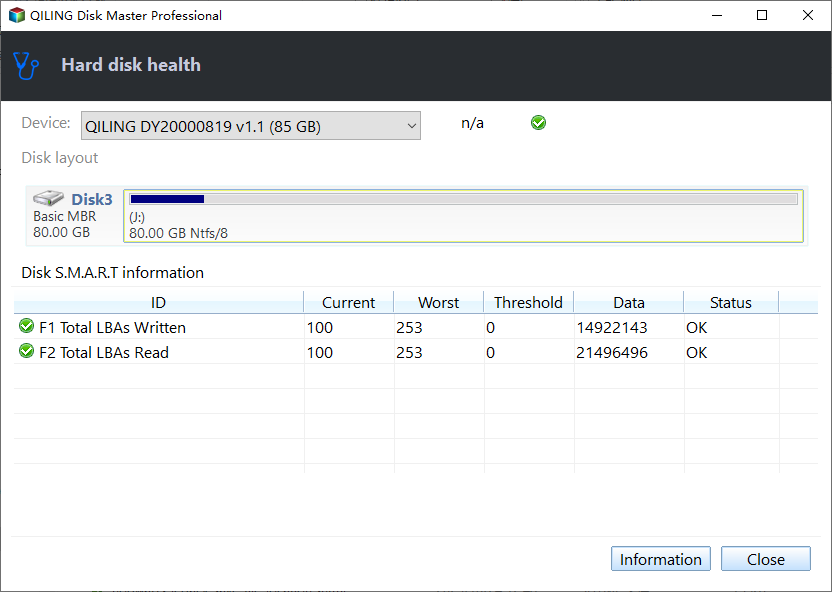
Qiling Disk Master is a tool that can easily and quickly check the health of your hard drive, and if there are any issues, it also provides features to help fix them. Additionally, it can be used as one of the best SSD benchmark tools to monitor the speed of your SSD.
You May Also Like:
Way 2. Check Samsung SSD Health via Samsung Magician
Samsung Magician Tool is a software designed by the manufacturer to test and troubleshoot Samsung SSD health. However, its interface can be confusing for non-tech-savvy users, resembling more of a management suite than a typical SSD analysis program.
Here are the steps to perform an integrative S. M. A. R. T. check on your Samsung SSD:
Step 1: Samsung Magician is a software tool that helps you to monitor and manage your Samsung SSD. To download the software, go to the official Samsung website and look for the "Magician" page. Click on the "Download" button to get the installation file. The link is https://semiconductor.
Step 2: After downloading the application, install it by following the steps provided, which will guide you through the installation process.
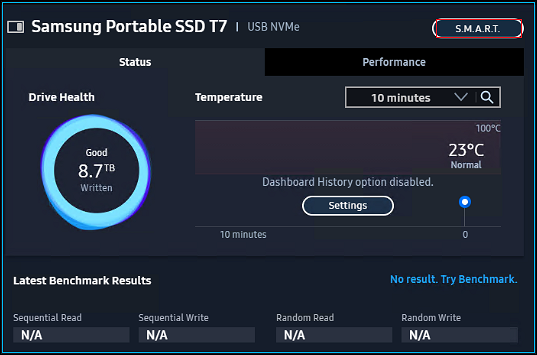
Step 3: Once installed, launch the app, and go to the Drive Dashboard menu.
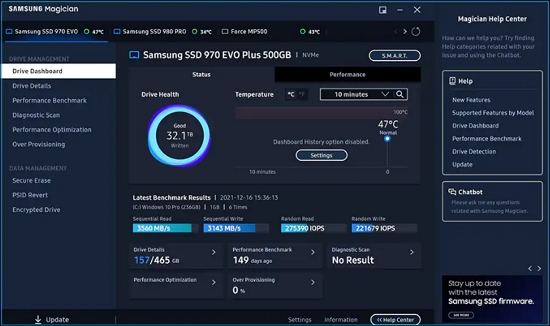
Step 4: Check the health and temperature status of your Samsung SSD by clicking the Status tab.
- Notice:
- You can choose to check the SSD's health status for a duration of 10 minutes, an hour, or a day.
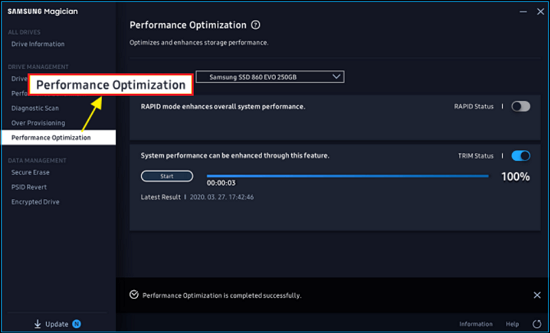
Step 5: To optimize performance, go to the Performance Optimization tab where you can inspect the active time, I/O speed, and read & write speed.
Step 6: To check the S. M. A. R. T. feature on your Samsung device, select the S. M. A. R. T. button beside the Samsung mode. This will take you to the S.
You can click the button below to share this guide with others who may find it helpful.
Conclusion
Checking the health of your SSD is essential for its overall well-being and data safety. To do this, we recommend using a tool like Qiling Disk Master, which can help you monitor and maintain your SSD's health, reducing the risk of data loss and ensuring it continues to work smoothly.
Qiling Disk Master is a software that monitors the temperature of Samsung SSDs in real-time and alerts users to potential issues. It also allows users to run a disk surface test to identify and fix bad sectors on the SSD.
FAQs About Check Samsung SSD Health
To check the health of a Samsung SSD, you can use the Samsung Magician software, which can be downloaded from the Samsung website. The software will provide information on the drive's health, including the total bytes written, the number of bad sectors, and the drive's temperature.
1. Does Samsung SSD fail?
Despite its superior performance, stability, and power efficiency, Samsung SSDs have a relatively short lifespan and limited write cycles, which may cause them to fail before reaching their expected lifespan of five to seven years.
2. How do I check my Samsung SSD health?
You can check the health status of your Samsung SSD using the Samsung Magician Tool, or run an independent program that offers the S. M. A. R. T feature to see the health status of your Samsung SSD.
3. What is Samsung SSD Magician?
Samsung Magician is a software program designed by Samsung to monitor drive health, optimize driver performance, and customize Samsung SSDs.
Related Articles
- Perform Xbox One S Hard Drive Upgrade - Guide with Pictures
- The Local Device Name Is Already in Use
- How to Fix Critical Process Died Error in Windows 11 [2024 🔥]
- Guide to Migrate OS to SSD for Windows 8.1 with Pictures
- How to Burn Windows 11 23H2 ISO to USB | 2024 Latest🔥
To burn the Windows 11 23H2 ISO to a USB drive, you can use a tool like Rufus or the Windows USB/DVD Download Tool. These tools allow you to create a bootable USB drive from the ISO file, which can then be used to install Windows 11. - Troubleshoot and Bypass SMART Failure in Windows 2024 [Full Guide]
This tutorial will guide you through step-by-step solutions to troubleshoot and bypass SMART failure issues in Windows, ensuring optimal performance of your disk.
Products
Articles & Tutorials
- Data Recovery
- Data Backup
- File Recovery
- File Backup
- System Backup and Restore
- Disk and Partition Clone
- Technical articles
- Mobile articles
- Disk Master Help
- Windows Data Recovery Tutorials
- Windows Secure Delete Tutorials
- Windows Partition Management Tutorials
- Windows File Backup and Restore Tutorials
- Windows System Backup and Restore Tutorials
- Windows Disk Backup and Restore Tutorials
- Windows Clone Tutorials