How to Reset a Windows Password [Step-by-Step]
If you've forgotten your Windows PC password, don't worry - you can bypass it and log in again. Qiling's guide shows you how to use their software, Qiling Disk Master, to quickly and securely remove your Windows password. You can also learn how to crack Windows 11/10/8/7 passwords without using any software.
Crack Windows Password with Qiling Disk Master - Safe & Quick
Qiling Disk Master Professional is a computer management tool that helps unlock a locked computer by creating a Windows password USB and resetting passwords.
The Password Reset tool offers a convenient and time-saving solution for resetting Windows passwords without compromising data integrity.
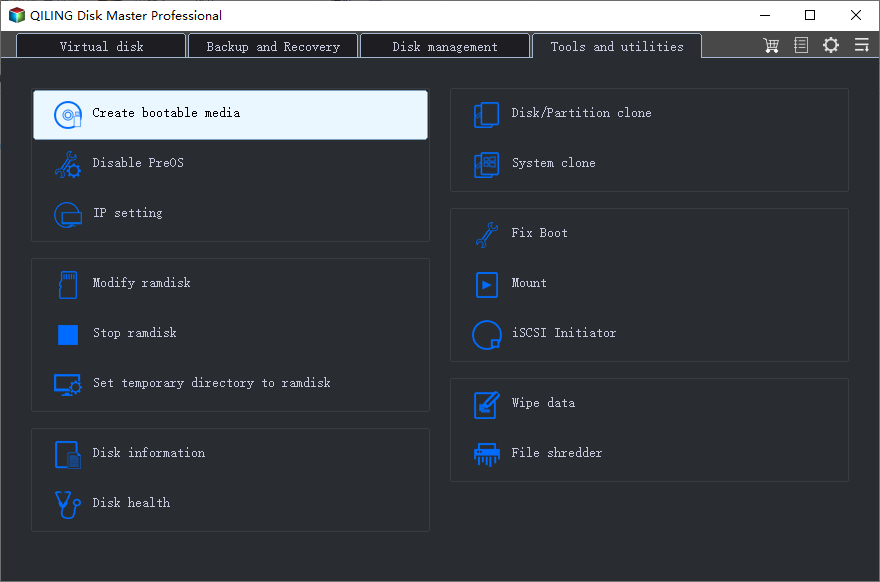
Step 1. Connect a working USB drive/external drive to a computer, open Qiling Disk Master (RE), and click "Create Bootable Media" to create a bootable media.
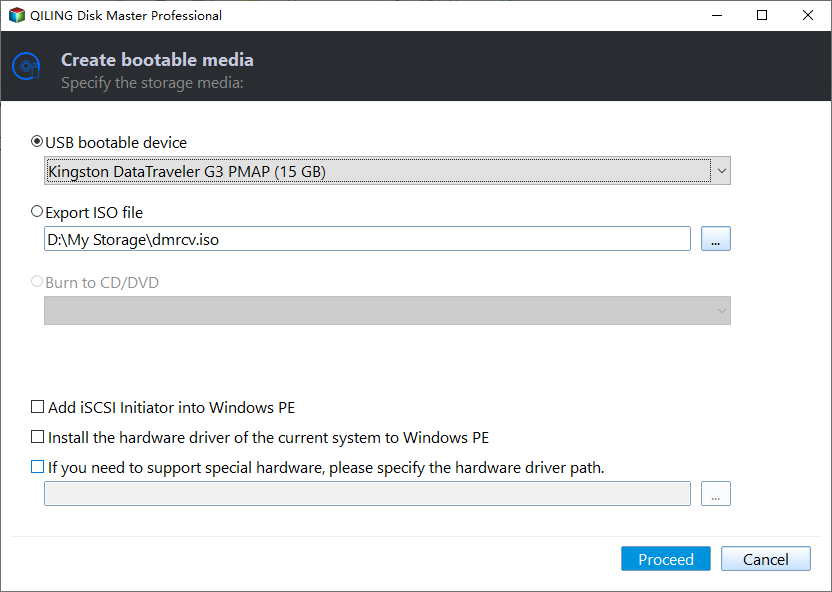
Step 2. Connect your movable device, such as a USB drive or external hard drive, and click "Proceed" to create an image of your device on the drive.
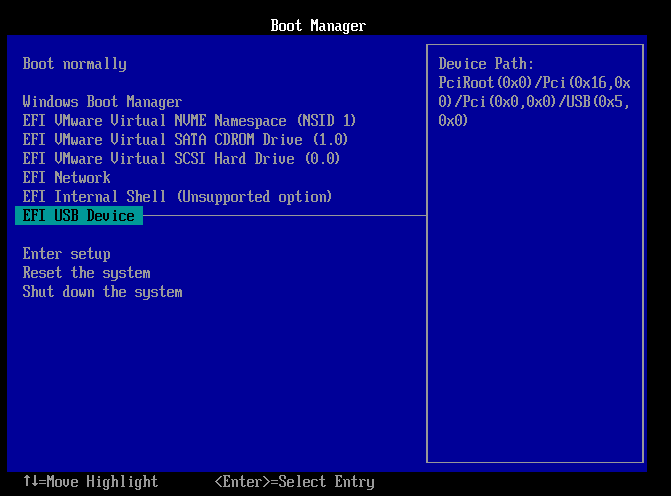
Step 3. Connect a bootable drive to a faulty computer, reboot it by pressing F2/Del to enter BIOS, set the bootable drive as the boot disk, and exit by pressing F10.
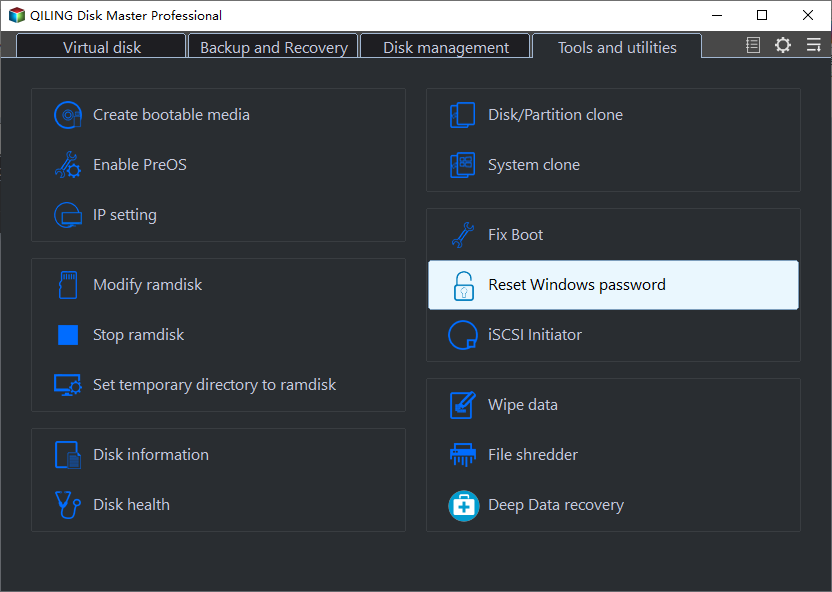
Step 4. The computer will enter WinPE desktop, where you can find and launch Password Reset.
Step 5. The process of resetting a Windows account involves selecting the Windows version, which can be Windows 10, Windows 11, or another version, and then choosing the specific Windows account that needs to be reset. This is typically done through the Settings app or the Control Panel, depending on the Windows version.

Step 6. The system will send a message to the user once the password has been changed successfully.
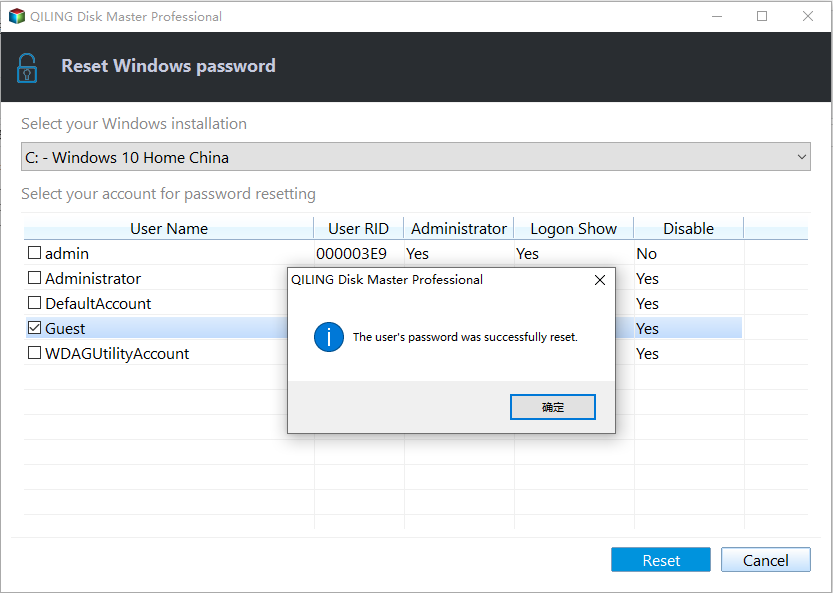
You can use this tool to perform various password-related actions, such as resetting a password, unlocking a locked account, or changing a password.
Crack Windows Password without Any Software
If you don't like third-4 options to crack Windows password without software include using a USB, Windows built-in tools, or other methods.
- 1️⃣Crack Windows Password with CMD
- 2️⃣Crack Windows Password Using USB
- 3️⃣Crack Windows Password via Microsoft Account
- 4️⃣Crack Windows Password via Super Administrator Account
Don't forget to click the share button if you like these methods. You can discuss the solutions to crack Windows password with others who need it.
Crack Windows Password with CMD
If you're unable to log into your Windows system, you can use the command prompt to reset your password. To do this, you'll need to boot Windows using a Windows installation USB. Once booted, open the command prompt and type "net user username *", replacing "username" with the name of the account you're trying to reset the password for.
Step 1. To resolve the issue, insert the Windows installation disk, click on "Repair Computer" from the menu, and navigate to the Command Prompt.
Step 2. Sequentially enter the following commands and hit Enter:
- c: (Change "C" to the letter of the system drive.)
- cd Windows\System32
- ren sethc.exe sethc.exe.bak
- copy cmd.exe sethc.exe
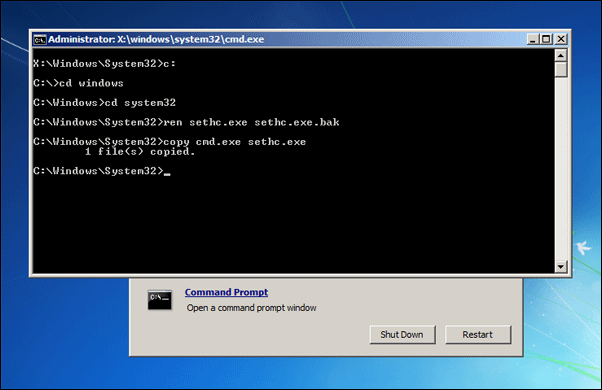
Step 3. To fix the issue, restart your computer after closing the Command Prompt, then reopen the Command Prompt by pressing "Shift" 5 times. This should resolve the problem.
Step 4. Use the following commands to change your Windows password:
- net user
- net user username password
Read Also:

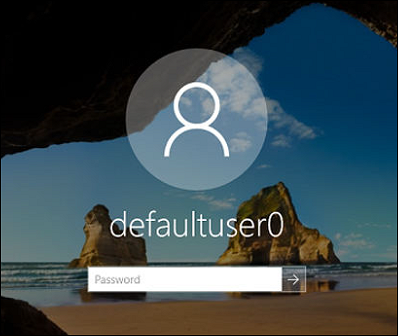
Defaultuser0 Password? Fix It Now! [5 Efficient Ways]
When defaultuser0 appears on the computer screen, don't worry, as this article proposes three solutions to resolve the issue for HP, Lenovo, and Dell users.
Crack Windows Password Using USB
You can crack a Windows password using a password reset or Windows installation disk. All versions of Windows allow you to create a password reset disk and use it if you forget your password. If you want to crack Windows 11 password using a USB, follow the steps.
Step 1. To create a password reset disk, insert the USB drive into your computer and go to the Control Panel, then click on "User Accounts" and select "User Accounts" again from the dropdown menu. From there, click on "Create Password Reset Disk" to proceed.
Step 2. If you forget your Windows 11 password, create a password reset disk, insert it, and log in to the Windows 11 login screen.
Step 3. Enter the wrong password and click the "Reset password" option below the password box.
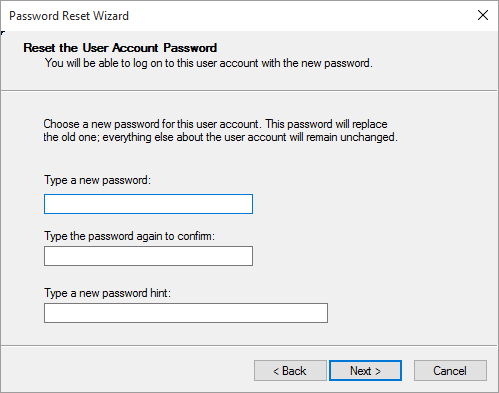
Step 4. To reset your Windows password using a USB drive, follow the password reset wizard. This process typically involves booting your computer from the USB drive, selecting the password reset option, and following the on-screen instructions to create a new password.
Crack Windows Password via Microsoft Account
To log in to your Windows account with Microsoft and reset your forgotten password, go to the Microsoft account sign-in page, click on "Forgot password" and follow the prompts to recover your account and reset your password. If you're using a Windows 10 device, you can also click on the Start button, select Settings, and then click on Accounts, then select Sign-in options and select "Forgot password" to reset your password.
Step 1. Visit the Microsoft password reset site and select "I forgot my password."
Step 2. You can enter your e-mail address, phone number, or Skype username and click Next.
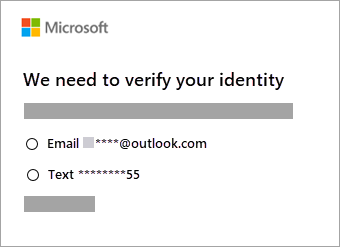
Step 3. Get the code and follow the prompts to crack and reset your password.
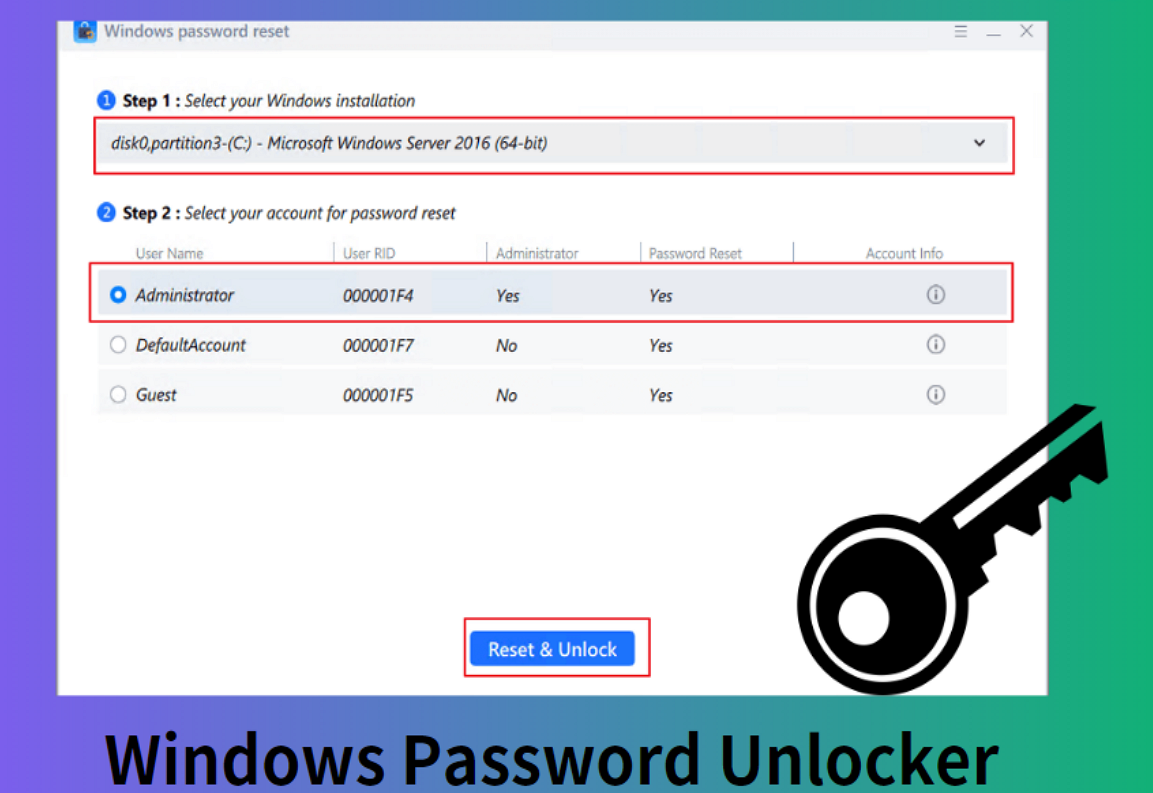
Windows Password Unlocker [Ultimate Guide]
This page provides a professional Windows Password Unlocker - Qiling Disk Master to help with Windows-related issues, including downloading the Windows password unlocker and creating a Windows password unlocker ISO.
Crack Windows Password via Super Administrator Account
Windows has a hidden feature called Super Administrator Account (SAC) that allows you to change your password without needing a USB drive or software. This feature can be used to reset Windows passwords if you're familiar with it.
Step 1. You can access the Super Administrator Account by restarting your computer and pressing the shift key 7 or 8 times as soon as the BIOS screen appears. This will allow you to access the account without having to enter a password.
Step 2: To access the user profiles, log in to SAC, navigate to the Control Panel, and select the "User Profiles" option from the available choices.
Step 3. Follow the on-screen prompts to select the user password name you want to reset and change the password successfully. Next time, log in from your main administrator account.
Conclusion
If you've forgotten your Windows password, don't worry - there are solutions available. For a hassle-free experience, we recommend using Qiling Disk Master, a tool that allows you to reset Windows passwords using a USB without losing any data. This user-friendly solution is suitable for both novices and tech experts, making it a reliable choice for those in need of password reset assistance.
If you're familiar with computer knowledge, you can use the command prompt or XX to crack the Windows 11/10 password without any software. This method allows you to bypass the password requirement and access your computer directly, but it's essential to note that this approach may have security implications and should be used with caution.
FAQs About How to Crack Windows Password
This section addresses frequently asked questions about cracking Windows 10/11 passwords. If you're interested in learning more, keep reading for answers to common queries.
1. How do I unlock my Windows 11 password if I forgot it?
If you've forgotten your Windows password, you can unlock your computer and reset your local account in Windows 11 by using a third-party tool, such as Qiling Disk Master, or by answering a security question to reset the password.
Step 1. From the sign-in screen, click the Reset Password link.
Step 2. Answer the security question and enter a new password.
2. How to break Windows 11 passwords with CMD?
To break the Windows 11 password using the Command Prompt, follow these steps: Open the Command Prompt as an administrator, then type the command "net user" to list all user accounts on the system. Identify the account you want to reset the password for and note its username.
Step 1. To open a Command Prompt window, press and hold the Windows key and the R key, then type cmd and press Enter.
Step 2. To change a user's password, open Command Prompt as an administrator, type "net user username newpassword" and press Enter, replacing "username" and "newpassword" with the actual username and desired password.
3. How do you crack a Windows 10 password?
Windows 10 has similarities with Windows 11, making it easy to crack Windows 11 passwords using the same methods. However, for those who are hesitant, Qiling Disk Master can provide a smart and safe solution for password recovery.
Related Articles
- How to Clone Windows to New SSD [Most Efficient Way]
- Solved: Can't Remove Windows.old Folder in Windows 11/10
- How to Solve "Diskpart Failed to Extend the Volume" [3 Efficient Ways]
- Fix for Low System Reserved Partition on MBR/GPT Disk in Windows 7/8/10
- How Do I Force Format SD Card on Windows 11/10? Your Guide Here
Formatting an SD card is usually a simple process, but if it's not working properly, you can try force formatting it to fix errors. This can help resolve issues with the SD card. - Forgot BitLocker Password: How to Recover?
Forgot BitLocker Password? This guide offers step-by-step solutions to help you recover your encrypted drive, regardless of your tech experience level.
Products
Articles & Tutorials
- Data Recovery
- Data Backup
- File Recovery
- File Backup
- System Backup and Restore
- Disk and Partition Clone
- Technical articles
- Mobile articles
- Disk Master Help
- Windows Data Recovery Tutorials
- Windows Secure Delete Tutorials
- Windows Partition Management Tutorials
- Windows File Backup and Restore Tutorials
- Windows System Backup and Restore Tutorials
- Windows Disk Backup and Restore Tutorials
- Windows Clone Tutorials