How to Run Xbox One SSD Performance Test [Step-by-Step Guide]
After upgrading your Xbox One's SSD or adding an external one, you can use reliable tools to measure its speed. This article provides a step-by-step guide on how to test your SSD's read/write speed on Xbox One. First, let's explore if an SSD can improve your Xbox One's performance.
Should You Upgrade Your Xbox One with an SSD
Upgrading your Xbox One with an SSD can significantly improve its performance, especially for data-intensive games like The Witcher 3, making it a worthwhile premium investment.
- The console startup time will be improved, saving an average of 10 to 30 seconds, depending on the OS version and number of applications installed.
- Most games will run faster, but not all.
- The non-moving elements of the SDD are much more reliable.
- SSDs are quieter than traditional hard drives because they have no moving parts, eliminating the noise caused by spinning disks and mechanical components. This makes them ideal for gaming setups, home theaters, and other environments where a quiet atmosphere is desired.
Whether to upgrade or not depends on your financial situation. If you're a dedicated player willing to spend a bit more, the benefits are clear. However, to determine if your SSD actually improves performance on your Xbox One, you'll need to continue reading.
Run Xbox One SSD Performance Test via Qiling Disk Master
Qiling Disk Master is a reliable tool that helps users test their SSD's speed and performance, making it a great choice for newbies in computing. It supports various types of SSDs, including SATA, M.2, and NVMe drives, and allows users to test random read/write, sequential read/write, I/O, and delay with just one click using the DiskMark tool.
Complex Level: Simple, Beginners
Duration: 2-3 minutes
This tutorial guide also applies to Test the performance of a solid-state drive (SSD) on various Xbox consoles, including the Xbox Series X, Xbox 360, and Xbox One X. This evaluation is essential to ensure the SSD can handle the demands of each console's operating system and games.
Preparation:
- Download Qiling Disk Master
- Take out the internal SSD from the Xbox One
- To connect an internal SSD or external SSD to a Windows PC, you can follow these steps: First, ensure the SSD is properly powered and connected to the PC. If it's an internal SSD, insert it into a free PCIe slot on the motherboard.
Step 1. Launch Qiling Disk Master and click the download button to activate the Surface test feature under the Disk management section.
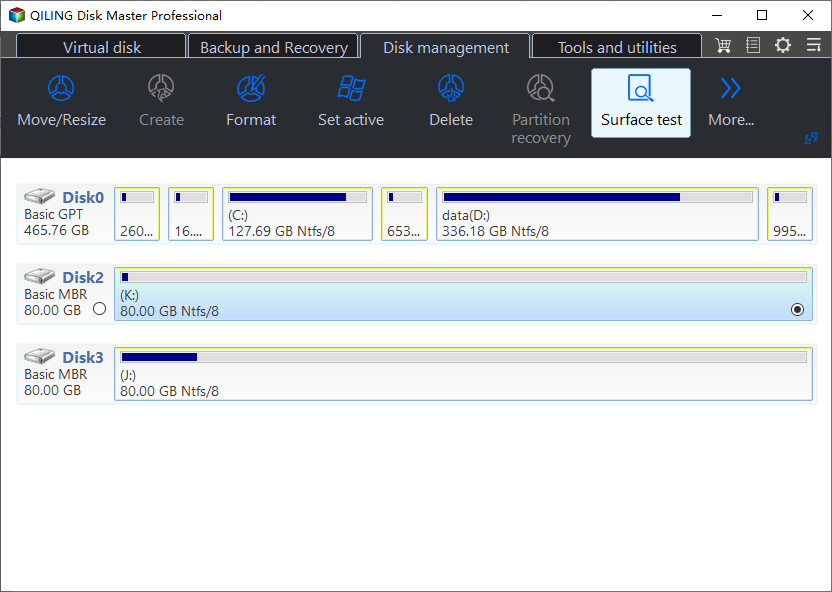
Step 2. Choose the target drive, test data, and block size.
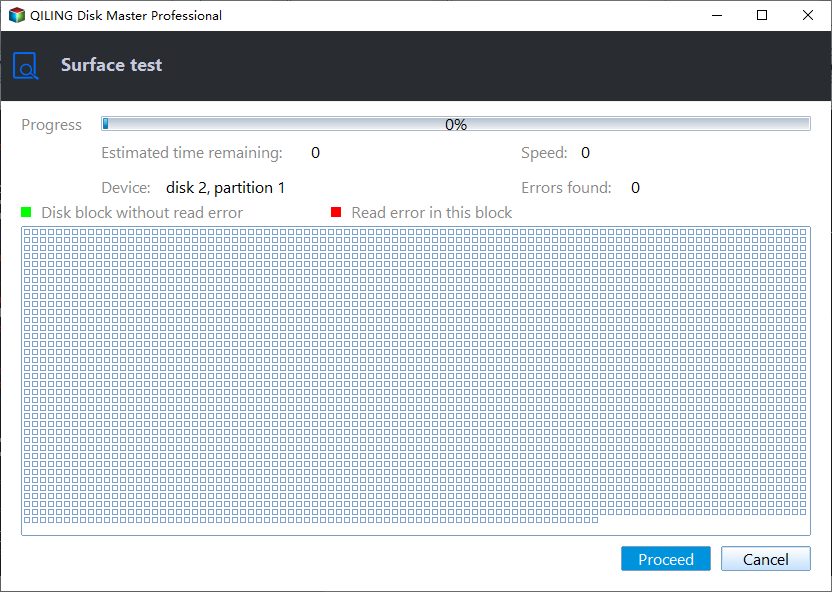
Step 3. Once everything is configured, click "Proceed" to begin the disk test, and you'll see the Sequential read speed, I/O, and Delay data.
If the instructions above are unclear, you can refer to the tutorial video below to check the speed of your hard drives.
Qiling Disk Master is a versatile tool that offers a range of features beyond running Xbox One SSD performance tests. It still provides many other capabilities, such as: (list the features here)
- Run SD card speed test
- Change SSD cluster size
- Format SSD for Xbox One
- Test SSD write/read speed
- Run Steam Deck SD card speed test
- 4K alignment SSD to get better performance
- And more
This tool helps manage your SSD, format SSD, and clone all your gaming data to another SSD or PC. Download it to try and experience its features.
Conclusion
Upgrading to a solid-state drive (SSD) can significantly improve performance across all games on the Xbox One, but if storage space is a priority, a hybrid upgrade that combines an SSD with the existing hard drive might be a better option. Alternatively, using an external hard drive can also help alleviate storage pressure and improve performance, making it a viable choice for those who want to boost their Xbox One's capabilities.
To test the internal or external SSD performance for Xbox One, Qiling Disk Master is a useful tool. With just two clicks, you can get detailed data on your SSD's performance. If you're experiencing an SSD slow write speed issue, this tool can help monitor and resolve the problem.
You may also like the following:
Xbox One SSD Performance FAQs
The Xbox One SSD performance is not as good as the PS5 SSD, but it's still a great option for gamers. The Xbox One SSD has a sequential read speed of up to 2 GB/s and a sequential write speed of up to 1.5 GB/s, which is faster than the standard hard drives used in most gaming consoles.
1. Should you upgrade your Xbox One with SSD?
Installing an SSD for your console won't significantly improve gaming performance, but it can provide a slight upgrade in terms of boot time and overall quietness, making it a cost-effective option for those looking for a minor upgrade.
2. What are the best internal SSDs for Xbox One?
A solid-Here are some recommendations for using a state drive to improve your laptop/PC's performance:
- WD Black SN850
- Samsung 990 Pro SSD
- Seagate Game Drive
- Seagate FireCuda 530
- Samsung 870 QVO
3. Will an external SSD make my Xbox One faster?
An SSD can improve game performance on the Xbox by reducing loading times and making some games run faster, but the extent of the improvement depends on the specific game.
Related Articles
- How to Burn Windows 11 23H2 ISO to USB | 2026 Latest🔥
- Guide to Check Disk Space Using PowerShell [2023 Tutorial]
- How to Format A USB Drive That Doesn't Show Up
- Top 5 Best SSD Speed Test Software Recommend with Pros & Cons
- How to Format SSD for Windows & Mac Installation
To format an SSD for Windows 11/10 installation, you have three options: using the Qiling Partition software, a user-friendly SSD format tool, or formatting via CMD command or Disk Management. Alternatively, if you're using a Mac, you can follow detailed steps to format your SSD. - How to Format SSD with Windows on It? [Windows 11/10/8/7]
Do you know how to format SSD with Windows on it? If you are looking for a solution to format SSD with Windows OS on it, this guide will provide you with an efficient way with Qiling Partition Master.
Products
Articles & Tutorials
- Data Recovery
- Data Backup
- File Recovery
- File Backup
- System Backup and Restore
- Disk and Partition Clone
- Technical articles
- Mobile articles
- Disk Master Help
- Windows Data Recovery Tutorials
- Windows Secure Delete Tutorials
- Windows Partition Management Tutorials
- Windows File Backup and Restore Tutorials
- Windows System Backup and Restore Tutorials
- Windows Disk Backup and Restore Tutorials
- Windows Clone Tutorials