What Are the Benefits of Dynamic Disk?
A dynamic disk offers more flexibility and advanced features compared to a basic disk, allowing for multiple partitions on a single disk, RAID configurations, and expanded storage capacity, among other benefits.
This article provides an in-depth look at dynamic disks, exploring their various aspects and benefits. By the end of this article, you'll have a thorough understanding of dynamic disks and be able to make an informed decision about whether to convert your basic disk to a dynamic one, thereby avoiding any confusion surrounding basic and dynamic disks.
What Are the Benefits of Dynamic Disk
The main benefit of a dynamic disk is its flexibility, allowing for modifications at any time, including the creation of additional partitions or volumes. This also enables the combination of unallocated space from multiple disks to form a single volume, enhancing disk performance. Moreover, dynamic disks with Veritas Storage Foundation for Windows provide additional advantages, such as the ability to upgrade and manage volumes more efficiently.
- A dynamic disk offers enhanced storage management capabilities, enabling users to create and manage volumes more efficiently.
- The system supports multiple RAID levels that enhance data availability and performance by combining multiple disks into a single logical unit.
- A dynamic disk allows you to easily expand or reduce the size of a volume if you need to allocate more or less space to it.
- A dynamic disk can support multiple operating systems such as Windows, Linux, macOS, etc.
- It allows you to create volumes larger than 2 TB, which is not possible with standard disks.
- It can migrate disk volumes from one system to another without losing data.
If you want to learn more difference between a basic disk and a dynamic disk, the link below can help.

Basic Disk VS Dynamic Disk (The Features, Differences, and Conversion)
When deciding between a dynamic and basic disk, consider the type of storage you need. Both can store data, but the key difference lies in their usage: basic disks are used for storing information, whereas dynamic disks are used for storing data in a different way.
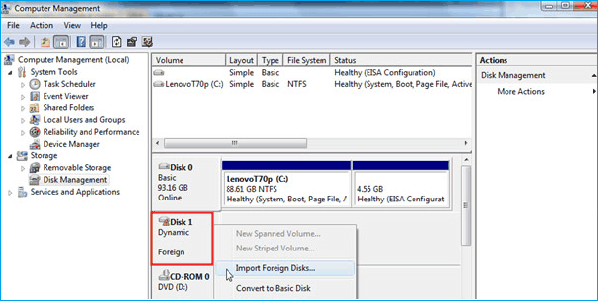
Let's break down the factors to consider when deciding whether to convert a disk to a dynamic disk. This includes the available disk space, the type of files being stored, and the system's performance requirements. If the disk is running low on space, converting to a dynamic disk might be a good option, as it allows for more efficient use of disk space.
Should Convert to Dynamic or Not
Converting a basic disk to a dynamic disk is generally recommended, as it allows for the creation of multiple volumes, migration of volumes, and the creation of mirrored, spanned, and RAID-5 volumes, among other benefits.
If you don't need to convert your disk to a dynamic disk, you can simply skip this step and move on to the next one. This is especially true if you're using a newer version of Windows that supports dynamic disks natively. In such cases, you can create a new volume or partition on the existing disk without converting it first.
- System partition
- Multi-boot environments
- Unknown partitions, like OEM partitions
- When downgrading your Windows operating system
- When your Windows operating system does not support dynamic disks
To convert a basic disk to a dynamic disk, you'll need to ensure that the disk is not being used as a boot disk and that it's not the only disk containing the operating system. Additionally, you should have a backup of your data before proceeding with the conversion.
You can convert a dynamic disk to a basic one using the built-in Disk Management tool in Windows. To do this, go to the Disk Management tool, right-click on the dynamic disk you want to convert, and select "Convert to Basic Disk".
How to Change Dynamic Disk to Basic Disk Safely
The choice between Basic and Dynamic disks depends on your specific needs. A comparison table can help you understand the key differences between these two disk types, ultimately guiding you in selecting the right one for your system.
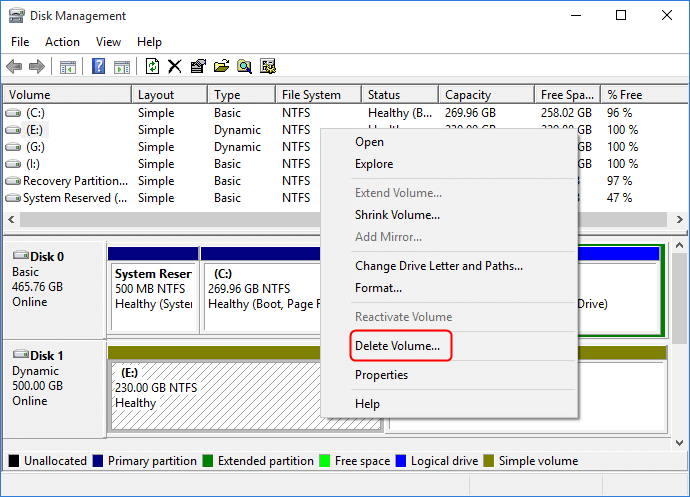
If you think converting to a dynamic disk is better for you. The method is straightforward, and you can convert quickly.
A Professional Tool Helps Convert Basic to Dynamic Disk
Qiling Disk Master is a tool that simplifies PC disk management, allowing users to easily and quickly convert basic disks to dynamic disks. Its user-friendly interface makes the process efficient and easy, making it a great choice for beginners who don't have technical experience. However, users of all skill levels can benefit from using Qiling Disk Master to streamline their disk management tasks and avoid hassle.
Download this tool and follow the guide to convert a basic disk to a dynamic disk.
Step 1. To get started, install and open Qiling Disk Master and navigate to the Disk Converter section.
Step 2. Select the disk conversion mode that suits your need:
- Convert Basic to Dynamic: change a Basic disk to Dynamic.
- Convert Dynamic to Basic: change a Dynamic disk to Basic.
Step 3. Select the target disk - Basic or Dynamic, confirm you've selected the correct disk and click "Convert" to start the conversion process.
0:00 - Converting a disk from Basic to Dynamic format takes approximately 0 minutes and 18 seconds, while converting a Dynamic disk back to Basic format takes around 0 minutes and 16 seconds. The process for both conversions is as follows: first, the disk needs to be initialized, then the conversion process begins, and finally, the disk is converted to the desired format.
In addition, it offers various other useful features, so now, let's see some features of this tool.
Main features of Qiling Disk Master:
- Clone dynamic disk
- Extend dynamic disk
- Quick partition new disk
- Delete dynamic partition
- Create/delete/resize partition
- Move partition to end of the disk
- Clone/copy a partition to another drive
- And more
This is a powerful all-Qiling Disk Master is a versatile tool that offers numerous solutions, making it easy to use and perform the conversion process smoothly and quickly. With its user-friendly interface, you can eliminate worries and complete tasks efficiently, enjoying its incredible features and functions. Just download and install Qiling Disk Master to experience its benefits.
Conclusion
The conversion process of a basic disk to a dynamic disk was explored using the Qiling Disk Master, highlighting key fundamentals about dynamic disks. Understanding the benefits and limitations of dynamic disks is crucial, as it's not always necessary to convert a basic disk, especially considering the reasons mentioned earlier.
We hope you find this blog post helpful. Please share your thoughts in the comments if you have any questions or suggestions. Thanks for reading!
You may also like:
Benefits of Dynamic Disk FAQs
The benefits of dynamic disks include the ability to add storage space without taking the system offline, increased flexibility in managing disk space, and improved data protection through the use of multiple disks. This can be particularly useful in server environments where storage needs can fluctuate.
1. Should I convert to a dynamic disk?
Converting a basic disk to a dynamic disk may be beneficial, offering advanced features, but it depends on your system's condition and specific needs. If your system meets the requirements, this conversion can be a good idea. However, if it doesn't, you can skip it and still maintain a functional system.
2. Which is the faster dynamic or basic disk?
The main difference between dynamic and basic disks is their management and organization of disk space, but they have the same technology and read and write speeds.
3. Does dynamic disk improve performance?
Dynamic disks can offer performance benefits in specific scenarios by utilizing advanced features like spanned, striped, or mirrored volumes. Nevertheless, overall performance ultimately depends on the system's unique configuration and usage patterns.
Related Articles
- Windows 10 Keeps Restarting or Continuously Reboots? Fix It Now!
- Fix A Device Which Does Not Exist Was Specified [100% Working Solutions]
This blog post will help you identify the reasons behind the 'a device which does not exist was specified' error and provide you with effective solutions to fix it. - Fixes for "An Error Occurred While PowerPoint Was Saving the File" in 2023
This article analyzes the reasons behind the error “An Error Occurred While PowerPoint Was Saving the File” and provides easy solutions to fix the issue, also introducing a professional tool to check for bad sectors and file system errors. - How to Fix 'An Error Occurred While Preparing the Installation' Error [macOS Upgrade Issue]
Fix the An error occurred while preparing the installation message and reinstall macOS while protecting important data. - OneDrive Files Corrupted | How to Restore Them in 2024
Learn how to fix and recover corrupted OneDrive files, check sync issues, restore previous versions, and protect cloud files. - How to Open Files With No Extension in Windows 10/11? [Updated 2023]
There are some files that come with no extension. Qiling shows you a guide to identify their types and open it easily.
Products
Articles & Tutorials
- Data Recovery
- Data Backup
- File Recovery
- File Backup
- System Backup and Restore
- Disk and Partition Clone
- Technical articles
- Mobile articles
- Disk Master Help
- Windows Data Recovery Tutorials
- Windows Secure Delete Tutorials
- Windows Partition Management Tutorials
- Windows File Backup and Restore Tutorials
- Windows System Backup and Restore Tutorials
- Windows Disk Backup and Restore Tutorials
- Windows Clone Tutorials