What Should I Do with My Old SSD?
Don't throw it away just yet. You can repurpose your old SSD for a variety of purposes. Here are some ideas:
If your answer is yes to these questions, please stay connected with this guide till the end to get the correct guidance.
What Should I Do with My Old SSD
You can repurpose an old SSD as a secondary storage drive for less frequently used files, use it as a boot drive for a secondary operating system, or even use it as a storage drive for a virtual machine. Additionally, you can use it as a storage drive for a Raspberry Pi or other single-board computers. You can also use it to store backups of important files, or even use it as a drive for a media center or streaming device. These options will help you get the most out of your old SSD and prevent it from being wasted.
Option 1. Use It as an External Backup Drive
Reusing the old solid-One of the best uses for an old SSD is to repurpose it as an external backup drive, and the process is relatively efficient. To do this, you'll need an external enclosure for the SSD, but once you have that, you can follow these steps to get started.
Step 1. To transfer your data from the old SSD to the new one, you can use the built-in Windows feature called "Disk Management" or a third-party cloning software like Qiling Disk Master. The process typically involves connecting both SSDs to your computer, selecting the old drive as the source and the new drive as the destination, and then initiating the transfer process.
Step 2. Buy an external enclosure.
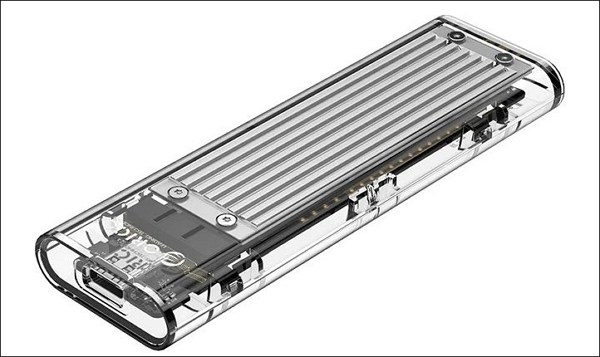
Step 3. Now open the case and slide into the old drive.
Step 4. To prepare the drive for installation, apply a thermal pad layer to the top of the drive, which will aid in heat dissipation.
Using an SSD (Solid-State Drive) is recommended over a traditional HDD (Hard Disk Drive) due to its superior speed and reliability. Even as SSDs age, their speed remains relatively consistent, whereas HDDs tend to slow down over time. Additionally, SSDs have a lower failure rate compared to HDDs, making them a more reliable option. Therefore, it's often more cost-effective to upgrade to an SSD rather than purchasing a new HDD.
Option 2. Use Old SSD as a Secondary Drive
If you're hesitant to use your old SSD as an external backup drive, consider using it as a secondary drive for your computer system instead. This way, you can make the most of your old SSD and give it a new purpose, effectively increasing its functionality.
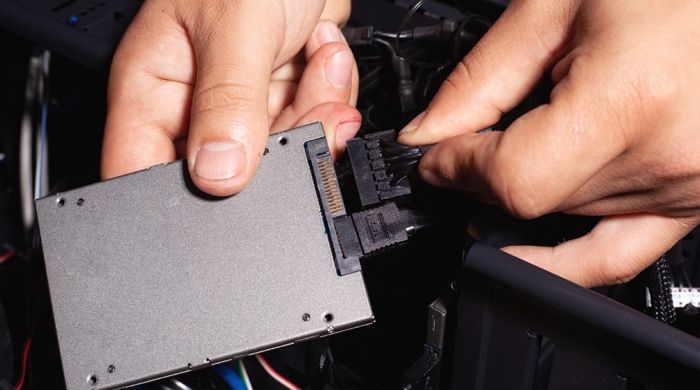
Windows allows you to move apps to another drive, expanding storage and relocating apps and games to an old SSD that's not frequently used.
Option 3. Sell the Old SSD
You can sell your old SSD to someone who needs it, rather than throwing it away or buying an enclosure. This way, you can get some money back for your old drive and also help someone who is looking for a compatible SSD.
The demand for used SSDs has surged in recent years, with Amazon and eBay being prominent platforms for their sale.
If you're willing to sell your old SSD, take the time to wipe its storage securely. Format or wipe the hard drive before selling it to protect your data. Use a reliable tool to encrypt your device's data, ensuring it remains safe and secure, even in different conditions.
Format/Wipe the Old SSD Before Reusing or Selling It
If you plan to sell your old SSD, we recommend wiping it first to ensure your privacy is protected. However, formatting can be a good option if you're using it on your computer, as it will also free up space on your device.
Qiling Disk Master Free is a reliable and efficient tool that makes formatting or wiping an SSD a convenient process. It's easy to use, requiring only a few clicks, and can be downloaded from the official website for seamless access.
If you're looking to breathe new life into your old SSD, detailed guides can help you format or whip it back into shape.
Guide 1. Format the Old SSD
Step 1. Right-click the hard drive partition and choose the "Format" option.
Step 2. In the new window, set the Partition label, File system, and Cluster size for the partition, then click "Proceed" to finalize the partitioning process.
Step 3. You see a warning window, click "Yes" to continue with the hard drive partition formatting process.
Guide 2. Wipe the Old SSD
We've set two options for you to wipe data. Choose the one you need.
Option 1. Wipe Partition
- In the Tools and utilities page, choose "Wipe Data".
- Set the time for which you want to wipe your partition in the new window.
- To erase data from a partition, select the partition you want to erase data from, review the changes, and then click "Proceed" to confirm the deletion.
Option 2. Wipe Disk
- In the Tools and utilities page, choose "Wipe Disk".
- Set the number of times to wipe data to 10 at most.
- Select the HDD/SSD and then click "Proceed".
This free partition manager offers a wide range of features, including.
- Free to use
- All-in-one partition manager
- Clone Windows 10 to larger SSD
- Convert MBR to GPT for Windows 11 upgradation
- Copy OS and data to another SSD or HDD (What Is HDD? See The Ultimate Guide of Hard Disk Drive)
- The software is compatible with various operating systems, including Windows 7, 8, 8.1, 10, and 11, allowing users to run it on different versions of the Windows operating system.
Conclusion
In 2023, instead of throwing away your old SSD, consider reusing it as an external backup or selling it, after formatting or wiping it to ensure any personal data is securely removed. This approach not only reduces electronic waste but also provides a cost-effective solution for your storage needs. By following the guide, you can explore the best options for your old SSD, whether it's repurposing it for personal use or selling it to make some extra money.
You may also like:
What Should I Do with My Old SSD FAQs
We have added up the total solutions for What should I do with my old SSD query? But if you still have some questions, here are their quick answers.
1. Can I use my old SSD on a new computer?
You can reuse your old SSD on a new computer if your new system supports the same SSD interface, such as M.2 or SATA. Just check your system's requirements and SSD properties to confirm compatibility.
2. How to use an SSD as external storage?
To use an SSD as external storage for backup, simply place it in a USB enclosure, USB-C hub, or Thunderbolt dock, making it easily portable and convenient for storing data.
3. Can SSDs last ten years?
Solid-Solid-state drives (SSDs) have a relatively long lifespan, but their durability varies depending on factors such as type, usage, and conditions. Some SSDs can last over 10 years, while others may not last as long, with frequent data writing and usage affecting their lifespan.
Related Articles
- Boot Mac into Disk Utility/Recovery Mode
- Windows 7 Black Screen with Cursor - 7 Quick Solutions
- Google Chrome Sync Keeps Pausing? Find Fixes Here
- Windows 10 Black Screen After Update [8 Methods]🔥
- What Is Volume Shadow Copy and How to Use It Correctly on Windows 11/10
Learn what Volume Shadow Copy is, how it works in Windows, and how it helps create snapshots, backups, and previous versions of files. - WD Easystore VS My Passport: Which One to Pick?🔥
WD Easystore VS My Passport: which is better and which one to choose? If you don't have an idea, you've come to the right page. This article will tell you the difference between WD Easystore and My Passport. After reading, you can pick the right one.
Products
Articles & Tutorials
- Data Recovery
- Data Backup
- File Recovery
- File Backup
- System Backup and Restore
- Disk and Partition Clone
- Technical articles
- Mobile articles
- Disk Master Help
- Windows Data Recovery Tutorials
- Windows Secure Delete Tutorials
- Windows Partition Management Tutorials
- Windows File Backup and Restore Tutorials
- Windows System Backup and Restore Tutorials
- Windows Disk Backup and Restore Tutorials
- Windows Clone Tutorials